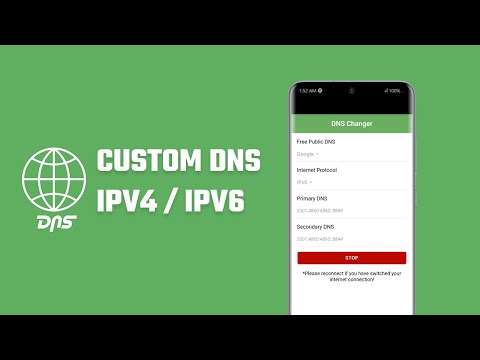

Custom DNS Changer IPV4 & IPV6
Contains adsIn-app purchases


Everyone
info
10K+
Downloads

Everyone
Learn more


About this app
Stop letting a slow ISP hold you back. Experience a more responsive, safer, and private internet with Custom DNS Changer for Android.
Is your gaming laggy? Are websites taking too long to load? Your default DNS might be the bottleneck. DNS Changer allows you to switch to global, high-performance servers in one tap - no root required.
🚀 Why Choose DNS Changer?
• Zero Distractions: A clean, premium experience designed for performance without interruptions.
• Lower Gaming Ping: Reduce lag and jitter in games like PUBG, Free Fire, and Roblox by connecting to optimized gaming nodes.
• Faster Browsing: Improve page load times and app responsiveness by bypassing slow ISP resolvers.
• Total Privacy: Prevent ISPs from tracking your browsing history.
• Enhanced Security: Select providers that automatically block phishing, malware, and malicious sites at the source.
🛠 Powerful Features
• One-Tap Connection: No complex setup. Tap once to optimize your connection.
• WiFi & Mobile Data: Works seamlessly on 3G, 4G, 5G, and WiFi.
• Reliable Provider List: Choose from trusted names like Google Public DNS, Cloudflare (1.1.1.1), and AdGuard.
• IPv4 & IPv6 Support: Future-proof your connection.
• Custom Servers: Add your own private DNS provider easily.
• Family Protection: Use family protection DNS filters (Custom) to block adult content and keep kids safe online.
🎮 Built for Gamers
Tired of "Network Error" or high MS? By reducing DNS resolution time, you get faster matchmaking and better hit registration in competitive online games.
🛡️ Privacy First
We believe your data is yours.
• No Logs: We never track, store, or sell your browsing data.
• No VPN Needed: While we use the Android VpnService API to route DNS queries, we are not a traditional VPN. Your IP address remains your own, and your speed isn't throttled by remote proxy servers.
📖 How to Use:
• Open the app.
• Select your preferred DNS provider (e.g., Cloudflare for speed, AdGuard for privacy).
• Tap Connect DNS.
• Enjoy a faster, cleaner internet experience!
Technical Note:
This application utilizes the VpnService permission to create a local DNS tunnel. This is the standard method for changing DNS settings system-wide on non-rooted Android devices. It does not change your IP or country. You cannot run another VPN service while DNS Changer is active.
Download now and take control of your internet speed today!
Is your gaming laggy? Are websites taking too long to load? Your default DNS might be the bottleneck. DNS Changer allows you to switch to global, high-performance servers in one tap - no root required.
🚀 Why Choose DNS Changer?
• Zero Distractions: A clean, premium experience designed for performance without interruptions.
• Lower Gaming Ping: Reduce lag and jitter in games like PUBG, Free Fire, and Roblox by connecting to optimized gaming nodes.
• Faster Browsing: Improve page load times and app responsiveness by bypassing slow ISP resolvers.
• Total Privacy: Prevent ISPs from tracking your browsing history.
• Enhanced Security: Select providers that automatically block phishing, malware, and malicious sites at the source.
🛠 Powerful Features
• One-Tap Connection: No complex setup. Tap once to optimize your connection.
• WiFi & Mobile Data: Works seamlessly on 3G, 4G, 5G, and WiFi.
• Reliable Provider List: Choose from trusted names like Google Public DNS, Cloudflare (1.1.1.1), and AdGuard.
• IPv4 & IPv6 Support: Future-proof your connection.
• Custom Servers: Add your own private DNS provider easily.
• Family Protection: Use family protection DNS filters (Custom) to block adult content and keep kids safe online.
🎮 Built for Gamers
Tired of "Network Error" or high MS? By reducing DNS resolution time, you get faster matchmaking and better hit registration in competitive online games.
🛡️ Privacy First
We believe your data is yours.
• No Logs: We never track, store, or sell your browsing data.
• No VPN Needed: While we use the Android VpnService API to route DNS queries, we are not a traditional VPN. Your IP address remains your own, and your speed isn't throttled by remote proxy servers.
📖 How to Use:
• Open the app.
• Select your preferred DNS provider (e.g., Cloudflare for speed, AdGuard for privacy).
• Tap Connect DNS.
• Enjoy a faster, cleaner internet experience!
Technical Note:
This application utilizes the VpnService permission to create a local DNS tunnel. This is the standard method for changing DNS settings system-wide on non-rooted Android devices. It does not change your IP or country. You cannot run another VPN service while DNS Changer is active.
Download now and take control of your internet speed today!
Improve internet privacy, gaming & connection stability with Custom DNS Changer
Updated on
Safety starts with understanding how developers collect and share your data. Data privacy and security practices may vary based on your use, region, and age. The developer provided this information and may update it over time.


Everyone
Learn moreApp support
About the developer
Saujan Man Pradhan
apps@ideastocode.com
3817 South Brookridge Ct
Bedford, TX 76021-1115
United States


