
Imatest Spectral Sensor


Everyone
info
10+
Downloads

Everyone
Learn more


About this app
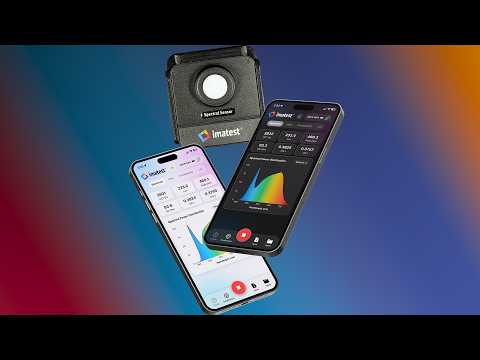
Whether you're calibrating camera systems on a modular test stand or matching practical lights and studio strobes for a multi-day shoot, SpectralSensor delivers absolute precision directly to your phone or computer. Interface seamlessly with your Imatest Spectral Illuminance Color Sensor (ISICS) and Low Light Illuminance Sensor (ILLIS) to take the guesswork out of your exposure, color science, and system calibration.
Multi-Sensor Dashboard: Instantly discover, connect, and manage multiple physical Imatest sensors via secure Bluetooth. Easily switch between devices or run a live "Continuous" polling mode across your entire setup.
Comprehensive Metrics: View real-time, exhaustive data readouts including Illuminance (Lux/fc), Correlated Color Temperature (CCT), CRI (Ra alongside granular R1-R15 bar charts), SDCM, Duv, Irradiance, and S/P Ratio.
Advanced Visualizations: Analyze your light with highly interactive tools. Scrub through the Spectral Power Distribution chart for exact wavelength intensities, or swipe through live-updating Chromaticity Maps (CIE 1931, 1960, 1976, and CIELAB) that pinpoint your exact color coordinates.
Illuminance Tracking: Track lux over time with an interactive history chart. Step away from the sensor and enable "Large Mode" for a massive, high-contrast lux readout visible from across a dark studio.
Data Portability: Instantly format your entire data payload into a clean text string for emails using the "Copy All" tool, or save your complete session locally as a comprehensive CSV file.
Mock Sensor Analysis: Open previously saved CSV files to automatically spin up a "Mock Sensor." This loads historical data back into the live UI, allowing you to use the interactive charts and scrubbing tools on past captures exactly as if the physical hardware was still connected. (Note: To protect your data integrity, the live recording trigger is strictly disabled when a Mock Sensor is active).
Built for working professionals. SpectralSensor features a completely ad-free, distraction-free interface focused entirely on functionality, stability, and accurate metrics.
Please note that SpectralSensor is a specialized hardware utility. While the application can be installed and explored using the internal mock sensor mode, live environmental measurements require proprietary Imatest hardware (ISICS or ILLIS), which is sold separately.
Take complete control of your lab and set lighting with the official companion app for Imatest measurement equipment.
Multi-Sensor Dashboard: Instantly discover, connect, and manage multiple physical Imatest sensors via secure Bluetooth. Easily switch between devices or run a live "Continuous" polling mode across your entire setup.
Comprehensive Metrics: View real-time, exhaustive data readouts including Illuminance (Lux/fc), Correlated Color Temperature (CCT), CRI (Ra alongside granular R1-R15 bar charts), SDCM, Duv, Irradiance, and S/P Ratio.
Advanced Visualizations: Analyze your light with highly interactive tools. Scrub through the Spectral Power Distribution chart for exact wavelength intensities, or swipe through live-updating Chromaticity Maps (CIE 1931, 1960, 1976, and CIELAB) that pinpoint your exact color coordinates.
Illuminance Tracking: Track lux over time with an interactive history chart. Step away from the sensor and enable "Large Mode" for a massive, high-contrast lux readout visible from across a dark studio.
Data Portability: Instantly format your entire data payload into a clean text string for emails using the "Copy All" tool, or save your complete session locally as a comprehensive CSV file.
Mock Sensor Analysis: Open previously saved CSV files to automatically spin up a "Mock Sensor." This loads historical data back into the live UI, allowing you to use the interactive charts and scrubbing tools on past captures exactly as if the physical hardware was still connected. (Note: To protect your data integrity, the live recording trigger is strictly disabled when a Mock Sensor is active).
Built for working professionals. SpectralSensor features a completely ad-free, distraction-free interface focused entirely on functionality, stability, and accurate metrics.
Please note that SpectralSensor is a specialized hardware utility. While the application can be installed and explored using the internal mock sensor mode, live environmental measurements require proprietary Imatest hardware (ISICS or ILLIS), which is sold separately.
Take complete control of your lab and set lighting with the official companion app for Imatest measurement equipment.
Pro Lighting Analysis
Updated on
Safety starts with understanding how developers collect and share your data. Data privacy and security practices may vary based on your use, region, and age. The developer provided this information and may update it over time.
- No data shared with third partiesLearn more about how developers declare sharing
- No data collectedLearn more about how developers declare collection


What’s new
What's new in V1.2: customizable dashboard metric slots, editable sensor names, and inline live mini plots.
Everyone
Learn moreApp support
phone
Phone number
+17203285105
About the developer
IMATEST LLC
support@imatest.com
2525 Frontier Ave # B
Boulder, CO 80301-2460
United States
+1 720-328-5105


