
Up.Link: Technology News
In-app purchases


Everyone
info
0+
Downloads

Everyone
Learn more


About this app
Up.Link brings the world of technology together in one place.
Discover the latest stories, follow your interests, and understand how the news connects, from AI and consumer gadgets to software, gaming, cybersecurity, hardware, science and space, and the technology business.
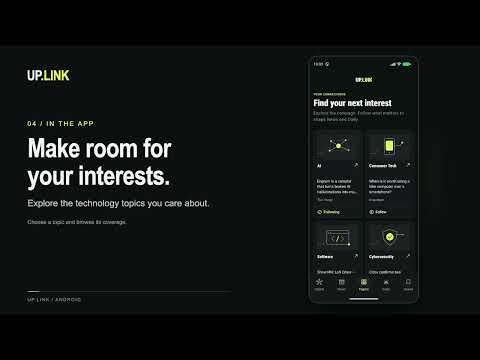
News that fits your interests
Browse Top stories for a broad view, or open Following for your chosen topics, companies, technologies, and people. Search headlines, summaries, and sources. Choose editorial, newest, or source order, and mute topics and publishers you would rather skip. Add up to three of your own RSS or Atom feeds, or paste a website's address and Up.Link finds its feed.
A reader built for reading
Stories open in a native reader with adjustable text size, serif type, line spacing, and default, sepia, and dark themes. When a publisher's page allows it, Up.Link extracts the article on your device; otherwise the summary and a link to the publisher remain. Saved stories keep their text offline, and Save a link brings in any web article the same way.
The whole story
Related coverage brings articles about the same event together, with a timeline and links to each publisher. Up.Link keeps each story's wording for 14 days, so you can see what changed since you read it, or replay a recent day as it was reported. Catch Me Up highlights new and updated stories after time away.
News with receipts
Track a claim from a story and record what actually happened. Keep a question open and see how your expectations held up. Follow a story to keep its sources together, and see which publishers reported first, reported alone, or revised their wording. Claim and stance detection is on-device pattern matching and is labelled that way. Share a story's evidence as an image or a linked PDF with Uplink Capsule.
Your Daily Uplink
Take a short tour through recent coverage as a reading briefing, with an optional daily reminder. Briefings fit an estimated time budget and may be shorter on quiet news days. Finish each day's edition to build a reading streak and see your week at a glance.
Stay informed
Optional local alerts when a followed subject makes news or an actively exploited vulnerability appears. Tell Up.Link what software you run, and matching security coverage leads your feed and your Daily. Security stories can show CVE identifiers, CISA Known Exploited Vulnerabilities status, CVSS scores from NVD, and EPSS exploit likelihood from FIRST. Unavailable scores are clearly marked; Up.Link never guesses a score.
Up.Link Pro
The news reader, full-text reader, topics, up to 20 followed subjects, three custom feeds, saving, related coverage, news with receipts, alerts, and the standard 5-minute Daily briefing work without a subscription. An optional Up.Link Pro subscription adds:
• Ask the News: cited answers to your questions, grounded in the stories you're reading (20 a day, shared with Daily context)
• Daily context that explains each edition, plus an AI editor's note
• Searchable 90-day history for followed stories
• Listening to your Daily and to complete articles with on-device speech, including an offline queue
• 10 specialist sources
• All six professional perspectives: Developer, Cybersecurity, Network Engineer, GRC, AI/ML, and Tech Leadership
• 3-, 5-, and 10-minute briefings
• Up to 50 followed subjects and 30 custom feeds with OPML import
Monthly and annual plans are available in the app through Google Play and renew automatically until cancelled in Google Play.
Your reading stays yours
There are no accounts and no ads. Reading history, followed subjects, claims, questions, and your software list stay on your device. Pro AI features send only what is needed to answer, such as your question and excerpts from the relevant stories.
Headlines and summaries are shown with attribution and link to each publisher's own page. Source availability can vary.
Discover the latest stories, follow your interests, and understand how the news connects, from AI and consumer gadgets to software, gaming, cybersecurity, hardware, science and space, and the technology business.
News that fits your interests
Browse Top stories for a broad view, or open Following for your chosen topics, companies, technologies, and people. Search headlines, summaries, and sources. Choose editorial, newest, or source order, and mute topics and publishers you would rather skip. Add up to three of your own RSS or Atom feeds, or paste a website's address and Up.Link finds its feed.
A reader built for reading
Stories open in a native reader with adjustable text size, serif type, line spacing, and default, sepia, and dark themes. When a publisher's page allows it, Up.Link extracts the article on your device; otherwise the summary and a link to the publisher remain. Saved stories keep their text offline, and Save a link brings in any web article the same way.
The whole story
Related coverage brings articles about the same event together, with a timeline and links to each publisher. Up.Link keeps each story's wording for 14 days, so you can see what changed since you read it, or replay a recent day as it was reported. Catch Me Up highlights new and updated stories after time away.
News with receipts
Track a claim from a story and record what actually happened. Keep a question open and see how your expectations held up. Follow a story to keep its sources together, and see which publishers reported first, reported alone, or revised their wording. Claim and stance detection is on-device pattern matching and is labelled that way. Share a story's evidence as an image or a linked PDF with Uplink Capsule.
Your Daily Uplink
Take a short tour through recent coverage as a reading briefing, with an optional daily reminder. Briefings fit an estimated time budget and may be shorter on quiet news days. Finish each day's edition to build a reading streak and see your week at a glance.
Stay informed
Optional local alerts when a followed subject makes news or an actively exploited vulnerability appears. Tell Up.Link what software you run, and matching security coverage leads your feed and your Daily. Security stories can show CVE identifiers, CISA Known Exploited Vulnerabilities status, CVSS scores from NVD, and EPSS exploit likelihood from FIRST. Unavailable scores are clearly marked; Up.Link never guesses a score.
Up.Link Pro
The news reader, full-text reader, topics, up to 20 followed subjects, three custom feeds, saving, related coverage, news with receipts, alerts, and the standard 5-minute Daily briefing work without a subscription. An optional Up.Link Pro subscription adds:
• Ask the News: cited answers to your questions, grounded in the stories you're reading (20 a day, shared with Daily context)
• Daily context that explains each edition, plus an AI editor's note
• Searchable 90-day history for followed stories
• Listening to your Daily and to complete articles with on-device speech, including an offline queue
• 10 specialist sources
• All six professional perspectives: Developer, Cybersecurity, Network Engineer, GRC, AI/ML, and Tech Leadership
• 3-, 5-, and 10-minute briefings
• Up to 50 followed subjects and 30 custom feeds with OPML import
Monthly and annual plans are available in the app through Google Play and renew automatically until cancelled in Google Play.
Your reading stays yours
There are no accounts and no ads. Reading history, followed subjects, claims, questions, and your software list stay on your device. Pro AI features send only what is needed to answer, such as your question and excerpts from the relevant stories.
Headlines and summaries are shown with attribution and link to each publisher's own page. Source availability can vary.
Technology news that connects: follow topics, read in full, see what changed.
Updated on
Featured stories

Safety starts with understanding how developers collect and share your data. Data privacy and security practices may vary based on your use, region, and age. The developer provided this information and may update it over time.
- No data shared with third partiesLearn more about how developers declare sharing
- No data collectedLearn more about how developers declare collection


Everyone
Learn moreApp support
phone
Phone number
+14044902808
About the developer
Jamsoft Inc.
support@jamsoftinc.com
5305 Vinings Springs Pt
Mableton, GA 30126-5996
United States
+1 404-490-2808


