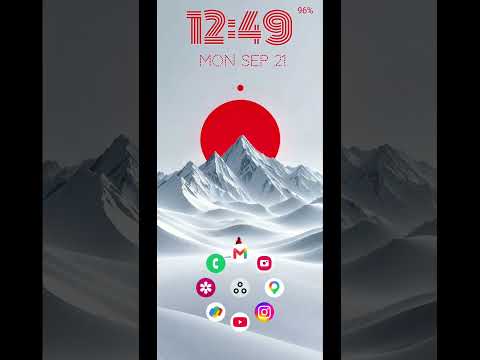

Comfer Launcher for Comfort

star
8.59K reviews

Everyone
info
1M+
Downloads

Everyone
Learn more


About this app
Comfer Launcher: Minimalist, Fast & Open Source
Transform your Android experience with Comfer, the ultimate minimalist Android launcher designed for focus, speed, and privacy.
Tired of cluttered home screens and endless swiping? Comfer is a simple launcher that replaces chaos with a clean, distraction-free interface. Find any app in seconds using our powerful instant search, navigate effortlessly with intuitive controls, and enjoy a truly ergonomic one-handed mode. Perfect for digital minimalists and power users, Comfer is the ad-free launcher upgrade your phone deserves.
Reclaim your screen time and productivity today.
Why Choose Comfer?
🚀 Fast Launcher Performance
Stop hunting for apps. Our optimized engine brings your most-used apps to your fingertips immediately. Experience lightning-quick navigation and low battery usage. It’s the fastest way to launch apps on Android.
🔒 100% Private Launcher
Your data belongs to you. Unlike other options, Comfer contains no ads and no trackers. We prioritize your privacy with a secure, offline-first design that never sells your personal information.
👆 Advanced Gesture Launcher
Master your device with intuitive gestures. Customize swipes to open favorites, toggle system settings, or launch shortcuts. Comfer adapts to your workflow, making navigation smoother than ever.
🎨 Customizable Launcher Aesthetic
Make your home screen your own. Stay stylish with full support for Material You themed icons and dynamic wallpapers. The clean app drawer offers a stunning visual refresh that matches your system’s dark or light mode perfectly.
📱 Ergonomic One-Handed Use
Designed for modern large screens, our unique interface keeps essential apps within thumb's reach. Experience the comfort of a true one-handed layout.
Key Features
• Android Launcher Optimized: Built for speed and seamless integration with your device.
• Smart App Drawer: Automatically sorts apps by frequency of use.
• Hidden Apps: Keep your home screen clean by hiding bloatware or distracting apps.
• Widget Support: Add essential widgets without creating clutter.
• Daily Wallpapers: Refresh your look with beautiful, premium backgrounds.
Transparency & Privacy Disclosures:
Accessibility Service:
To provide a convenient shortcut to your 'Recent Apps' screen with a single gesture, Comfer offers an optional feature using the AccessibilityService API. This service requires your explicit permission and is used only to open the recent apps screen. It does not monitor your actions, read your screen, or collect any data.
Notification Listener Service:
To display notification badges on app icons, Comfer offers an optional feature using the Notification Listener Service. This service requires your explicit permission and is used only to show you a summary of which apps have active notifications.
Download Comfer Launcher today and experience a faster, cleaner, and more productive Android interface.
Transform your Android experience with Comfer, the ultimate minimalist Android launcher designed for focus, speed, and privacy.
Tired of cluttered home screens and endless swiping? Comfer is a simple launcher that replaces chaos with a clean, distraction-free interface. Find any app in seconds using our powerful instant search, navigate effortlessly with intuitive controls, and enjoy a truly ergonomic one-handed mode. Perfect for digital minimalists and power users, Comfer is the ad-free launcher upgrade your phone deserves.
Reclaim your screen time and productivity today.
Why Choose Comfer?
🚀 Fast Launcher Performance
Stop hunting for apps. Our optimized engine brings your most-used apps to your fingertips immediately. Experience lightning-quick navigation and low battery usage. It’s the fastest way to launch apps on Android.
🔒 100% Private Launcher
Your data belongs to you. Unlike other options, Comfer contains no ads and no trackers. We prioritize your privacy with a secure, offline-first design that never sells your personal information.
👆 Advanced Gesture Launcher
Master your device with intuitive gestures. Customize swipes to open favorites, toggle system settings, or launch shortcuts. Comfer adapts to your workflow, making navigation smoother than ever.
🎨 Customizable Launcher Aesthetic
Make your home screen your own. Stay stylish with full support for Material You themed icons and dynamic wallpapers. The clean app drawer offers a stunning visual refresh that matches your system’s dark or light mode perfectly.
📱 Ergonomic One-Handed Use
Designed for modern large screens, our unique interface keeps essential apps within thumb's reach. Experience the comfort of a true one-handed layout.
Key Features
• Android Launcher Optimized: Built for speed and seamless integration with your device.
• Smart App Drawer: Automatically sorts apps by frequency of use.
• Hidden Apps: Keep your home screen clean by hiding bloatware or distracting apps.
• Widget Support: Add essential widgets without creating clutter.
• Daily Wallpapers: Refresh your look with beautiful, premium backgrounds.
Transparency & Privacy Disclosures:
Accessibility Service:
To provide a convenient shortcut to your 'Recent Apps' screen with a single gesture, Comfer offers an optional feature using the AccessibilityService API. This service requires your explicit permission and is used only to open the recent apps screen. It does not monitor your actions, read your screen, or collect any data.
Notification Listener Service:
To display notification badges on app icons, Comfer offers an optional feature using the Notification Listener Service. This service requires your explicit permission and is used only to show you a summary of which apps have active notifications.
Download Comfer Launcher today and experience a faster, cleaner, and more productive Android interface.
Your private android launcher. Minimal & fast with 7 quick swipe app shortcuts.
Updated on
Featured stories

Safety starts with understanding how developers collect and share your data. Data privacy and security practices may vary based on your use, region, and age. The developer provided this information and may update it over time.
- No data shared with third partiesLearn more about how developers declare sharing
- No data collectedLearn more about how developers declare collection


Ratings and reviews
8.53K reviews

Lorin Bevie
- Flag inappropriate
- Show review history
September 17, 2026
can give you 5 star but- Will you remove the little hand appearing constantly on the home screen. Then the keyboard options, can we get an easier style aswell, it becomes difficult to type when searching for a specific app. keys are small also, difficult to find thr letters quicky.
2 people found this review helpful

Steve Franklin
- Flag inappropriate
July 26, 2026
After reading about this launcher, I decided to check it out. Wow is all I can say. Very neat how a search with the cool keyboard automatically populates at the bottom of the screen so quickly. The cool scrolling through the app drawer as it were is another cool feature. Excellently designed launcher. Purchased the pro version just to show my love to the devs.
26 people found this review helpful

Stacey Klump
- Flag inappropriate
September 14, 2026
Really fun launcher with commen sense shortcuts. I love tapping on the time and the alarm app opens. It's common sense, but Samsung wasn't doing it for me, Comfer does.
4 people found this review helpful
What’s new
Enhancements for V55
Everyone
Learn moreApp support
About the developer
Jeevan Singh
g1@abona.in
Pakbara, New Moradabad
F 208 Super Tech, Palm Green
Moradabad, Uttar Pradesh 244102
India


