
Soccer Tactic Board
Contains ads
4.5star
10.6K reviews
1M+
Downloads

Everyone
info


About this app
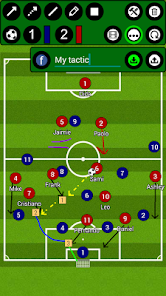
Football Tactic Board, allows you to create your own tactics for every match situation, for FREE and NO REGISTRATIONS nor payments are needed for more advanced tools ;). Intuitive UI, simple, quick using.
Video Manuals here:
https://drive.google.com/drive/folders/1w66zK4uM23tQ9rrOQpkoOJPHZTydqIeG?usp=sharing
You can change the field, to six different options. Full field view, Half field view, Freekicks left, right, straight and of course penalty!
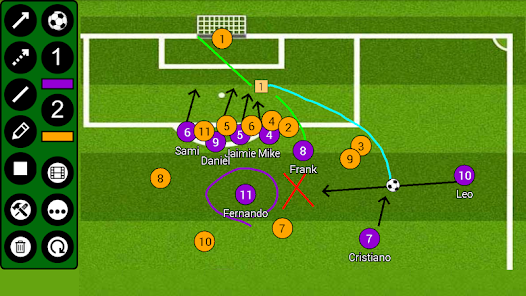
FTB provides you seven tools! Rectangle with number inside! Sipmle Line, Arrow, Dotted arrow, Pen, Text and Area! Everything you need to create your tactic!
Save your tactics into one frame, or do frame by frame ANIMATION, for more advanced tactics! You can set animation speed to make it simply the BEST.
You can analyse your own photos and your own videos!
Create your teams and players!
***manual on bottom of the page***
FTB allows you several ways to share tactic or animation with others!
- for tactic - you can do photo of your tactic or you can export it into file
- for animation - you can export it into file
This file can be easily imported into app on any other device ;)
***manual on bottom of the page***
Simply remove objects, if you want to rework your tactic, with remove function! Or you can reset everything with just one click!
Create football tactics
/*More field options*/
*Full field
*Half field
*Freekicks
*Corners
*Penalties
/*Tools*/
*Arrow
*Dotted arrow
*Line
*Rectangle
*Pen
*Text
*Area
*Delete
/*Useful features*/
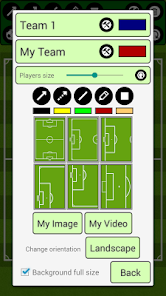
*Change players size
*Save tactics
*Export/Import tactics and animations
*Frame by frame animation
*Portrait/Landscape mode
***HOW TO ADD YOUR TEAM***
Go to edit window (top right tools button), click on team1/team2 edit button on the right of team, add new team and players. Then select this team by clicking on it.
***HOW TO EXPORT TACTIC / ANIMATION***
Go to tactic / animation loading window, on the bottom click on EXPORT, and then click on the tactic / animation which you want to be exported.
Tactics are then exported to your device to folder /FootballBoard/Tactics
Animations to /FootballBoard/Animations
Now you can send them to others and they can import them ;)
***HOW TO IMPORT TACTIC / ANIMATION***
Copy tactic / animation file to your device folder
- tactic to /FootballBoard/Import/Tactics
- animation to /FootballBoard/Import/Animations
(if this folder doesnt exists - Go to tactic / animation loading window, on the bottom click on IMPORT and folders will be created)
Now you have tactic / animation in right folder, so now it is very simple:
Go to tactic / animation loading window, on the bottom click on IMPORT
In import window, there are shown tactics / animations which are copied in import folder
and now you just click on the tactic / animation which you want to be imported.
Video Manuals here:
https://drive.google.com/drive/folders/1w66zK4uM23tQ9rrOQpkoOJPHZTydqIeG?usp=sharing
You can change the field, to six different options. Full field view, Half field view, Freekicks left, right, straight and of course penalty!
FTB provides you seven tools! Rectangle with number inside! Sipmle Line, Arrow, Dotted arrow, Pen, Text and Area! Everything you need to create your tactic!
Save your tactics into one frame, or do frame by frame ANIMATION, for more advanced tactics! You can set animation speed to make it simply the BEST.
You can analyse your own photos and your own videos!
Create your teams and players!
***manual on bottom of the page***
FTB allows you several ways to share tactic or animation with others!
- for tactic - you can do photo of your tactic or you can export it into file
- for animation - you can export it into file
This file can be easily imported into app on any other device ;)
***manual on bottom of the page***
Simply remove objects, if you want to rework your tactic, with remove function! Or you can reset everything with just one click!
Create football tactics
/*More field options*/
*Full field
*Half field
*Freekicks
*Corners
*Penalties
/*Tools*/
*Arrow
*Dotted arrow
*Line
*Rectangle
*Pen
*Text
*Area
*Delete
/*Useful features*/
*Change players size
*Save tactics
*Export/Import tactics and animations
*Frame by frame animation
*Portrait/Landscape mode
***HOW TO ADD YOUR TEAM***
Go to edit window (top right tools button), click on team1/team2 edit button on the right of team, add new team and players. Then select this team by clicking on it.
***HOW TO EXPORT TACTIC / ANIMATION***
Go to tactic / animation loading window, on the bottom click on EXPORT, and then click on the tactic / animation which you want to be exported.
Tactics are then exported to your device to folder /FootballBoard/Tactics
Animations to /FootballBoard/Animations
Now you can send them to others and they can import them ;)
***HOW TO IMPORT TACTIC / ANIMATION***
Copy tactic / animation file to your device folder
- tactic to /FootballBoard/Import/Tactics
- animation to /FootballBoard/Import/Animations
(if this folder doesnt exists - Go to tactic / animation loading window, on the bottom click on IMPORT and folders will be created)
Now you have tactic / animation in right folder, so now it is very simple:
Go to tactic / animation loading window, on the bottom click on IMPORT
In import window, there are shown tactics / animations which are copied in import folder
and now you just click on the tactic / animation which you want to be imported.
Updated on
Safety starts with understanding how developers collect and share your data. Data privacy and security practices may vary based on your use, region, and age. The developer provided this information and may update it over time.

This app may share these data types with third parties
Device or other IDs

No data collected
Learn more about how developers declare collection

Data is encrypted in transit

Data can’t be deleted
Ratings and reviews
4.5
9.28K reviews

A Google user
- Flag inappropriate
- Show review history
September 21, 2018
Tactics aren't useful if you cannot share them. Unfortunately, the video export cuts off at about 8 seconds as mentioned by other users. This renders the app somewhat useless I reached out to the developer a week ago and heard nothing. Otherwise, this would be at least 4* app. If individual frames in an animation could be edited, that would be very productive in demonstrating different variations from the same starting point. Also, an undo feature would be a useful for things like deleted items. Hope we can find a fix for the video export. Running a One plus 3T 128GB Android 8.0.0. I was able to get video export working fully with an older and slower tablet. Would really like chapter marks for each position in the animation video. Could not get this to work on a Chromebook where video generation might be faster.
21 people found this review helpful

Abs Sam
- Flag inappropriate
- Show review history
April 12, 2024
Absolutely amazing app. Been using this for a'couple of years now. Very useful for drawing Tactical phase animations (too see how things play out before a session). I mainly use it to show animations to individuals or the mid/ defence block on how i want the players to behave in or out of possession (as a visual aid supplememt to what was practiced on the field). Good for match days to draw up animations on the fly during the first half to show to the subs. Overall a very good tool to have.
A Google user
- Flag inappropriate
- Show review history
September 18, 2018
Decent app and fairly intuitive, could maybe do with a few more features. I'd like to be able to place more than one actual football and maybe permanently use my own background image, button labels wouldn't go a miss either. Overall its good, particularly for a free app. One negative is I use it on my phone which makes it a little bit clunky but still works fine. I also agree with another reviewer about the lack of an undo button.
47 people found this review helpful
What's new
Android 13 repair export permission bug.


