
Orpheus Deck
In-app purchases


Everyone
info
10+
Downloads

Everyone
Learn more


About this app
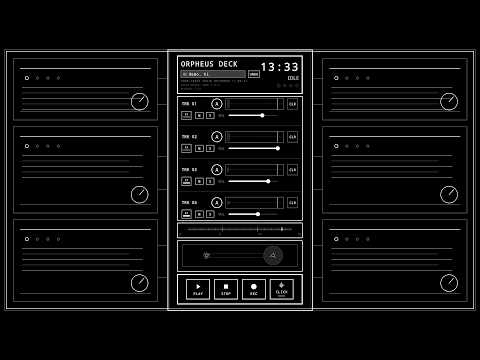
Orpheus Deck is a retro-inspired four-track recorder for songwriters, musicians, and audio creatives who need to capture ideas from the muses before they disappear.
Think of it as a musical sketchbook: fast enough to catch a riff before you forget it, focused enough to stay out of your way, and familiar enough to feel like an old cassette machine brought into your phone.
Record riffs, melodies, vocals, harmonies, demos, practice parts, sound experiments, and rough song sketches across four tracks. Arm, mute, solo, overdub, adjust levels, edit your recordings, and export WAV files when you are ready to take an idea further.
BUILT FOR MAKING MUSIC
• Four-track recording and overdubbing
• Retro cassette-inspired interface
• Track arm, mute, solo, and volume controls
• Waveform display and precision positioning
• LEVEL for shaping and boosting track volume
• Advanced Metronome with BPM, accent sound, and visual beat guidance
• Project save and load
• Raw Mix and Master Mix WAV export
• Native low-latency Android audio engine
• No ads
• Recordings and projects stay local unless you choose to export or share them
ORPHEUS PRO
The core four-track recorder and LEVEL remain available without Pro.
Orpheus Pro adds:
• Import WAV
• One-tap all-track WAV export
• Track name templates
• Non-destructive EDIT/CUT
• Additional Advanced Metronome time signatures
• Groove controls
EDIT without destroying the tape.
Orpheus Deck's EDIT machine lets you make multiple non-destructive cuts while keeping the rest of the recording aligned. Bypass your edits, undo cuts, or clear them without altering the original recording.
A MUSICAL MACHINE, NOT A STUDIO MENU
Orpheus is intentionally designed around a small set of connected music-making machines rather than a screen full of traditional DAW controls.
Record first. Experiment with the built-in tools. Export when you want to continue somewhere else.
RECORDING AND LATENCY
Phone recording hardware varies. Orpheus uses a native low-latency audio engine, but headphones and Android devices can still introduce different amounts of monitoring and overdub latency.
For the best overdubbing experience:
• Use wired headphones.
• Avoid Bluetooth headphones while overdubbing because Bluetooth adds significant delay.
• Use Orpheus's latency tools when needed.
• For larger productions, export your WAV files and continue in your DAW.
Orpheus Deck is a creative sketchbook, not a sterile studio.
Capture the idea. Keep playing. Let a few beautiful imperfections become part of the song.
Think of it as a musical sketchbook: fast enough to catch a riff before you forget it, focused enough to stay out of your way, and familiar enough to feel like an old cassette machine brought into your phone.
Record riffs, melodies, vocals, harmonies, demos, practice parts, sound experiments, and rough song sketches across four tracks. Arm, mute, solo, overdub, adjust levels, edit your recordings, and export WAV files when you are ready to take an idea further.
BUILT FOR MAKING MUSIC
• Four-track recording and overdubbing
• Retro cassette-inspired interface
• Track arm, mute, solo, and volume controls
• Waveform display and precision positioning
• LEVEL for shaping and boosting track volume
• Advanced Metronome with BPM, accent sound, and visual beat guidance
• Project save and load
• Raw Mix and Master Mix WAV export
• Native low-latency Android audio engine
• No ads
• Recordings and projects stay local unless you choose to export or share them
ORPHEUS PRO
The core four-track recorder and LEVEL remain available without Pro.
Orpheus Pro adds:
• Import WAV
• One-tap all-track WAV export
• Track name templates
• Non-destructive EDIT/CUT
• Additional Advanced Metronome time signatures
• Groove controls
EDIT without destroying the tape.
Orpheus Deck's EDIT machine lets you make multiple non-destructive cuts while keeping the rest of the recording aligned. Bypass your edits, undo cuts, or clear them without altering the original recording.
A MUSICAL MACHINE, NOT A STUDIO MENU
Orpheus is intentionally designed around a small set of connected music-making machines rather than a screen full of traditional DAW controls.
Record first. Experiment with the built-in tools. Export when you want to continue somewhere else.
RECORDING AND LATENCY
Phone recording hardware varies. Orpheus uses a native low-latency audio engine, but headphones and Android devices can still introduce different amounts of monitoring and overdub latency.
For the best overdubbing experience:
• Use wired headphones.
• Avoid Bluetooth headphones while overdubbing because Bluetooth adds significant delay.
• Use Orpheus's latency tools when needed.
• For larger productions, export your WAV files and continue in your DAW.
Orpheus Deck is a creative sketchbook, not a sterile studio.
Capture the idea. Keep playing. Let a few beautiful imperfections become part of the song.
A retro four-track audio recorder
Updated on
Safety starts with understanding how developers collect and share your data. Data privacy and security practices may vary based on your use, region, and age. The developer provided this information and may update it over time.
- No data shared with third partiesLearn more about how developers declare sharing
- No data collectedLearn more about how developers declare collection


What’s new
Orpheus Deck 1.3
• Added non-destructive EDIT/CUT tools
• Added LEVEL gain and ceiling controls
• Expanded the Advanced Metronome with new meters and Groove
• Improved Main Deck and O-FX transport controls
• Improved project management, Guide, and export workflow
• Major reliability and project-storage improvements
• Added non-destructive EDIT/CUT tools
• Added LEVEL gain and ceiling controls
• Expanded the Advanced Metronome with new meters and Groove
• Improved Main Deck and O-FX transport controls
• Improved project management, Guide, and export workflow
• Major reliability and project-storage improvements
Everyone
Learn moreApp support
About the developer
Jonathan Lee
junkfeathersmusic@gmail.com
1116 West Pacific Street
Springfield, MO 65803
United States


