Matrix Digital WatchFace

Everyone
info
100+
Downloads
shoppingmode81% off•Offer ends 9/13/26, 7:59 PM


About this app
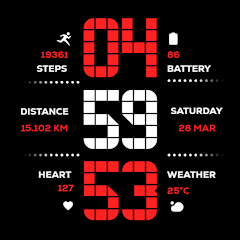
Elevate your Wear OS experience with the perfect fusion of retro-digital aesthetics and high-performance functionality. Designed specifically for the modern user, this watch face brings a classic tech vibe to your wrist.
Timekeeping: Precise Digital clock with full support for both 12H and 24H formats.
Health & Fitness: * Detailed Step Counter for daily activity tracking.
Real-time Heart Rate monitoring to stay on top of your vitals.
Dedicated Distance Tracking displayed in Kilometers (KM).
Smart Info: Integrated Weather updates and Date display at a glance.
Battery Optimization: Features an Advanced Always-On Display (AOD) designed to maximize battery life without sacrificing style.
🎨 Customization Options
13 Vibrant Color Schemes: Match your watch face to your outfit or mood with a wide variety of colors.
Device Optimization: Specifically tuned for seamless performance on Samsung Galaxy Watch and Google Pixel Watch.
📥 Step-by-Step Installation Guide
Open Play Store: On your Wear OS smartwatch, navigate to the Google Play Store.
Search: Use the search icon and type "Matrix Digital WatchFace".
Install: Tap the Install button to download it directly to your device.
Set as Default: * Long-press your current watch face.
Swipe right to "Add Watch Face" or click the "+" icon.
Select Matrix Digital from the list to apply.
Personalize: Long-press the watch face again and tap "Customize" to choose from the 13 available color themes.
Timekeeping: Precise Digital clock with full support for both 12H and 24H formats.
Health & Fitness: * Detailed Step Counter for daily activity tracking.
Real-time Heart Rate monitoring to stay on top of your vitals.
Dedicated Distance Tracking displayed in Kilometers (KM).
Smart Info: Integrated Weather updates and Date display at a glance.
Battery Optimization: Features an Advanced Always-On Display (AOD) designed to maximize battery life without sacrificing style.
🎨 Customization Options
13 Vibrant Color Schemes: Match your watch face to your outfit or mood with a wide variety of colors.
Device Optimization: Specifically tuned for seamless performance on Samsung Galaxy Watch and Google Pixel Watch.
📥 Step-by-Step Installation Guide
Open Play Store: On your Wear OS smartwatch, navigate to the Google Play Store.
Search: Use the search icon and type "Matrix Digital WatchFace".
Install: Tap the Install button to download it directly to your device.
Set as Default: * Long-press your current watch face.
Swipe right to "Add Watch Face" or click the "+" icon.
Select Matrix Digital from the list to apply.
Personalize: Long-press the watch face again and tap "Customize" to choose from the 13 available color themes.
Modern Matrix-style digital watch face with 13 colors and health data.
Updated on
Safety starts with understanding how developers collect and share your data. Data privacy and security practices may vary based on your use, region, and age. The developer provided this information and may update it over time.
- No data shared with third partiesLearn more about how developers declare sharing
- No data collectedLearn more about how developers declare collection


What’s new
1.0
• Initial Release.
• Initial Release.
App support
About the developer
ABUBKAR ISMAIL MANASIYA
justwatchface@gmail.com
496, Rahmat masjid, rahmat nagar
bavalchudi, banaskantha, Gujarat
Chhapi, Gujarat 385210
India


