
KB국민은행 스타뱅킹
4.0star
리뷰 13.5만개
1000만+
다운로드

전체이용가
info
앱 정보
■장애발생 시 조치방법 안내
- LG폰 기종에서 KB국민인증서가 안보일 경우
☞ LG폰 운영체계(OS)가 구글 개발정책에 맞게 업데이트 되지 않아 발생되는 현상입니다. 이러한 경우, [구글 Play스토어에서 KB스타뱅킹 앱 삭제 및 재설치 > 스마트폰 전원 재부팅 > KB국민인증서 재발급]을 하시면 정상적으로 이용 가능합니다.
- 앱 업데이트 또는 설치가 되지 않는 경우
☞ [설정 > 애플리케이션 > Play스토어 > 저장공간]에서 데이터 삭제 및 캐시 삭제 후 다시 시도 부탁드립니다.
- KB국민인증서 발급 또는 로그인이 되지 않는 경우
☞ [KB스타뱅킹 앱 삭제 > 휴대폰 기기 재부팅 > KB스타뱅킹 앱 재설치] 후 KB국민인증서 발급을 다시 시도 부탁드립니다.
- 삼성 스마트폰 신분증 인식이 잘 되지 않는 경우
☞ [휴대폰설정 > 애플리케이션 > 카메라 > 카메라설정 > 대상추적 AF 'ON'] 활성화 부탁드립니다.
- 실시간 입출금 Push알림이 오지 않는 경우 일반적 조치
☞ 휴대폰 기기 [설정>애플리케이션>KB스타뱅킹>알림]에서 '알림설정' 및 '알림 카테고리 內 kbbank' 허용 여부 확인
☞ [KB스타뱅킹 전체메뉴 > 환경설정 > 앱환경설정 > 캐시/쿠키 삭제 > 쿠키/데이터 지우기] 실행
☞ [KB스타뱅킹 전체메뉴 > 알림설정] 메뉴에서 알림(Push) 동의 해제 후 다시 동의 설정
☞ 위의 조치에도 Push 알림이 오지 않는 경우, KB스타뱅킹 삭제 > 휴대폰 전원 재부팅 > KB스타뱅킹 재설치(※ 단, AOS의 경우 공동인증서 삭제되므로 재발급 필요)
■ KB 스타뱅킹 고객 소통창구
· 인터넷 채팅상담: KB스타뱅킹 홈 > 챗봇/상담 > 챗봇/상담채팅 (챗봇상담: 24시간)
· 네이버 포스트 : https://post.naver.com/kbebiz_star?isHome=1 클릭 또는 네이버 검색창 內 '네이버 포스트' 검색 > 포스트 검색 입력 창에 'KB스타뱅킹 앱리뷰' 입력
· 부점메일: kbg460003@kbfg.com
· 고객센터: 1588-9999, 1599-9999, 1644-9999(0번▶3번) (해외: +82-2-6300-9999) (전화상담: 평일 9-18시)
■ KB스타뱅킹, 이렇게 활용하세요!
· KB스타뱅킹 앱 內 V3를 탑재해 두었어요(G6.2.0버전 이상). KB스타뱅킹 앱을 실행하는 동안 V3 보안프로그램이 정상적으로 작동되어 안전하게 이용하실 수 있습니다.
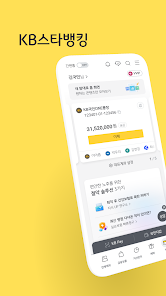
· KB국민인증서로 '자동로그인'을 설정해보세요. 앱을 열자마자 자동으로 로그인되어 홈으로 이동합니다.
· 본인명의 휴대폰과 신분증만 있다면, 은행 방문 없이 입출금통장과 인터넷뱅킹까지 한 번에 만들 수 있어요. (만 14세 이상)
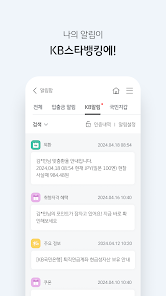
· 입출금 알림과 혜택·투자정보 등 지금 나에게 필요한 실시간 알림을 이제 KB스타뱅킹으로 받아보세요.
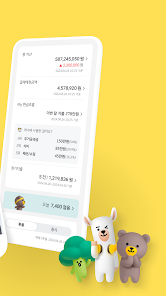
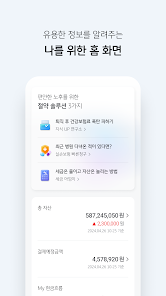
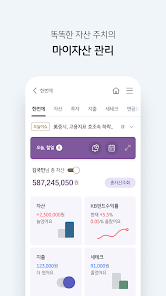
· 만기·수익률, 상품정보와 지점에서 보낸 메시지 등 나를 위한 맞춤형 정보를 한 눈에 볼 수 있어요.
· 차별화, 전문화된 KB자산관리! 금융활동과 생활패턴을 고려한 상품 추천! 더 이상 고민할 필요 없어요.
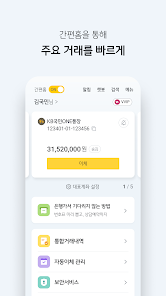
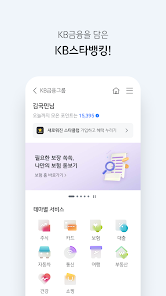
· KB금융그룹 상품조회와 주식매매, KB Pay, 보험설계 등 특화서비스까지, 이제 KB스타뱅킹 하나로 이용해보세요.
■ KB국민인증서로 더 빠르고 안전하게!
· KB국민인증서는 스마트폰의 안전 영역에 KB국민은행 인증서를 발급하고 저장하여 탈취/복제 걱정 없이 KB스타뱅킹을 이용할 수 있는 서비스입니다. (1인 1기기)
· 보안카드 또는 OTP 없이도 간편하고 안전하게 거래해보세요.
- 2백만원 이하 이체할 때는 계좌 비밀번호만으로 간편하게!
- 2백만원~5천만원까지는 계좌 비밀번호와 6자리 간편비밀번호만으로 이체! (5천만원 초과 시 추가인증 필요)
※ 고객님께서 설정하신 인터넷뱅킹 이체한도 범위 안에서 이용하실 수 있습니다.
· 해외 직구할 때 개인통관고유부호 발급부터 건강보험료 납부, 연말정산까지! KB국민인증서로 경험할 수 있는 편리함은 점점 늘어납니다.
■ 앱 접근권한에 대한 고지
정보통신망 이용촉진 및 정보보호 등에 관한 법률 제 22조의 2(접근권한에 대한 동의), 동 시행령에 따라 KB스타뱅킹 서비스 제공을 위하여 필요한 접근권한을 아래와 같이 안내해 드립니다.
【필수적 접근권한】
• 전화: 휴대폰 본인인증을 위해 휴대폰 번호를 확인하고, 휴대폰 상태 및 기기정보에 대한 접근권한으로, 이용폰 지정 서비스, 스마트OTP, 휴대폰본인인증, 환경설정 내 버전 확인, KB국민인증서 (재)발급, 금융/공동인증서 발급, 오픈뱅킹 등 이용 시 사용합니다.
• 설치된 앱: 전자금융거래 사고 방지를 위해 스마트폰에 설치된 애플리케이션 중 위협이 될 수 있는 항목을 탐지하기 위해 사용합니다.
【선택적 접근권한】
• 저장공간 : 기기사진, 미디어, 파일에 대한 접근권한으로, [인증서 저장, 수정, 삭제, 읽기], [이체 후 특별한 송금메세지 발송], [통장사본 저장], [이체확인증 저장] 등 이용 시 사용합니다.
• 연락처(주소록) : 연락처 이체, 이체결과 SMS 전송시 기기 내 연락처 정보를 불러오기 위해 사용합니다.
• 카메라 : 사진 촬영 기능에 대한 접근권한으로, 신분증 촬영 및 편의서비스(은행에 서류제출, 공과금 촬영납부 등), QR인증서 복사 시에 사용합니다.
• 마이크 : 비대면 실명확인을 위한 영상통화, 음성을 통한 빠른이체 등 이용 시 사용합니다.
• 위치 : 기기 위치정보에 대한 접근권한으로, 지점/자동화기기 찾기, 지점상담 예약서비스 등 이용 시 사용합니다.
• 신체활동 : KB매일걷기 서비스를 이용할 때 사용합니다.
• 알림: Push알림을 통해 ARS 인증을 받거나, 유익한 상품 ·서비스 ·이벤트 정보 및 다양한 금융 혜택 등 알림 수신을 위해 사용합니다.
※ 선택적 접근권한의 허용에 동의하지 않아도 KB스타뱅킹 서비스의 이용이 가능하나, 필요한 일부 기능 사용에 제한이 있을 수 있으며, [스마트폰 설정 > 애플리케이션 > KB스타뱅킹 > 권한] 메뉴에서 변경이 가능합니다.
※ 안드로이드 O.S 6.0 미만 버전 스마트폰을 이용하시는 경우 선택적 접근권한 없이 모두 필수적 접근권한으로 적용될 수 있습니다. 이 경우 스마트폰의 운영체제를 안드로이드 6.0 이상으로 업그레이드할 수 있는지 확인하여 업그레이드 하신 후, 이미 설치한 앱을 삭제, 재설치하셔야 접근권한 설정이 정상적으로 가능합니다.
■ 공지사항
· 안드로이드 버전 5.0 이상의 스마트기기를 사용하는 개인인터넷뱅킹 고객님이시라면 누구든지 KB스타뱅킹을 이용하실 수 있습니다.
· 이동통신사 3G/LTE/5G, 무선인터넷(Wi-Fi)을 통해 설치할 수 있으며, 3G/LTE/5G에서는 이용하시는 요금제에 따라 정해진 용량이 초과된 경우 데이터 요금이 부과될 수 있습니다.
· 금융감독당국의 지침에 따라 전자금융 사고 예방을 위해 임의로 개조(탈옥, 루팅)한 스마트기기에서는 KB스타뱅킹 이용이 불가하며, 특정 앱이 설치되어있는 경우에도 임의 개조한 기기로 인식할 수 있습니다. (A/S센터 문의 및 초기화 권장)
- LG폰 기종에서 KB국민인증서가 안보일 경우
☞ LG폰 운영체계(OS)가 구글 개발정책에 맞게 업데이트 되지 않아 발생되는 현상입니다. 이러한 경우, [구글 Play스토어에서 KB스타뱅킹 앱 삭제 및 재설치 > 스마트폰 전원 재부팅 > KB국민인증서 재발급]을 하시면 정상적으로 이용 가능합니다.
- 앱 업데이트 또는 설치가 되지 않는 경우
☞ [설정 > 애플리케이션 > Play스토어 > 저장공간]에서 데이터 삭제 및 캐시 삭제 후 다시 시도 부탁드립니다.
- KB국민인증서 발급 또는 로그인이 되지 않는 경우
☞ [KB스타뱅킹 앱 삭제 > 휴대폰 기기 재부팅 > KB스타뱅킹 앱 재설치] 후 KB국민인증서 발급을 다시 시도 부탁드립니다.
- 삼성 스마트폰 신분증 인식이 잘 되지 않는 경우
☞ [휴대폰설정 > 애플리케이션 > 카메라 > 카메라설정 > 대상추적 AF 'ON'] 활성화 부탁드립니다.
- 실시간 입출금 Push알림이 오지 않는 경우 일반적 조치
☞ 휴대폰 기기 [설정>애플리케이션>KB스타뱅킹>알림]에서 '알림설정' 및 '알림 카테고리 內 kbbank' 허용 여부 확인
☞ [KB스타뱅킹 전체메뉴 > 환경설정 > 앱환경설정 > 캐시/쿠키 삭제 > 쿠키/데이터 지우기] 실행
☞ [KB스타뱅킹 전체메뉴 > 알림설정] 메뉴에서 알림(Push) 동의 해제 후 다시 동의 설정
☞ 위의 조치에도 Push 알림이 오지 않는 경우, KB스타뱅킹 삭제 > 휴대폰 전원 재부팅 > KB스타뱅킹 재설치(※ 단, AOS의 경우 공동인증서 삭제되므로 재발급 필요)
■ KB 스타뱅킹 고객 소통창구
· 인터넷 채팅상담: KB스타뱅킹 홈 > 챗봇/상담 > 챗봇/상담채팅 (챗봇상담: 24시간)
· 네이버 포스트 : https://post.naver.com/kbebiz_star?isHome=1 클릭 또는 네이버 검색창 內 '네이버 포스트' 검색 > 포스트 검색 입력 창에 'KB스타뱅킹 앱리뷰' 입력
· 부점메일: kbg460003@kbfg.com
· 고객센터: 1588-9999, 1599-9999, 1644-9999(0번▶3번) (해외: +82-2-6300-9999) (전화상담: 평일 9-18시)
■ KB스타뱅킹, 이렇게 활용하세요!
· KB스타뱅킹 앱 內 V3를 탑재해 두었어요(G6.2.0버전 이상). KB스타뱅킹 앱을 실행하는 동안 V3 보안프로그램이 정상적으로 작동되어 안전하게 이용하실 수 있습니다.
· KB국민인증서로 '자동로그인'을 설정해보세요. 앱을 열자마자 자동으로 로그인되어 홈으로 이동합니다.
· 본인명의 휴대폰과 신분증만 있다면, 은행 방문 없이 입출금통장과 인터넷뱅킹까지 한 번에 만들 수 있어요. (만 14세 이상)
· 입출금 알림과 혜택·투자정보 등 지금 나에게 필요한 실시간 알림을 이제 KB스타뱅킹으로 받아보세요.
· 만기·수익률, 상품정보와 지점에서 보낸 메시지 등 나를 위한 맞춤형 정보를 한 눈에 볼 수 있어요.
· 차별화, 전문화된 KB자산관리! 금융활동과 생활패턴을 고려한 상품 추천! 더 이상 고민할 필요 없어요.
· KB금융그룹 상품조회와 주식매매, KB Pay, 보험설계 등 특화서비스까지, 이제 KB스타뱅킹 하나로 이용해보세요.
■ KB국민인증서로 더 빠르고 안전하게!
· KB국민인증서는 스마트폰의 안전 영역에 KB국민은행 인증서를 발급하고 저장하여 탈취/복제 걱정 없이 KB스타뱅킹을 이용할 수 있는 서비스입니다. (1인 1기기)
· 보안카드 또는 OTP 없이도 간편하고 안전하게 거래해보세요.
- 2백만원 이하 이체할 때는 계좌 비밀번호만으로 간편하게!
- 2백만원~5천만원까지는 계좌 비밀번호와 6자리 간편비밀번호만으로 이체! (5천만원 초과 시 추가인증 필요)
※ 고객님께서 설정하신 인터넷뱅킹 이체한도 범위 안에서 이용하실 수 있습니다.
· 해외 직구할 때 개인통관고유부호 발급부터 건강보험료 납부, 연말정산까지! KB국민인증서로 경험할 수 있는 편리함은 점점 늘어납니다.
■ 앱 접근권한에 대한 고지
정보통신망 이용촉진 및 정보보호 등에 관한 법률 제 22조의 2(접근권한에 대한 동의), 동 시행령에 따라 KB스타뱅킹 서비스 제공을 위하여 필요한 접근권한을 아래와 같이 안내해 드립니다.
【필수적 접근권한】
• 전화: 휴대폰 본인인증을 위해 휴대폰 번호를 확인하고, 휴대폰 상태 및 기기정보에 대한 접근권한으로, 이용폰 지정 서비스, 스마트OTP, 휴대폰본인인증, 환경설정 내 버전 확인, KB국민인증서 (재)발급, 금융/공동인증서 발급, 오픈뱅킹 등 이용 시 사용합니다.
• 설치된 앱: 전자금융거래 사고 방지를 위해 스마트폰에 설치된 애플리케이션 중 위협이 될 수 있는 항목을 탐지하기 위해 사용합니다.
【선택적 접근권한】
• 저장공간 : 기기사진, 미디어, 파일에 대한 접근권한으로, [인증서 저장, 수정, 삭제, 읽기], [이체 후 특별한 송금메세지 발송], [통장사본 저장], [이체확인증 저장] 등 이용 시 사용합니다.
• 연락처(주소록) : 연락처 이체, 이체결과 SMS 전송시 기기 내 연락처 정보를 불러오기 위해 사용합니다.
• 카메라 : 사진 촬영 기능에 대한 접근권한으로, 신분증 촬영 및 편의서비스(은행에 서류제출, 공과금 촬영납부 등), QR인증서 복사 시에 사용합니다.
• 마이크 : 비대면 실명확인을 위한 영상통화, 음성을 통한 빠른이체 등 이용 시 사용합니다.
• 위치 : 기기 위치정보에 대한 접근권한으로, 지점/자동화기기 찾기, 지점상담 예약서비스 등 이용 시 사용합니다.
• 신체활동 : KB매일걷기 서비스를 이용할 때 사용합니다.
• 알림: Push알림을 통해 ARS 인증을 받거나, 유익한 상품 ·서비스 ·이벤트 정보 및 다양한 금융 혜택 등 알림 수신을 위해 사용합니다.
※ 선택적 접근권한의 허용에 동의하지 않아도 KB스타뱅킹 서비스의 이용이 가능하나, 필요한 일부 기능 사용에 제한이 있을 수 있으며, [스마트폰 설정 > 애플리케이션 > KB스타뱅킹 > 권한] 메뉴에서 변경이 가능합니다.
※ 안드로이드 O.S 6.0 미만 버전 스마트폰을 이용하시는 경우 선택적 접근권한 없이 모두 필수적 접근권한으로 적용될 수 있습니다. 이 경우 스마트폰의 운영체제를 안드로이드 6.0 이상으로 업그레이드할 수 있는지 확인하여 업그레이드 하신 후, 이미 설치한 앱을 삭제, 재설치하셔야 접근권한 설정이 정상적으로 가능합니다.
■ 공지사항
· 안드로이드 버전 5.0 이상의 스마트기기를 사용하는 개인인터넷뱅킹 고객님이시라면 누구든지 KB스타뱅킹을 이용하실 수 있습니다.
· 이동통신사 3G/LTE/5G, 무선인터넷(Wi-Fi)을 통해 설치할 수 있으며, 3G/LTE/5G에서는 이용하시는 요금제에 따라 정해진 용량이 초과된 경우 데이터 요금이 부과될 수 있습니다.
· 금융감독당국의 지침에 따라 전자금융 사고 예방을 위해 임의로 개조(탈옥, 루팅)한 스마트기기에서는 KB스타뱅킹 이용이 불가하며, 특정 앱이 설치되어있는 경우에도 임의 개조한 기기로 인식할 수 있습니다. (A/S센터 문의 및 초기화 권장)
업데이트 날짜
보안은 개발자가 데이터를 수집 및 공유하는 방식을 파악하는 것에서 시작됩니다. 데이터 개인 정보 보호 및 보안 관행은 사용자의 앱 사용, 지역, 연령에 따라 다를 수 있습니다. 이는 개발자가 제공한 정보이며 추후 업데이트될 수 있습니다.

앱에서 이러한 데이터 유형을 서드 파티와 공유할 수 있습니다.
개인 정보, 금융 정보 외 5개 항목

수집된 데이터가 없습니다.
개발자가 어떻게 수집을 선언하는지 자세히 알아보세요.

전송 중 데이터 암호화됨

데이터를 삭제할 수 없음
평가 및 리뷰
4.0
리뷰 13.3만개

M Choi
- 부적절한 리뷰로 신고
- 리뷰 기록 표시
2021년 3월 2일
편리하게 잘 사용하고 있어요 아직까지 큰 불편함이나 개선사항이 느껴지는 부분은 없어요 :) 타은행도 같이 잔액조회 가능해서 한눈에 보이는게 편리하구요 모바일 인증서로 간편하게 로그인&아웃 가능해서 편리해요. 타행이체나 내 외환통장으로 이체해서 바로 달러구매가 가능한 것도 너무 좋으네요
사용자 8명이 이 리뷰가 유용하다고 평가함

문인숙
- 부적절한 리뷰로 신고
2024년 5월 7일
편리한 기능으로 어디서나 불편없이 손 쉽게 잘 이용하고 있습니다. 통장 확인도 쉽고, 이체도 참 쉽습니다. 저같은 나이의 사람은 은행가서 해야할 부담이 많이 덥니다. 앞으로도 계속 편리하게 이용할수 있길 바랍니다.
사용자 30명이 이 리뷰가 유용하다고 평가함
KB국민은행
2024년 5월 7일
고객님 안녕하세요! KB스타뱅킹을 이용해 주셔서 진심으로 감사드립니다. KB스타뱅킹은 고객님께서 항상 편리하게 사용하실 수 있도록 최선을 다하겠습니다! 앱 이용 중 개선사항이 있으시다면, [네이버 포스트 'KB스타뱅킹 앱리뷰' 고객의 소리] 또는 고객센터(1588-9999>0>3번)로 언제든 편하게 말씀해 주시기 바랍니다♥ 감사합니다!

삼월
- 부적절한 리뷰로 신고
2024년 4월 19일
오늘 갑자기 홈화면이 바꼈던데 잘쓰고 있었는데 전혀 안쓰는 기능들만 홈화면에 들어 왔어요 이전처럼 설정을 할수 있게 해주던가.. 콘텐츠 추가 라고 만들어 놓고는 실제로 추가 되는건 하나도 없고 도대체 콘텐츠 추가 버튼은 왜 맞든건가요ㅠ이전 홈화면 대비 나아진게 하나도 없어요 선택권이라도 제대로 주던가 주는척만 해둔 그지 같은 변경이에요
사용자 56명이 이 리뷰가 유용하다고 평가함
KB국민은행
2024년 4월 22일
안녕하세요, 고객님. 홈화면 內 콘텐츠가 많아 복잡하다는 고객님들의 의견 및 홈화면 이용 데이터를 분석하여 이용률이 높은 콘텐츠 중심으로 2024년 4월 18일 개편을 진행하였으나, 이용에 불편을 드려 죄송한 마음입니다. 부득이하게 고객님께서 자주 이용하시는 콘텐츠가 홈에서 삭제되었다면, 우측 상단 전체메뉴 內 [My 메뉴]로 설정하여 이용하시기를 부탁드리겠습니다. [My메뉴] 설정을 들어가시면 [My메뉴 추가/삭제]를 통해 최대 6개까지 자주 이용하시는 메뉴를 등록하여 빠르게 해당 메뉴로의 진입이 가능합니다. 고객님의 소중한 의견을 바탕으로 KB스타뱅킹을 더욱 편리하게 이용할 수 있도록 노력하겠습니다. 감사합니다.
새로운 기능
KB스타뱅킹을 더욱 편리하고 안전하게 이용하실 수 있도록
신분증 촬영 기능을 개선하였고
키패드 입력 시 보안성을 강화했어요.
신분증 촬영 기능을 개선하였고
키패드 입력 시 보안성을 강화했어요.


