
AdGuard DNS Protection
Contains ads


Everyone
info
500+
Downloads

Everyone
Learn more


About this app
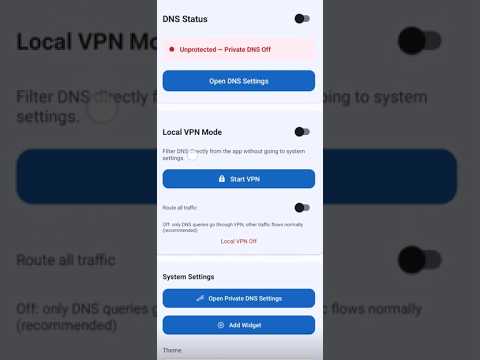
AdGuard DNS Protection helps protect your Android device from ads, trackers, phishing websites, malware, and harmful content using secure Private DNS or Local VPN mode—no root required.
How to use
If your phone is not rooted, the app automatically copies the selected DNS address to the clipboard and opens the Private DNS settings screen. Simply paste the address into the Private DNS provider hostname field. To disable DNS protection, open the DNS settings again using the same button and set Private DNS to Off.
🔹 Features
• Private DNS (DNS over TLS)
• One-tap Local VPN mode
• Support for AdGuard DNS, AdGuard Family Protection, CleanBrowsing Family DNS, and custom DNS providers
• Home screen widget for quick toggling
• Dark and Light themes
• Support for 20+ languages
• Family-friendly internet protection
• Fast DNS switching
• No root required
🛡 Two protection modes
Local VPN Mode: Start DNS protection instantly with one tap. Only DNS requests are filtered, while your regular internet traffic continues uninterrupted.
System Private DNS: Use Android's built-in DNS over TLS for secure, system-wide DNS protection.
👨👩👧 Family Protection
Protect your family from:
• Adult content
• Malware
• Phishing websites
• Scam websites
• Gambling websites
• Online trackers
⚡ Why choose AdGuard DNS Protection?
• Easy setup
• Privacy-focused
• Lightweight
• Secure DNS
• Modern Material Design
• Android widget support
📱 Requirements
• Android 6.0 or later
• Android 9 or later for System Private DNS
• VPN permission for Local VPN mode
AdGuard DNS Protection is a simple yet powerful tool that enhances your Android device's security and privacy, helping you and your family browse the web more safely.
How to use
If your phone is not rooted, the app automatically copies the selected DNS address to the clipboard and opens the Private DNS settings screen. Simply paste the address into the Private DNS provider hostname field. To disable DNS protection, open the DNS settings again using the same button and set Private DNS to Off.
🔹 Features
• Private DNS (DNS over TLS)
• One-tap Local VPN mode
• Support for AdGuard DNS, AdGuard Family Protection, CleanBrowsing Family DNS, and custom DNS providers
• Home screen widget for quick toggling
• Dark and Light themes
• Support for 20+ languages
• Family-friendly internet protection
• Fast DNS switching
• No root required
🛡 Two protection modes
Local VPN Mode: Start DNS protection instantly with one tap. Only DNS requests are filtered, while your regular internet traffic continues uninterrupted.
System Private DNS: Use Android's built-in DNS over TLS for secure, system-wide DNS protection.
👨👩👧 Family Protection
Protect your family from:
• Adult content
• Malware
• Phishing websites
• Scam websites
• Gambling websites
• Online trackers
⚡ Why choose AdGuard DNS Protection?
• Easy setup
• Privacy-focused
• Lightweight
• Secure DNS
• Modern Material Design
• Android widget support
📱 Requirements
• Android 6.0 or later
• Android 9 or later for System Private DNS
• VPN permission for Local VPN mode
AdGuard DNS Protection is a simple yet powerful tool that enhances your Android device's security and privacy, helping you and your family browse the web more safely.
AdGuard DNS Protection – block ads, trackers, malware & adult content on Android
Updated on
Safety starts with understanding how developers collect and share your data. Data privacy and security practices may vary based on your use, region, and age. The developer provided this information and may update it over time.
- No data shared with third partiesLearn more about how developers declare sharing
- No data collectedLearn more about how developers declare collection


What’s new
🚀Secure your Android with AdGuard DNS Protection! Block ads, trackers, malware, and phishing effortlessly. No root required.
• Choose Private DNS (DoT) or Local VPN mode.
• Enable Family Protection to block adult content and scams.
• Fast DNS switching & easy setup.
Update now for a safer, faster, and ad-free browsing experience!
• Choose Private DNS (DoT) or Local VPN mode.
• Enable Family Protection to block adult content and scams.
• Fast DNS switching & easy setup.
Update now for a safer, faster, and ad-free browsing experience!
Everyone
Learn moreApp support
About the developer
kerim kuru
eslemserrakuru@gmail.com
göktürk mahhallesi 173. cadde çankaya / ankara
no:4
06670 iç anadolu/Ankara
Türkiye


