
Trace Canvas
Contains ads


Everyone
info
500+
Downloads

Everyone
Learn more


About this app
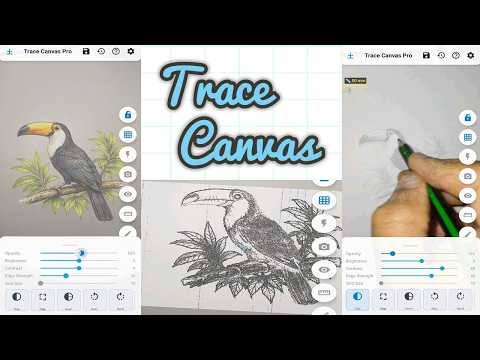
TraceCanvas turns your phone into a tracing tool — place it above a sheet of
paper, load any reference image, and trace directly onto the paper while
watching the transparent overlay through the screen.
Perfect for artists, kids learning to draw, handprint keepsakes, lettering
practice, and anyone who wants to transfer an image to paper accurately.
─── HOW IT WORKS ───
Place your phone on a stand or holder above paper. Import a photo or drawing
from your gallery. It appears as a semi-transparent overlay on the live camera
view. Adjust position, size, and rotation with your fingers, then trace what
you see onto the paper below.
FEATURES
- Overlay control
• Drag, pinch-zoom, and rotate the reference image freely
• Adjust opacity to balance visibility of image and paper
• Lock the overlay to prevent accidental movement while tracing
• Auto-lock after idle — set a timer in Settings so the overlay locks
itself once you stop adjusting
- Image processing
• Grayscale, Invert, and Edge detection modes for cleaner tracing lines
• Brightness and contrast sliders
• Horizontal and vertical flip
• Adjustable edge strength
- Alignment guides
• Grid, rule-of-thirds, crosshair, symmetry, and level overlays
• Adjustable grid size
- Distance calibration
• Draw a reference mark on paper, then use the built-in calibration tool
to set the exact phone-to-paper distance
• A yellow ruler appears on screen showing your reference size — match it
on future sessions to always trace at the same physical scale
• Calibration is saved with each session
- Sessions
• Save your image, position, opacity, and all settings as a named session
• Restore any previous session in one tap to continue exactly where you left off
• Sessions remember calibration, overlay state, and all adjustments
- Export
• Capture the overlay as a processed image
• Export edge-detected or adjusted versions directly to your gallery
- Camera tools
• Tap to focus
• Torch / flashlight toggle
• Drawing mode hides all controls for a clean full-screen view.
paper, load any reference image, and trace directly onto the paper while
watching the transparent overlay through the screen.
Perfect for artists, kids learning to draw, handprint keepsakes, lettering
practice, and anyone who wants to transfer an image to paper accurately.
─── HOW IT WORKS ───
Place your phone on a stand or holder above paper. Import a photo or drawing
from your gallery. It appears as a semi-transparent overlay on the live camera
view. Adjust position, size, and rotation with your fingers, then trace what
you see onto the paper below.
FEATURES
- Overlay control
• Drag, pinch-zoom, and rotate the reference image freely
• Adjust opacity to balance visibility of image and paper
• Lock the overlay to prevent accidental movement while tracing
• Auto-lock after idle — set a timer in Settings so the overlay locks
itself once you stop adjusting
- Image processing
• Grayscale, Invert, and Edge detection modes for cleaner tracing lines
• Brightness and contrast sliders
• Horizontal and vertical flip
• Adjustable edge strength
- Alignment guides
• Grid, rule-of-thirds, crosshair, symmetry, and level overlays
• Adjustable grid size
- Distance calibration
• Draw a reference mark on paper, then use the built-in calibration tool
to set the exact phone-to-paper distance
• A yellow ruler appears on screen showing your reference size — match it
on future sessions to always trace at the same physical scale
• Calibration is saved with each session
- Sessions
• Save your image, position, opacity, and all settings as a named session
• Restore any previous session in one tap to continue exactly where you left off
• Sessions remember calibration, overlay state, and all adjustments
- Export
• Capture the overlay as a processed image
• Export edge-detected or adjusted versions directly to your gallery
- Camera tools
• Tap to focus
• Torch / flashlight toggle
• Drawing mode hides all controls for a clean full-screen view.
Trace any image onto paper using your phone camera as a live guide.
Updated on
Safety starts with understanding how developers collect and share your data. Data privacy and security practices may vary based on your use, region, and age. The developer provided this information and may update it over time.
- No data shared with third partiesLearn more about how developers declare sharing
- No data collectedLearn more about how developers declare collection
- Data is encrypted in transit
- Data can’t be deleted


Everyone
Learn moreApp support
About the developer
ahmed sousane
postmaster@kidshandprint.com
HAY KASBAH RUE 22 NO 8
MOHAMMEDIA 28800
Morocco


