
내일 타이머


Everyone
info
10+
Downloads

Everyone
Learn more


About this app
1) Short Description (Recommended 80 characters)
A timer/alarm that extends beyond today and into tomorrow. Check the remaining time and end time on the screen and in the notification.
2) Detailed Description (Body)
Tomorrow Timer is a timer/stopwatch/alarm app that displays not only the remaining time but also the "when it will ring (end/alarm time)" (based on the date/AM/PM) to avoid confusion even when using long timers (today → tomorrow).
The app operates offline (can be used without internet access), and settings are stored only on the device.
Key Features
- Timer that can be scheduled until tomorrow
- Timers can be set from the current time until tomorrow (the next day).
- The scheduled end (alarm) time is intuitively displayed.
- Example: "End: Tomorrow, January 6th, 2:40 PM."
- Displayed on the screen and in the notification (ongoing notification), so you can immediately see when it will ring. - Instant control from the notification bar
- Quickly pause/resume/stop the running timer/stopwatch from the notification bar
- Multiple timers are displayed in an easy-to-view list format
- Quick presets
- Quickly start frequently used timers, such as 10, 15, or 30 minutes, with a button
- Stopwatch
- Easy start/stop/reset
- Alarm (clock alarm)
- Set an alarm at a desired time
- Repeat alarms for each day of the week
- Name the alarm
- Set snooze time/number of times
- Individual sound/vibration settings
Today's Added/Improved Features (2026-01-05)
- Added mini calendar feature
- Quickly select a date using a small calendar on the date selection screen.
- Added "Change Sound" feature (user mp3 selection)
- Tap the folder button in "Change Sound" at the bottom of the alarm editing screen to select an mp3 file from your Downloads folder, etc., to use as an alarm sound. - If the selected file is deleted or inaccessible, the app will automatically revert to its default built-in sound.
3) Simple Usage Instructions (Instructions)
Timer
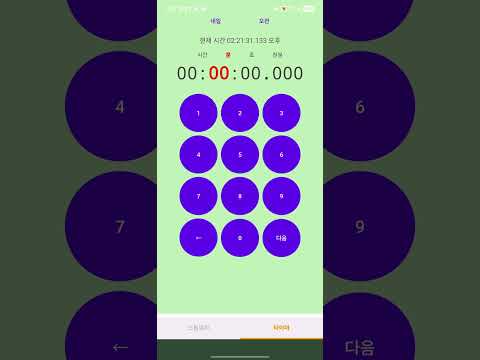
1. Enter a number or select a preset (10/15/30 minutes) on the timer screen.
2. Press Start to start the timer.
3. Check the "Notification Time (Expected End Time)" on the screen/notifications.
4. While the timer is running, quickly control it with Pause/Resume/Stop in the notification bar.
Stopwatch
1. Select Stopwatch from the bottom tab.
2. Easy to use with Start/Stop/Reset.
Alarm (Clock Alarm)
1. Select Alarm from the bottom tab.
2. Add an alarm with the + button.
3. Set the time/day/name/snooze/vibration, etc., and save.
4. Switch to ON/OFF from the list.
5. (Optional) Change sound: "Change sound" → Folder button → Select mp3.
4) Permission information (available as is in the Play Console "Permission Description")
The following permissions (or system settings) may be used for the app's "Accurate notifications / Notification bar control / Background stability / Alarm sound playback." The permissions displayed may vary depending on the Android version/device policy.
- Notification permission (POST_NOTIFICATIONS, Android 13+)
- Required to display ongoing notifications and send timer/alarm end notifications.
- Exact Alarm permission (SCHEDULE_EXACT_ALARM, USE_EXACT_ALARM, Android 12+ depending on device/OS)
- Schedules an "Exact Alarm" to ensure that the timer/alarm sounds at the set time.
- On some devices, you may need to enable "Allow Exact Alarm" in the Settings screen.
- Foreground Service (FOREGROUND_SERVICE, FOREGROUND_SERVICE_MEDIA_PLAYBACK)
- Used to ensure stable operation of the timer/alarm even when the app is in the background, and to play alarm sounds.
- Keep screen awake/locked (WAKE_LOCK)
- Reduces delays/missed notifications by keeping the CPU and operation active when an alarm sounds.
- Vibrate (VIBRATE)
- Used for alarm vibration.
- Full-screen notification (USE_FULL_SCREEN_INTENT)
- Can be used to clearly display full-screen notifications when an alarm sounds (depending on device settings).
- Request battery optimization exceptions (REQUEST_IGNORE_BATTERY_OPTIMIZATIONS, optional)
- Notifications may be delayed on some devices (e.g., due to manufacturer power-saving policies).
If desired, the user can request/prompt for the "Battery Optimization Exclusion" setting.
- The app will still function without this permission, but the accuracy of long-term timers/alarms may be affected.
About audio file (mp3) selection
- The app does not scan the entire storage and only accesses audio files manually selected by the user in the "System File Picker." - The file itself is not transmitted externally; only the reference information (URI) required for playback is stored on the device.
- If the selected file is deleted, the app automatically reverts to the default built-in sound.
5) Update History (Example of "What's New" text in the Store)
- 26.01.04
- Added alarm function (day repeat, name, snooze, sound/vibration settings, alarm management)
- 26.01.05
- Added mini calendar function (quick date selection)
- Added alarm "Change Sound" function: MP3 files in the download folder can be selected
- Stability and UI improvements
A timer/alarm that extends beyond today and into tomorrow. Check the remaining time and end time on the screen and in the notification.
2) Detailed Description (Body)
Tomorrow Timer is a timer/stopwatch/alarm app that displays not only the remaining time but also the "when it will ring (end/alarm time)" (based on the date/AM/PM) to avoid confusion even when using long timers (today → tomorrow).
The app operates offline (can be used without internet access), and settings are stored only on the device.
Key Features
- Timer that can be scheduled until tomorrow
- Timers can be set from the current time until tomorrow (the next day).
- The scheduled end (alarm) time is intuitively displayed.
- Example: "End: Tomorrow, January 6th, 2:40 PM."
- Displayed on the screen and in the notification (ongoing notification), so you can immediately see when it will ring. - Instant control from the notification bar
- Quickly pause/resume/stop the running timer/stopwatch from the notification bar
- Multiple timers are displayed in an easy-to-view list format
- Quick presets
- Quickly start frequently used timers, such as 10, 15, or 30 minutes, with a button
- Stopwatch
- Easy start/stop/reset
- Alarm (clock alarm)
- Set an alarm at a desired time
- Repeat alarms for each day of the week
- Name the alarm
- Set snooze time/number of times
- Individual sound/vibration settings
Today's Added/Improved Features (2026-01-05)
- Added mini calendar feature
- Quickly select a date using a small calendar on the date selection screen.
- Added "Change Sound" feature (user mp3 selection)
- Tap the folder button in "Change Sound" at the bottom of the alarm editing screen to select an mp3 file from your Downloads folder, etc., to use as an alarm sound. - If the selected file is deleted or inaccessible, the app will automatically revert to its default built-in sound.
3) Simple Usage Instructions (Instructions)
Timer
1. Enter a number or select a preset (10/15/30 minutes) on the timer screen.
2. Press Start to start the timer.
3. Check the "Notification Time (Expected End Time)" on the screen/notifications.
4. While the timer is running, quickly control it with Pause/Resume/Stop in the notification bar.
Stopwatch
1. Select Stopwatch from the bottom tab.
2. Easy to use with Start/Stop/Reset.
Alarm (Clock Alarm)
1. Select Alarm from the bottom tab.
2. Add an alarm with the + button.
3. Set the time/day/name/snooze/vibration, etc., and save.
4. Switch to ON/OFF from the list.
5. (Optional) Change sound: "Change sound" → Folder button → Select mp3.
4) Permission information (available as is in the Play Console "Permission Description")
The following permissions (or system settings) may be used for the app's "Accurate notifications / Notification bar control / Background stability / Alarm sound playback." The permissions displayed may vary depending on the Android version/device policy.
- Notification permission (POST_NOTIFICATIONS, Android 13+)
- Required to display ongoing notifications and send timer/alarm end notifications.
- Exact Alarm permission (SCHEDULE_EXACT_ALARM, USE_EXACT_ALARM, Android 12+ depending on device/OS)
- Schedules an "Exact Alarm" to ensure that the timer/alarm sounds at the set time.
- On some devices, you may need to enable "Allow Exact Alarm" in the Settings screen.
- Foreground Service (FOREGROUND_SERVICE, FOREGROUND_SERVICE_MEDIA_PLAYBACK)
- Used to ensure stable operation of the timer/alarm even when the app is in the background, and to play alarm sounds.
- Keep screen awake/locked (WAKE_LOCK)
- Reduces delays/missed notifications by keeping the CPU and operation active when an alarm sounds.
- Vibrate (VIBRATE)
- Used for alarm vibration.
- Full-screen notification (USE_FULL_SCREEN_INTENT)
- Can be used to clearly display full-screen notifications when an alarm sounds (depending on device settings).
- Request battery optimization exceptions (REQUEST_IGNORE_BATTERY_OPTIMIZATIONS, optional)
- Notifications may be delayed on some devices (e.g., due to manufacturer power-saving policies).
If desired, the user can request/prompt for the "Battery Optimization Exclusion" setting.
- The app will still function without this permission, but the accuracy of long-term timers/alarms may be affected.
About audio file (mp3) selection
- The app does not scan the entire storage and only accesses audio files manually selected by the user in the "System File Picker." - The file itself is not transmitted externally; only the reference information (URI) required for playback is stored on the device.
- If the selected file is deleted, the app automatically reverts to the default built-in sound.
5) Update History (Example of "What's New" text in the Store)
- 26.01.04
- Added alarm function (day repeat, name, snooze, sound/vibration settings, alarm management)
- 26.01.05
- Added mini calendar function (quick date selection)
- Added alarm "Change Sound" function: MP3 files in the download folder can be selected
- Stability and UI improvements
This app has timer and stopwatch functions.
Updated on
Safety starts with understanding how developers collect and share your data. Data privacy and security practices may vary based on your use, region, and age. The developer provided this information and may update it over time.
- No data shared with third partiesLearn more about how developers declare sharing
- No data collectedLearn more about how developers declare collection


What’s new
ko-KR AGP 업데이트 기타


