
Kwikset

2.4star
1.96K reviews
100K+
Downloads

Everyone
info
About this app
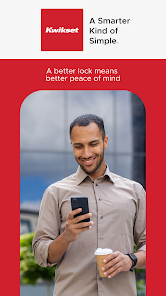
Your home is your sanctuary, filled with everything you hold dear. At Kwikset, we understand that the locks you choose to protect your home is a decision you do not take lightly. That is why we do not take shortcuts when it comes to quality, because we know that a better lock means better peace of mind.
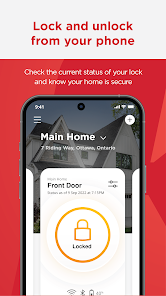
Remote Access Control
Monitor the status of your locks and manage your home's access seamlessly from anywhere at any time.
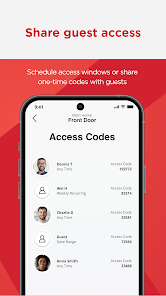
Trusted Access Management
Share app access with guests or create scheduled or one-time access codes for keyless entry.
Instant Activity Alerts
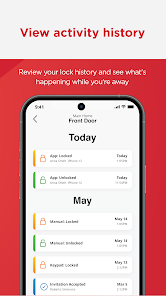
Receive instant notifications anytime someone accesses your home, or when invalid codes are entered, or lock tampering occurs.
Intuitive Home Management
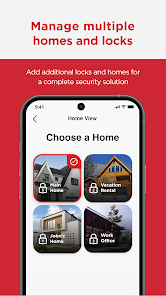
Easily configure and manage multiple homes and locks for complete control.
Seamless Integration with Smart Ecosystems
Add your lock to your preferred smart home ecosystems, including Google Home or Amazon Alexa, or amplify automation through IFTTT.
Security and Peace of Mind
Kwikset provides unparalleled security, safeguarding your privacy by never transmitting access codes across our servers. All data shared between the lock, the server and the Kwikset app are highly encrypted, and our servers are exclusively hosted in the US. Our goal is to provide you with the utmost convenience and safety for your smart living experience.
The Kwikset App is compatible with all Kwikset Halo and Kwikset Aura smart locks.
Remote Access Control
Monitor the status of your locks and manage your home's access seamlessly from anywhere at any time.
Trusted Access Management
Share app access with guests or create scheduled or one-time access codes for keyless entry.
Instant Activity Alerts
Receive instant notifications anytime someone accesses your home, or when invalid codes are entered, or lock tampering occurs.
Intuitive Home Management
Easily configure and manage multiple homes and locks for complete control.
Seamless Integration with Smart Ecosystems
Add your lock to your preferred smart home ecosystems, including Google Home or Amazon Alexa, or amplify automation through IFTTT.
Security and Peace of Mind
Kwikset provides unparalleled security, safeguarding your privacy by never transmitting access codes across our servers. All data shared between the lock, the server and the Kwikset app are highly encrypted, and our servers are exclusively hosted in the US. Our goal is to provide you with the utmost convenience and safety for your smart living experience.
The Kwikset App is compatible with all Kwikset Halo and Kwikset Aura smart locks.
Updated on
Safety starts with understanding how developers collect and share your data. Data privacy and security practices may vary based on your use, region, and age. The developer provided this information and may update it over time.

No data shared with third parties
Learn more about how developers declare sharing

This app may collect these data types
Location, Personal info and 2 others

Data is encrypted in transit

You can request that data be deleted
Ratings and reviews
2.5
1.89K reviews

Bruce Krymow
- Flag inappropriate
July 20, 2024
App is not well developed... no options to control notifications, so you get 100+ bothersome notifications a day every time a door is locked/unlocked when opened/closed. The only option is to shut off all notifications using the android app on their phone, which defeats the purpose of getting low battery or security notifications that you do want. And in the case with my new Samsung S24+, turning the notifications off doesn't work...they still keep coming non-stop!
Spectrum Brands
July 23, 2024
Hello Bruce,
The app history will display all lock usage and the app will also show the battery percentage. If you are still receiving the notifications after attempting to disable them, we're happy to help you resolve this. Our Support Team is available to assist you here: https://www.kwikset.com/support/customer-service
Thank you,
Kwikset

Michael Frybarger
- Flag inappropriate
- Show review history
May 29, 2024
60% of the time, it works every time! I can add/update user codes for my airbnb guests once in a while like it's supposed to. Recently, the app has decided not to let me add or change my guests' access. I've tried restarting my phone, uninstalling and reinstalling the app, and deleting cache and data. If you're looking for a solution for airbnb access, I'd say this is not it. Edit: I already re-paired the phone via Bluetooth. Even while connected via Bluetooth it will not let me add/change codes
2 people found this review helpful
Spectrum Brands
May 29, 2024
Hello Michael,
We recommend performing a factory reset on the lock, clearing the phone's cache, and then repairing the lock back to the app. Should you need any additional support, our team is happy to assist you here:
https://www.kwikset.com/support/customer-service
Thank you,
Kwikset

Brian Sears
- Flag inappropriate
- Show review history
May 21, 2024
Set up was easy and straightforward and everything worked. No idea how long this will go for but initial experience has been good. The UI is pretty intuitive so far. Update: Spoke too soon. I opened the app a day later after setup and "my home" was gone. Trying to log out failed a few times but then eventually worked after clicking around. Logging back in seemed to fix the problem as my luck reappeared.
4 people found this review helpful
Spectrum Brands
May 21, 2024
Hello Brian,
To ensure the Home and Lock are synched, please try resynching your phone to the lock by removing and reinserting the batteries. Next, clear the phone's cache and data. Go back to the app and repair the lock. In addition, please ensure you are only logged into the phone that was initially paired to the lock.
Thank you,
Kwikset
What's new
Improved Lock Access Management, so now you can limit access to specific locks within a home when adding new Home Users.
Design improvements, performance enhancements, and bug fixes to improve overall app reliability
Design improvements, performance enhancements, and bug fixes to improve overall app reliability