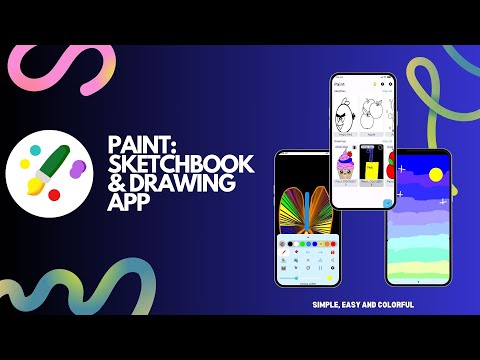

Paint - Sketchbook & Drawing
Contains ads

star
777 reviews

Everyone
info
100K+
Downloads


About this app
Welcome to Paint: Sketchbook & Drawing, the ultimate digital canvas designed for artists, hobbyists, and anyone who loves to create art. You no longer need physical paper, heavy sketchbooks, or expensive desktop software to express yourself. Bring your imagination to life anytime, anywhere, with powerful layer support, an interactive adult coloring book, and completely customizable paint brush tools. Whether you want to sketch a quick idea or draw a detailed masterpiece, our drawing pad provides the perfect workspace.
🎨 WHY CHOOSE OUR DIGITAL CANVAS & DRAWING PAD?
Our sketch pad provides an intuitive full-screen drawing experience without messy toolbars blocking your sight. Tap into a clean art studio where you can focus entirely on your brush stroke styles, vector shapes, and color blending. It’s the perfect pocket sketchbook for digital painting, quick sketching, and relaxing coloring sessions.
✨ EXPLORE ADVANCED PAINT & DRAW FEATURES ✨
🥞 PROFESSIONAL MULTI-LAYER DRAWING ENGINE
Take control of your digital art like a professional illustrator. Our advanced layering system allows you to divide complex drawings into distinct transparent sheets:
• Create dedicated layers for background traces, precise drawing outlines, color fills, and fine detailing.
• Smoothly adjust individual layer opacity from 0% to 100% to create realistic shading and paint depth.
• Easily add new layers, delete, rename, or drag and drop to reorder your sketch.
🖌️ COMPREHENSIVE BRUSH & SKETCH STYLING
Explore an expansive library of unique brush styles designed to mimic authentic physical art mediums:
• Standard Paint Styles: Normal Round Brush, Precision Pencil, Flat Square Brush, Sharp Marker, Pen, and Ink Brush.
• Creative Effects & Textures: Glowing Neon, Soft Blur, Smudge Tool, Rich Paint Roller, Airbrush, Oil Paint Brush, and Crayon.
• Precise Customization: Slide the real-time width and opacity bars to adjust your drawing tools down to the exact pixel thickness.
• Vector Pathing: Easily toggle between Solid Lines, Dash Paths, or Solid Fill drawing styles.
🔷 SMART VECTOR SHAPES LIBRARY
Achieve geometric perfection on your sketchpad using built-in vector assets. Quickly drop, manipulate, and colorize structured objects:
• Instantly insert precise Lines, Rectangles, Heart, etc
• Use active transform bounding handles to drag, drop, resize, scale, or rotate your vector shapes instantly.
🖼️ DYNAMIC REFERENCE TRACING & PHOTO BACKGROUNDS
Want to practice your drawing techniques or replicate a real-world photo?
• Import any reference image directly from your photo gallery onto your paint canvas.
• Control reference photo transparency to use it as a faint background blueprint for quick tracing and sketching.
🖍️ HD COLORING BOOK FOR RELAXATION
Get access to a high-definition coloring book storefront loaded with beautiful outline sketches:
• Enjoy a relaxing coloring book experience with cloud-synchronized categories including Animals, Birds, Vehicles, Mandalas, Cartoons, and Fruits.
💾 RELIABLE UNDO ENGINE & GALLERY SECURE LOCAL DB
• Never lose a sketch thanks to an unlimited, high-fidelity command replay Undo and Redo system.
• Your drawing masterpieces save automatically into a local project database, generating a neat sketchbook gallery organized by date.
• Export your finished digital art and paint projects in universal high-quality JPEG format.
🌐 GLOBAL LANGUAGE SUPPORT
We believe art should be accessible to everyone. Our paint and draw application is fully localized in English, Spanish, French, Gujarati, Hindi, Indonesian, Italian, German, Polish, Russian, Portuguese, Hebrew, and Ukrainian.
Download Paint: Sketchbook & Drawing today! Draw your imagination, fill your sketch with vibrant color, paint your masterpiece, and share your art with the world.
✉️ USER SUPPORT & FEEDBACK
We are constantly improving based on developer updates and user reviews. For support or queries, contact us at: kaushalvasava.app.feedback@gmail.com
🎨 WHY CHOOSE OUR DIGITAL CANVAS & DRAWING PAD?
Our sketch pad provides an intuitive full-screen drawing experience without messy toolbars blocking your sight. Tap into a clean art studio where you can focus entirely on your brush stroke styles, vector shapes, and color blending. It’s the perfect pocket sketchbook for digital painting, quick sketching, and relaxing coloring sessions.
✨ EXPLORE ADVANCED PAINT & DRAW FEATURES ✨
🥞 PROFESSIONAL MULTI-LAYER DRAWING ENGINE
Take control of your digital art like a professional illustrator. Our advanced layering system allows you to divide complex drawings into distinct transparent sheets:
• Create dedicated layers for background traces, precise drawing outlines, color fills, and fine detailing.
• Smoothly adjust individual layer opacity from 0% to 100% to create realistic shading and paint depth.
• Easily add new layers, delete, rename, or drag and drop to reorder your sketch.
🖌️ COMPREHENSIVE BRUSH & SKETCH STYLING
Explore an expansive library of unique brush styles designed to mimic authentic physical art mediums:
• Standard Paint Styles: Normal Round Brush, Precision Pencil, Flat Square Brush, Sharp Marker, Pen, and Ink Brush.
• Creative Effects & Textures: Glowing Neon, Soft Blur, Smudge Tool, Rich Paint Roller, Airbrush, Oil Paint Brush, and Crayon.
• Precise Customization: Slide the real-time width and opacity bars to adjust your drawing tools down to the exact pixel thickness.
• Vector Pathing: Easily toggle between Solid Lines, Dash Paths, or Solid Fill drawing styles.
🔷 SMART VECTOR SHAPES LIBRARY
Achieve geometric perfection on your sketchpad using built-in vector assets. Quickly drop, manipulate, and colorize structured objects:
• Instantly insert precise Lines, Rectangles, Heart, etc
• Use active transform bounding handles to drag, drop, resize, scale, or rotate your vector shapes instantly.
🖼️ DYNAMIC REFERENCE TRACING & PHOTO BACKGROUNDS
Want to practice your drawing techniques or replicate a real-world photo?
• Import any reference image directly from your photo gallery onto your paint canvas.
• Control reference photo transparency to use it as a faint background blueprint for quick tracing and sketching.
🖍️ HD COLORING BOOK FOR RELAXATION
Get access to a high-definition coloring book storefront loaded with beautiful outline sketches:
• Enjoy a relaxing coloring book experience with cloud-synchronized categories including Animals, Birds, Vehicles, Mandalas, Cartoons, and Fruits.
💾 RELIABLE UNDO ENGINE & GALLERY SECURE LOCAL DB
• Never lose a sketch thanks to an unlimited, high-fidelity command replay Undo and Redo system.
• Your drawing masterpieces save automatically into a local project database, generating a neat sketchbook gallery organized by date.
• Export your finished digital art and paint projects in universal high-quality JPEG format.
🌐 GLOBAL LANGUAGE SUPPORT
We believe art should be accessible to everyone. Our paint and draw application is fully localized in English, Spanish, French, Gujarati, Hindi, Indonesian, Italian, German, Polish, Russian, Portuguese, Hebrew, and Ukrainian.
Download Paint: Sketchbook & Drawing today! Draw your imagination, fill your sketch with vibrant color, paint your masterpiece, and share your art with the world.
✉️ USER SUPPORT & FEEDBACK
We are constantly improving based on developer updates and user reviews. For support or queries, contact us at: kaushalvasava.app.feedback@gmail.com
Draw, sketch & paint on a digital canvas! Easy drawing pad & coloring book.
Updated on
Safety starts with understanding how developers collect and share your data. Data privacy and security practices may vary based on your use, region, and age. The developer provided this information and may update it over time.
- No data shared with third partiesLearn more about how developers declare sharing
- This app may collect these data typesPersonal info and App info and performance
- Data isn’t encrypted


Ratings and reviews
658 reviews

Eddy Gomez
- Flag inappropriate
December 2, 2023
This is a very good way to learn how to sketch and draw your ideas and have them saved in any files you want to have them printed out later. it's easy to practice and learn how to use certain tools and techniques to help you out and fix your drawing idea. I recommend it.
24 people found this review helpful
Kaushal Vasava
December 2, 2023
Thank you for your valuable words ❤️. We will keep working on it! Please check out my other apps.

Matthew Hatfield
- Flag inappropriate
February 6, 2024
Not all that easy to use. Hard to navigate. Hard to work with fine detail. For basically will sketches yeah. But if you hope to put any detail in the sketches or move around the picture with ease, forget it
7 people found this review helpful
Kaushal Vasava
February 6, 2024
Dear User, really appreciate your suggestion. We will consider it and improve our app in the new version. If you have questions or suggestions please contact us at kaushalvasava.app.feedback@gmail.com.

Kimberly Nichols
- Flag inappropriate
December 24, 2023
Simple, user-friendly app that allows me to quickly sketch up ideas for garment designs. I'm not an artist by any stretch, so I needed something that would easily allow me to get my design ideas out of my head.
26 people found this review helpful
Kaushal Vasava
December 24, 2023
Thank you ❤️, Check my other apps, I hope that helps you.
What’s new
✨ Big Update: Pro Features Added! ✨
- Added an advanced multi-layer system to split your artwork
- New opacity slider for precise blending and brush transparency
- Expanded artistic brush collection with multiple textures
- Fully optimized with native support for Android 16
- Under-the-hood bug fixes and canvas performance improvements
- Added an advanced multi-layer system to split your artwork
- New opacity slider for precise blending and brush transparency
- Expanded artistic brush collection with multiple textures
- Fully optimized with native support for Android 16
- Under-the-hood bug fixes and canvas performance improvements
App support
About the developer
Vasava Kaushalkumar
kaushalvasava.app.feedback@gmail.com
India


