
ChristPath - Scroll The Bible
In-app purchases

star
123 reviews

Everyone
info
1K+
Downloads

Everyone
Learn more


About this app
Scroll the Bible. One verse at a time.
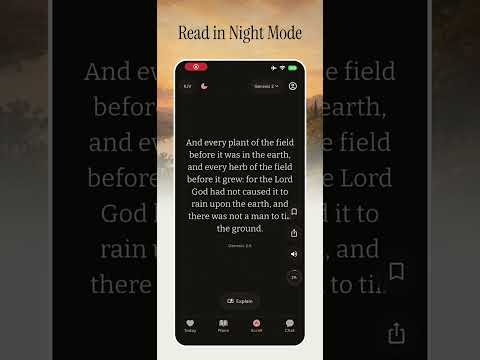
ChristPath is a modern Bible app designed for the way you already use your phone. Swipe through Scripture one verse at a time, discover new passages, build a daily habit, and spend more time in God's Word.
Instead of scrolling through endless content, use that same simple gesture to explore the Bible. Take your time with each verse, save the ones that speak to you, share Scripture with others, and come back each day to continue your journey.
WHY CHRISTPATH
Bible reading doesn't have to feel overwhelming. ChristPath makes Scripture simple to explore and easy to return to every day.
Whether you're starting your faith journey, trying to become more consistent with Bible reading, or looking for a fresh way to spend time in Scripture, ChristPath helps you build a rhythm that fits your life.
WHAT YOU'LL FIND
• Scroll — Swipe through Scripture one verse at a time. Like, save, and share verses as you read.
• Reading Plans — Follow guided Bible reading plans and stay on track with a clear daily reading goal.
• Custom Plans — Create your own reading plan based on the books, chapters, or passages you want to explore.
• Streaks & Widgets — Keep your reading progress and daily streak visible with widgets, making it easier to stay consistent and keep God's Word part of your routine.
• Today — See your progress, continue where you left off, and keep track of your journey through Scripture.
• Ask — Ask questions about faith, prayer, forgiveness, hope, anxiety, and other topics, with answers grounded in Scripture.
• Explain — Explore any verse through Summary, Context, Meaning, and Reflection to better understand what you're reading.
• Listen — Listen to Scripture wherever you are, whether you're walking, commuting, or simply taking a quiet moment.
• Save & Share — Save meaningful verses and create beautiful Scripture cards to share with friends and family.
• Streaks & Crowns — Build a daily reading habit and progress through milestones as you continue showing up.
• Reminders — Set morning, midday, or evening reminders to help make Bible reading part of your day.
• Offline Bible — Download supported Bible translations and continue reading without an internet connection.
HOW IT WORKS
Open ChristPath and start scrolling through Scripture. Read at your own pace, explore verses that catch your attention, and use Explain or Ask when you want to go deeper.
Follow a reading plan, create your own, or simply scroll through the Bible whenever you have a moment.
Your progress builds over time — one verse, one day, and one step at a time.
FOR YOUR DAILY WALK
ChristPath is for anyone who wants to spend more time in Scripture without making Bible reading feel complicated.
Start with a few verses or follow a complete reading plan. Build consistency, develop a daily habit, and make more time for God's Word.
If you're already going to scroll, scroll toward something that matters.
Scroll the Bible. One verse at a time.
PLEASE NOTE: SOME FEATURES MAY REQUIRE A SUBSCRIPTION. PLEASE READ OUR TERMS OF SERVICE BELOW:
https://joinchristpath.xyz/terms
https://joinchristpath.xyz/privacy
ChristPath is a modern Bible app designed for the way you already use your phone. Swipe through Scripture one verse at a time, discover new passages, build a daily habit, and spend more time in God's Word.
Instead of scrolling through endless content, use that same simple gesture to explore the Bible. Take your time with each verse, save the ones that speak to you, share Scripture with others, and come back each day to continue your journey.
WHY CHRISTPATH
Bible reading doesn't have to feel overwhelming. ChristPath makes Scripture simple to explore and easy to return to every day.
Whether you're starting your faith journey, trying to become more consistent with Bible reading, or looking for a fresh way to spend time in Scripture, ChristPath helps you build a rhythm that fits your life.
WHAT YOU'LL FIND
• Scroll — Swipe through Scripture one verse at a time. Like, save, and share verses as you read.
• Reading Plans — Follow guided Bible reading plans and stay on track with a clear daily reading goal.
• Custom Plans — Create your own reading plan based on the books, chapters, or passages you want to explore.
• Streaks & Widgets — Keep your reading progress and daily streak visible with widgets, making it easier to stay consistent and keep God's Word part of your routine.
• Today — See your progress, continue where you left off, and keep track of your journey through Scripture.
• Ask — Ask questions about faith, prayer, forgiveness, hope, anxiety, and other topics, with answers grounded in Scripture.
• Explain — Explore any verse through Summary, Context, Meaning, and Reflection to better understand what you're reading.
• Listen — Listen to Scripture wherever you are, whether you're walking, commuting, or simply taking a quiet moment.
• Save & Share — Save meaningful verses and create beautiful Scripture cards to share with friends and family.
• Streaks & Crowns — Build a daily reading habit and progress through milestones as you continue showing up.
• Reminders — Set morning, midday, or evening reminders to help make Bible reading part of your day.
• Offline Bible — Download supported Bible translations and continue reading without an internet connection.
HOW IT WORKS
Open ChristPath and start scrolling through Scripture. Read at your own pace, explore verses that catch your attention, and use Explain or Ask when you want to go deeper.
Follow a reading plan, create your own, or simply scroll through the Bible whenever you have a moment.
Your progress builds over time — one verse, one day, and one step at a time.
FOR YOUR DAILY WALK
ChristPath is for anyone who wants to spend more time in Scripture without making Bible reading feel complicated.
Start with a few verses or follow a complete reading plan. Build consistency, develop a daily habit, and make more time for God's Word.
If you're already going to scroll, scroll toward something that matters.
Scroll the Bible. One verse at a time.
PLEASE NOTE: SOME FEATURES MAY REQUIRE A SUBSCRIPTION. PLEASE READ OUR TERMS OF SERVICE BELOW:
https://joinchristpath.xyz/terms
https://joinchristpath.xyz/privacy
Keep your reading focused instead of losing time in endless feeds.
Updated on
Safety starts with understanding how developers collect and share your data. Data privacy and security practices may vary based on your use, region, and age. The developer provided this information and may update it over time.
- This app may share these data types with third partiesPersonal info, App info and performance, and Device or other IDs
- No data collectedLearn more about how developers declare collection
- Data is encrypted in transit
- You can request that data be deleted


Ratings and reviews
119 reviews

Blume Garcia
- Flag inappropriate
October 19, 2026
Make sure to get this app!! It has really helped me to stay off social media im a teen and I just want to swipe and swipe and this app has really helped me with that!! customer support is amazing if you have any issues!! This a perfect app for teen and really anyone that has a problem with being on social media to much!! Its amazing!!!
2 people found this review helpful

Ask Alex
- Flag inappropriate
September 27, 2026
love the app it's I was going to rate it like at 555 but it's not what I was expecting I was expecting like like I was expecting a scores of like YouTubers like tell about scriptures scrolling something that you know but this is also better but yeah beautiful choice and yeah I think this is one of my favourite so far
Lantiex (PTY) LTD
September 28, 2026
Thank you for your feedback and for rating our app. If you have additional thoughts, we would welcome them again; please send them to support@joinchristpath.xyz.

A Google user
- Flag inappropriate
July 27, 2026
I really had faith and hope in this app and it showed me that I should have faith in god
5 people found this review helpful
Lantiex (PTY) LTD
September 28, 2026
Thank you for downloading our app! We will keep working on it!
What’s new
We’re a Christian team committed to giving you the best. For feedback, please contact our email support at support@joinchristpath.xyz. We also appreciate your review. Thank you so much.
- Bug fixes.
- Functionality improvements.
- Bug fixes.
- Functionality improvements.
Everyone
Learn moreApp support
About the developer
Lantiex (PTY) LTD
hello@lantiex.com
10778 SANDBUR ST
CENTURION
0187
South Africa
+27 84 638 6113