
Live Rocket Tracker


Everyone
info
1+
Downloads

Everyone
Learn more


About this app
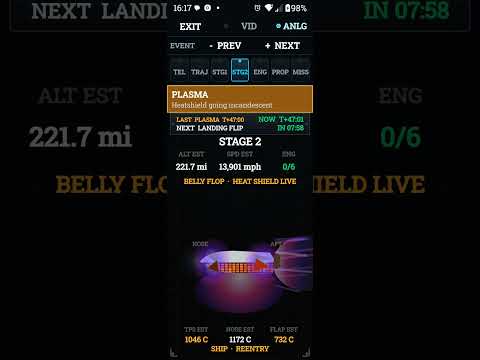
Set Live Rocket Tracker as your live wallpaper, and a second home screen page turns into a mission-control HUD. Choose that page number in Settings. Android only lets a live wallpaper live on one page, so keep your icons on page 1 and put the console on page 2.
Watch a launch without opening anything. Countdown, vehicle, pad, analog or digital gauges, stage stacks, engine lights, the ground track, and the event tape sit right on the wallpaper. Skip through historic launches with + and -. Flip to digital when you want the big map.
Tap in for the full command center: telemetry, trajectory, engines, propellant, and two webcast panes. Sign in once inside a pane, or jump to the real YouTube app if you already have Premium.
Numbers you see are labeled EST. We do not pretend we have a secret live downlink. If a rocket is not in the catalog, you get an honest “data update required,” not a made-up drawing.
Built around Starship and Falcon. The same HUD also covers published vehicles from all countries, with real public facts in one catalog. Built for a phone first.
If you want your phone to feel like a console on launch day, this is it.
Watch a launch without opening anything. Countdown, vehicle, pad, analog or digital gauges, stage stacks, engine lights, the ground track, and the event tape sit right on the wallpaper. Skip through historic launches with + and -. Flip to digital when you want the big map.
Tap in for the full command center: telemetry, trajectory, engines, propellant, and two webcast panes. Sign in once inside a pane, or jump to the real YouTube app if you already have Premium.
Numbers you see are labeled EST. We do not pretend we have a secret live downlink. If a rocket is not in the catalog, you get an honest “data update required,” not a made-up drawing.
Built around Starship and Falcon. The same HUD also covers published vehicles from all countries, with real public facts in one catalog. Built for a phone first.
If you want your phone to feel like a console on launch day, this is it.
Command Center HUD on a second home screen page. Rockets from every country.
Updated on
Safety starts with understanding how developers collect and share your data. Data privacy and security practices may vary based on your use, region, and age. The developer provided this information and may update it over time.
- No data shared with third partiesLearn more about how developers declare sharing
- No data collectedLearn more about how developers declare collection


What’s new
Fixed the broken event tape and added improvements. Added languages for specific countries to all buttons and events. Added 2 more countries to our art pass. Fixed Falcon Heavy art. Fixed Historic not becoming Historic after launch was completed. Added another Disclaimer.
Everyone
Learn moreApp support
phone
Phone number
+16825575930
About the developer
Christopher OLSEN
skiiwa67@gmail.com
6025 Tallie Rd
Fort Worth, TX 76112-7933
United States