
Music Widget Android
In-app purchases

star
1.06K reviews

Everyone
info
100K+
Downloads

Everyone
Learn more


About this app
Beautifully designed music widgets for your home screen, support your favorite music player and control the playing status or open the app.
The ultimate tool to keep up with your favorite music on your mobile device. This nifty widget integrates perfectly on your phone's home screen and displays information about the music you're playing, without even having to open the music app!
Outstanding Features:
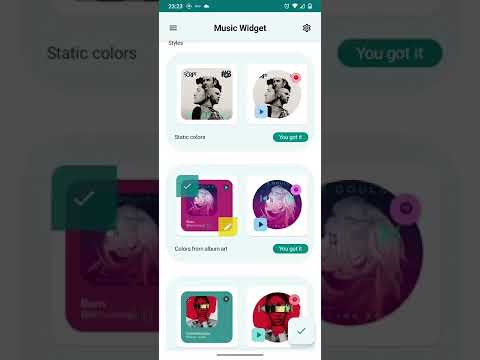
🎵 Real-Time Information: With Music Widget, you'll have instant access to key details of the song you're enjoying, such as song name, artist, album and album art, all in a beautiful and attractive widget design .
🔊 Quick Control: Change tracks, adjust the volume or pause the music right from the widget without having to open the music app, allowing you to keep the flow of your day without interruptions.
🌟 Personalization : Allows you to customize the look of your widget to suit your personal style. Choose from a variety of themes and widget styles to make it look perfect on your home screen.
🚀 Optimized for Efficiency: It is light and does not affect the performance of your device. Enjoy your favorite music without worrying about battery life or resource usage.
With Music Widget, your music has never been so close and easy to control. Download the app now and bring your home screen to life with information about the music you love.
🚫 𝗛𝗜𝗗𝗗𝗘𝗡 𝗠𝗘𝗗𝗜𝗔 𝗖𝗢𝗡𝗧𝗥𝗢𝗟𝗦 🚫
👉 In the square widgets you can control the music by pressing left, center and right on the title
👉 In circle widgets you can control music pressing the top left and top right side in the cover
🚫 𝗜𝗠𝗣𝗢𝗥𝗧𝗔𝗡𝗧 𝗙𝗢𝗥 𝗣𝗛𝗢𝗡𝗘𝗦 𝗪𝗜𝗧𝗛 𝗔𝗡𝗗𝗥𝗢𝗜𝗗 𝟭𝟮 🚫
👉 On some phones with Android 12, Material Your colors is not fully implemented. In this case the colors no match with your current wallpaper. To solve this case you have the option "Force Material You colors", enable it to mimic the colors. 👈
Widget Designs:
⚡ Android 12 style
⚡ Material You Colors style
⚡ IOS Style
⚡ Blurred album art style
Widget Features
✅ Circular widget with Material You dynamic colors
✅ Automatically choose current player, but you can set a default player
✅ Resizeable
✅ Uses colors determined from the album art
𝗦𝘂𝗽𝗽𝗼𝗿𝘁𝗲𝗱 𝗺𝘂𝘀𝗶𝗰 𝘀𝘁𝗿𝗲𝗮𝗺𝗶𝗻𝗴 𝗽𝗹𝗮𝘆𝗲𝗿𝘀:
👍 👍 Now Music Widget support almost anything music player! 👍👍
👍 Spotify: Music and Podcasts
👍 YouTube Music
👍 Amazon Music
👍Apple Music
👍 Deezer
👍 Tidal
👍 Spotify Lite
👍 Musixmatch
👍 Pandora - Music & Podcasts
👍 SoundCloud: Play Music & Songs
👍 Gaana Hindi Song Music App
👍 JioSaavn - Music & Podcasts
👍 Hungama Music - Stream
Other music players supported:
👍 Samsung
👍 Mi Music (Xiaomi player)
👍 Sony
👍 Oppo
👍 Huawei Music
👍 Google Podcasts
👍 Lg
👍 iHeart Radio
👍 BlackPlayer
👍 Poweramp
👍 Musicolet
👍 Muzio
👍 Vmons
👍 Retro Music
👍 Audify
👍 Pulsar
👍 Pi Music
👍 Phonograph
👍 Eon
👍 Oto Music
👍 eSound
👍 Tune In
👍 Yandex
👍 Vivo I Music
👍 Nugs Net
👍 Nightwave Plaza
👍 Neutron Player
👍 Resso Music
👍 Sirin Audiobook
👍 Stellio
👍 Plexamp
👍 Audiomack
👍 Aimp
👍 Bandcamp
👍 DI:FM
👍 iBroadcast
👍 Nyx Music
👍 BlackPlayer
👍 HiBy Music
✌ Privacy matters!
This app does not collect data of any kind. No usage statistics, no user tracking, no ad profiles.
The ultimate tool to keep up with your favorite music on your mobile device. This nifty widget integrates perfectly on your phone's home screen and displays information about the music you're playing, without even having to open the music app!
Outstanding Features:
🎵 Real-Time Information: With Music Widget, you'll have instant access to key details of the song you're enjoying, such as song name, artist, album and album art, all in a beautiful and attractive widget design .
🔊 Quick Control: Change tracks, adjust the volume or pause the music right from the widget without having to open the music app, allowing you to keep the flow of your day without interruptions.
🌟 Personalization : Allows you to customize the look of your widget to suit your personal style. Choose from a variety of themes and widget styles to make it look perfect on your home screen.
🚀 Optimized for Efficiency: It is light and does not affect the performance of your device. Enjoy your favorite music without worrying about battery life or resource usage.
With Music Widget, your music has never been so close and easy to control. Download the app now and bring your home screen to life with information about the music you love.
🚫 𝗛𝗜𝗗𝗗𝗘𝗡 𝗠𝗘𝗗𝗜𝗔 𝗖𝗢𝗡𝗧𝗥𝗢𝗟𝗦 🚫
👉 In the square widgets you can control the music by pressing left, center and right on the title
👉 In circle widgets you can control music pressing the top left and top right side in the cover
🚫 𝗜𝗠𝗣𝗢𝗥𝗧𝗔𝗡𝗧 𝗙𝗢𝗥 𝗣𝗛𝗢𝗡𝗘𝗦 𝗪𝗜𝗧𝗛 𝗔𝗡𝗗𝗥𝗢𝗜𝗗 𝟭𝟮 🚫
👉 On some phones with Android 12, Material Your colors is not fully implemented. In this case the colors no match with your current wallpaper. To solve this case you have the option "Force Material You colors", enable it to mimic the colors. 👈
Widget Designs:
⚡ Android 12 style
⚡ Material You Colors style
⚡ IOS Style
⚡ Blurred album art style
Widget Features
✅ Circular widget with Material You dynamic colors
✅ Automatically choose current player, but you can set a default player
✅ Resizeable
✅ Uses colors determined from the album art
𝗦𝘂𝗽𝗽𝗼𝗿𝘁𝗲𝗱 𝗺𝘂𝘀𝗶𝗰 𝘀𝘁𝗿𝗲𝗮𝗺𝗶𝗻𝗴 𝗽𝗹𝗮𝘆𝗲𝗿𝘀:
👍 👍 Now Music Widget support almost anything music player! 👍👍
👍 Spotify: Music and Podcasts
👍 YouTube Music
👍 Amazon Music
👍Apple Music
👍 Deezer
👍 Tidal
👍 Spotify Lite
👍 Musixmatch
👍 Pandora - Music & Podcasts
👍 SoundCloud: Play Music & Songs
👍 Gaana Hindi Song Music App
👍 JioSaavn - Music & Podcasts
👍 Hungama Music - Stream
Other music players supported:
👍 Samsung
👍 Mi Music (Xiaomi player)
👍 Sony
👍 Oppo
👍 Huawei Music
👍 Google Podcasts
👍 Lg
👍 iHeart Radio
👍 BlackPlayer
👍 Poweramp
👍 Musicolet
👍 Muzio
👍 Vmons
👍 Retro Music
👍 Audify
👍 Pulsar
👍 Pi Music
👍 Phonograph
👍 Eon
👍 Oto Music
👍 eSound
👍 Tune In
👍 Yandex
👍 Vivo I Music
👍 Nugs Net
👍 Nightwave Plaza
👍 Neutron Player
👍 Resso Music
👍 Sirin Audiobook
👍 Stellio
👍 Plexamp
👍 Audiomack
👍 Aimp
👍 Bandcamp
👍 DI:FM
👍 iBroadcast
👍 Nyx Music
👍 BlackPlayer
👍 HiBy Music
✌ Privacy matters!
This app does not collect data of any kind. No usage statistics, no user tracking, no ad profiles.
Beautiful music widgets to control most popular music players.
Updated on
Featured stories

Safety starts with understanding how developers collect and share your data. Data privacy and security practices may vary based on your use, region, and age. The developer provided this information and may update it over time.
- No data shared with third partiesLearn more about how developers declare sharing
- No data collectedLearn more about how developers declare collection
- Committed to follow the Play Families Policy


Ratings and reviews
1.04K reviews

internetdallyer73
- Flag inappropriate
April 14, 2023
Hi. This is one of only two widgets on the entire store that supports multiple audio sources AND looks amazing. However I have an issue. Although the designs look great, the album art isn't centered, and when pressing any buttons the colored accents that pop up are NOT centered. Also, on certain styles the album name clips into the buttons. Please fix these slight issues and this will be the best widget on the App Store.
18 people found this review helpful
Lst Apps
June 6, 2023
Hello. Thank you for reporting the issue.
We keep working to improve our app.

Pedro Soares
- Flag inappropriate
- Show review history
August 1, 2026
UPDATE: After the developer reply I just noticed this is now working. Fully recommended this widget pack. It's beautiful and works flawless. Just giving 2 stars but looking to increase to 5 as the app has great potential but unfortunately it's not picking up the album art colours. I purchased a set of widgets and still not working. If this is resolved I'll give 5 stats.
1 person found this review helpful
Lst Apps
August 1, 2026
Hello. We apologize for the inconvenience. This is a Spotify issue. We've already released an update to fix it, which will be available to everyone soon. Regards.

Henk van Setten
- Flag inappropriate
August 17, 2026
Just doesn't work. The widget keeps saying it needs notification access, even though in the app settings I did enable notifications for this app. Couldn't get it working.
Lst Apps
September 8, 2026
Hello, sorry for the inconvenience. Please write us to lst.developer.10@gmail.com so we can help you.
What’s new
Spotify cover art fix
Everyone
Learn moreApp support
About the developer
Luciano Nicolas Soto
lst.developer.10@gmail.com
Ruta 43
4608 Monterrico
Switzerland


