
M3UNex Player: IPTV & Xtream
Contains ads


Everyone
info
1K+
Downloads

Everyone
Learn more


About this app
📺 **M3UNex Player – Smart IPTV Player for M3U & Xtream**
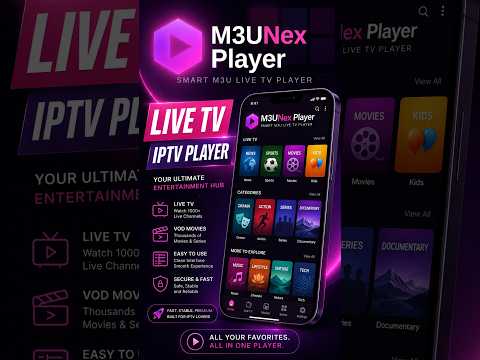
M3UNex Player is a fast, clean, and easy-to-use IPTV media player for your own **M3U, M3U8, and Xtream Codes playlists**.
Watch your own **Live TV channels, Movies, and Series** on Android phones, tablets, and Android TV devices.
M3UNex Player does not provide IPTV subscriptions, playlists, channels, or media content. Users must add their own legally obtained playlist or Xtream account.
🔥 **Key Features**
• **M3U & M3U8 Support**
Add your own playlist URLs and browse Live TV channels by groups and categories.
• **Xtream Codes Support**
Use your own Xtream account to access supported Live TV, Movies, and Series.
• **Live TV Playback**
Supports common IPTV streaming formats including HLS and MPEG-TS with built-in playback recovery.
• **Movies & Series**
Browse supported Xtream Movies and Series using dedicated poster-based catalogs.
• **Large Playlist Support**
Designed to efficiently handle large Live TV, Movie, and Series libraries.
• **Search & Categories**
Quickly find channels, Movies, and Series and browse available groups and categories.
• **Favorites**
Save favorite Live TV channels, Movies, and Series for quick access.
• **Continue Watching**
Resume supported Movies and Series from where you stopped.
• **Playback Controls**
Pause, resume and seek supported on-demand content, use fullscreen mode, and access available audio and subtitle tracks.
• **Picture-in-Picture**
Continue watching supported content in a floating window while using other apps.
• **Channel Health Checker**
Check playlist channels and identify streams that are currently reachable or unavailable.
• **New Channel Detection**
Detect newly added channels when supported playlists are refreshed.
• **Adult Content Control**
Adult content is hidden by default and can be enabled from Settings.
• **Classic & Compact Dashboard**
Choose between the full Classic Dashboard and a clean Compact two-column group layout.
• **Android TV Friendly**
Designed for convenient navigation across mobile devices and Android TV.
⚡ **Built for IPTV Playback**
M3UNex Player provides an organized way to browse and play your own Live TV, sports, news, entertainment, Movies, Series, and other legally accessible streams.
🛠️ **How to Add a Playlist**
1. Open M3UNex Player.
2. Tap the **Add (+)** option.
3. Choose M3U/M3U8 or Xtream Codes.
4. Enter your own playlist or account details.
5. Save and start browsing.
⚠️ **DISCLAIMER & LEGAL NOTICE**
• M3UNex Player does **not** provide, host, sell, or distribute IPTV subscriptions, playlists, channels, Movies, Series, or other media content.
• The app contains **no preloaded channels or copyrighted media**.
• Users must provide their own legally obtained M3U/M3U8 playlist or Xtream account.
• M3UNex Player is not affiliated with or endorsed by any third-party IPTV provider or subscription service.
• Users are responsible for ensuring they have the necessary rights and permissions to access and play content added to the app.
• M3UNex Player does not encourage or support unauthorized streaming or copyright infringement.
• M3UNex Player functions strictly as a media player and playlist-management application.
📩 **Support**
For support or feedback, please use the developer contact information available on the M3UNex Player Google Play listing.
M3UNex Player is a fast, clean, and easy-to-use IPTV media player for your own **M3U, M3U8, and Xtream Codes playlists**.
Watch your own **Live TV channels, Movies, and Series** on Android phones, tablets, and Android TV devices.
M3UNex Player does not provide IPTV subscriptions, playlists, channels, or media content. Users must add their own legally obtained playlist or Xtream account.
🔥 **Key Features**
• **M3U & M3U8 Support**
Add your own playlist URLs and browse Live TV channels by groups and categories.
• **Xtream Codes Support**
Use your own Xtream account to access supported Live TV, Movies, and Series.
• **Live TV Playback**
Supports common IPTV streaming formats including HLS and MPEG-TS with built-in playback recovery.
• **Movies & Series**
Browse supported Xtream Movies and Series using dedicated poster-based catalogs.
• **Large Playlist Support**
Designed to efficiently handle large Live TV, Movie, and Series libraries.
• **Search & Categories**
Quickly find channels, Movies, and Series and browse available groups and categories.
• **Favorites**
Save favorite Live TV channels, Movies, and Series for quick access.
• **Continue Watching**
Resume supported Movies and Series from where you stopped.
• **Playback Controls**
Pause, resume and seek supported on-demand content, use fullscreen mode, and access available audio and subtitle tracks.
• **Picture-in-Picture**
Continue watching supported content in a floating window while using other apps.
• **Channel Health Checker**
Check playlist channels and identify streams that are currently reachable or unavailable.
• **New Channel Detection**
Detect newly added channels when supported playlists are refreshed.
• **Adult Content Control**
Adult content is hidden by default and can be enabled from Settings.
• **Classic & Compact Dashboard**
Choose between the full Classic Dashboard and a clean Compact two-column group layout.
• **Android TV Friendly**
Designed for convenient navigation across mobile devices and Android TV.
⚡ **Built for IPTV Playback**
M3UNex Player provides an organized way to browse and play your own Live TV, sports, news, entertainment, Movies, Series, and other legally accessible streams.
🛠️ **How to Add a Playlist**
1. Open M3UNex Player.
2. Tap the **Add (+)** option.
3. Choose M3U/M3U8 or Xtream Codes.
4. Enter your own playlist or account details.
5. Save and start browsing.
⚠️ **DISCLAIMER & LEGAL NOTICE**
• M3UNex Player does **not** provide, host, sell, or distribute IPTV subscriptions, playlists, channels, Movies, Series, or other media content.
• The app contains **no preloaded channels or copyrighted media**.
• Users must provide their own legally obtained M3U/M3U8 playlist or Xtream account.
• M3UNex Player is not affiliated with or endorsed by any third-party IPTV provider or subscription service.
• Users are responsible for ensuring they have the necessary rights and permissions to access and play content added to the app.
• M3UNex Player does not encourage or support unauthorized streaming or copyright infringement.
• M3UNex Player functions strictly as a media player and playlist-management application.
📩 **Support**
For support or feedback, please use the developer contact information available on the M3UNex Player Google Play listing.
Play your own Live TV, sports, movies & series with M3U, M3U8 & Xtream.
Updated on
Safety starts with understanding how developers collect and share your data. Data privacy and security practices may vary based on your use, region, and age. The developer provided this information and may update it over time.


What’s new
**What’s New**
* Improved dashboard and group navigation
* Better player and playlist experience
* Improved ads, stability, and performance
* Improved dashboard and group navigation
* Better player and playlist experience
* Improved ads, stability, and performance


