

Business Card Scanner for Goog
Contains adsIn-app purchases

3.1star
21 reviews
1K+
Downloads

Everyone
info


About this app
Business Card Reader for Google Sheets is the easiest, quickest and safest solution to convey your business cards info to Google Sheets.
Snap a photo of the business card and Google Sheets Card Scanner instantly import all card data directly into your Google Sheets. Moreover, this app helps you to find out more information about your potential client, partner, or colleague.
*this application was developed to work with Google Sheets is not developed by Google Sheets, and Google Sheets is a registered trademark
How it works
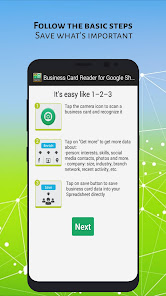
You can save a business card just in 2 clicks:
1. Snap a photo of a business card and the app recognizes it automatically
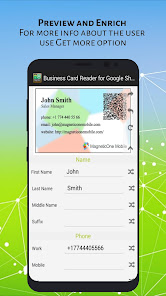
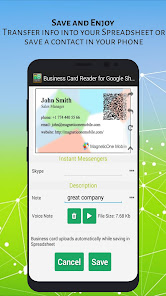
2. Preview and save results
Features
- Simple interface
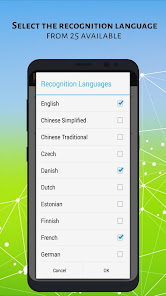
- 25 recognitions languages supported
- Multilingual cards recognition supported
- Built-in integration wizard exclusively for Google Sheets
- Preview results and make necessary changes before saving
- Ability to recognize business cards from recent card images
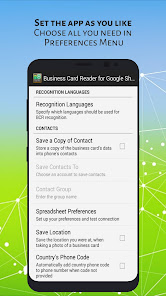
- Automatically add country phone code, if it’s missing in the business card phone number
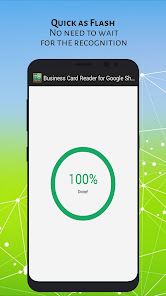
- Fast recognition process (improved recognition speed for UltraHD business cards' photos)
- Encrypted recognition server connection for maximum data security
- Precise conversion of business card data (using OCR)
- It always keeps your contacts secure and in one place
- Add text and voice notes for each business card
- It doesn't violate any laws or privacy rights
- Navigate to contact address on a map
Unique Features
- Get more extended person’s information on the fly from a database of daaata.io: Company name, Position, Job title, Address, Social network profiles, messengers, etc.*
- Send a letter with your contact information to a saved contact
- Save the location of a business card recognition process
Supported languages
- Chinese (Simplified and Traditional)
- Czech
- Danish
- Dutch (Netherlands)
- English
- Estonian
- Finnish
- French
- German
- Greek
- Indonesian
- Italian
- Japanese
- Korean
- Norwegian (both Bokmal and Nynorsk)
- Polish
- Portuguese (Portugal)
- Portuguese (Brazilian)
- Russian
- Spanish
- Swedish
- Turkish
- Ukrainian
Prising
It’s a FREE version with limited amount of business cards recognitions
Pay As You Go plans:
Personal
$14.99* – 100 business cards recognitions
$27.99* – 200 business cards recognitions
$59.99* – 500 business cards recognitions
$99.99* – 1000 business cards recognitions
Corporate (per year)
$99.99* – 1000 business cards recognitions
$199.99* – 2500 business cards recognitions
$299.99* – 5000 business cards recognitions
$399.99* – 8000 business cards recognitions
*plus taxes are collected in some countries
Get in touch
E-mail: contact@magneticonemobile.com
We are here to help you! If you have any questions or suggestions, feel free to contact us. We’re ready to be better for every our user!
Snap a photo of the business card and Google Sheets Card Scanner instantly import all card data directly into your Google Sheets. Moreover, this app helps you to find out more information about your potential client, partner, or colleague.
*this application was developed to work with Google Sheets is not developed by Google Sheets, and Google Sheets is a registered trademark
How it works
You can save a business card just in 2 clicks:
1. Snap a photo of a business card and the app recognizes it automatically
2. Preview and save results
Features
- Simple interface
- 25 recognitions languages supported
- Multilingual cards recognition supported
- Built-in integration wizard exclusively for Google Sheets
- Preview results and make necessary changes before saving
- Ability to recognize business cards from recent card images
- Automatically add country phone code, if it’s missing in the business card phone number
- Fast recognition process (improved recognition speed for UltraHD business cards' photos)
- Encrypted recognition server connection for maximum data security
- Precise conversion of business card data (using OCR)
- It always keeps your contacts secure and in one place
- Add text and voice notes for each business card
- It doesn't violate any laws or privacy rights
- Navigate to contact address on a map
Unique Features
- Get more extended person’s information on the fly from a database of daaata.io: Company name, Position, Job title, Address, Social network profiles, messengers, etc.*
- Send a letter with your contact information to a saved contact
- Save the location of a business card recognition process
Supported languages
- Chinese (Simplified and Traditional)
- Czech
- Danish
- Dutch (Netherlands)
- English
- Estonian
- Finnish
- French
- German
- Greek
- Indonesian
- Italian
- Japanese
- Korean
- Norwegian (both Bokmal and Nynorsk)
- Polish
- Portuguese (Portugal)
- Portuguese (Brazilian)
- Russian
- Spanish
- Swedish
- Turkish
- Ukrainian
Prising
It’s a FREE version with limited amount of business cards recognitions
Pay As You Go plans:
Personal
$14.99* – 100 business cards recognitions
$27.99* – 200 business cards recognitions
$59.99* – 500 business cards recognitions
$99.99* – 1000 business cards recognitions
Corporate (per year)
$99.99* – 1000 business cards recognitions
$199.99* – 2500 business cards recognitions
$299.99* – 5000 business cards recognitions
$399.99* – 8000 business cards recognitions
*plus taxes are collected in some countries
Get in touch
E-mail: contact@magneticonemobile.com
We are here to help you! If you have any questions or suggestions, feel free to contact us. We’re ready to be better for every our user!
Updated on
Safety starts with understanding how developers collect and share your data. Data privacy and security practices may vary based on your use, region, and age. The developer provided this information and may update it over time.

No data shared with third parties
Learn more about how developers declare sharing

No data collected
Learn more about how developers declare collection

Data is encrypted in transit

Data can’t be deleted
Ratings and reviews
2.5
19 reviews

A Google user
- Flag inappropriate
October 17, 2018
This is just a 10 scan trial. In addition it doesn't seem to accurately scan all business cards. International dialing code numbers aren't accurately translated into the app.
2 people found this review helpful
Mobile Works Ltd
October 22, 2018
Dear Jakob, thank you for your feedback. The number of free scans is clearly described in the description. Concerning your issue: we are sorry for the inconveniences you have faced with during the use of our application. Please send us a concrete list of what do you think has to be improved on our e-mail - support@magneticonemobile.com.
A Google user
- Flag inappropriate
January 1, 2020
How do you connect to google sheet ? How many scans are free is not mentioned prominently, there after the cost ?
2 people found this review helpful
Mobile Works Ltd
January 2, 2020
Hello, Venkat.
Just click the button "connect", after that you will have 10 free scans.
Also, you can try Business Card Reader for Multi CRM. That app supports Google Sheet and has a better UX.
A Google user
- Flag inappropriate
April 4, 2019
Just started using the app and it is saving me time ... which is an incredibly valuable resource
1 person found this review helpful
Mobile Works Ltd
April 4, 2019
Dear user, thank you for your positive comment and mark.


