
Floatee - Floating All In One
Contains adsIn-app purchases

star
12.3K reviews

Everyone
info
1M+
Downloads

Everyone
Learn more


About this app
Tired of switching between apps? Floatee is your all-in-one floating app that combines the best tools in one place — AI assistant, real-time screen translation, drawing tools, document scanner, auto clicker, and more — all overlaying any app without interrupting your workflow.
🤖 ASK AI — Multiple AI Models in One Tap
Crop anything on your screen — text or image — and send it instantly to ChatGPT, Google AI, or Gemini. Get answers in a floating window without opening a separate app. Fast, smart, automatic.
🌐 AUTO SCREEN TRANSLATE — Live Translation While You Scroll
Translate any on-screen text in real time as you scroll or switch screens. No screenshots, no copy-pasting. Perfect for foreign articles, manga, manhwa, social media, or any content in another language.
🎬 SUBTITLE TRANSLATOR — Watch Without Barriers
Watch movies and videos with real-time subtitle translation overlaid directly on your screen. No need to rely on built-in subtitles — Floatee handles it for you automatically.
🌍 FLOATING BROWSER — Search Anything, Instantly
Crop any text or image on your screen and send it straight to Google Search or Google Lens — all inside a floating browser without leaving your current app. One tap to search, one tap to discover.
🖱️ AUTO CLICKER
Automate taps, long presses, and swipes on your screen. Great for games, app testing, or any repetitive task.
✏️ DRAW ON SCREEN & COLOR PICKER
Annotate, highlight, or sketch directly on your screen. The built-in color picker instantly identifies any color on display — ideal for designers, developers, and content creators.
📸 DOCUMENT SCANNER
Turn photos or physical documents into clean JPG or PDF files using your camera. Scan, save, and share — right from the floating window.
📷 QR CODE SCANNER
Scan any QR code instantly without opening your camera app. Results appear in the floating window in seconds.
🎵 MUSIC SHORTCUT
Access your favorite songs from internal storage directly from the floating menu — no limits on shortcuts, no need to open a music player.
🪟 FLOATING APPS
Run any app in a floating window — browser, calculator, dictionary, translator, or any custom app of your choice. True multitasking, finally.
🕐 FLOATING CLOCK
Keep track of time without leaving your current app. The floating clock supports current time, countdown timer, and stopwatch — always visible on top of any screen.
🌙 ASSISTIVE TOUCH
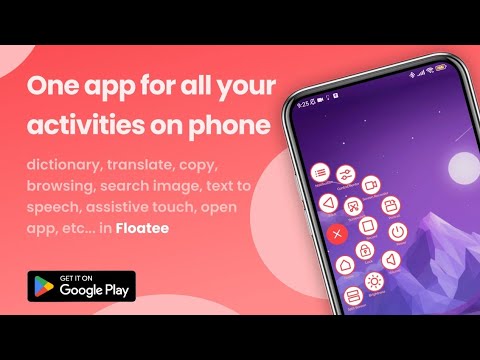
A virtual floating button for everything you need: back, home, recents, screenshot, screen record, split screen, brightness, volume, and more — all in one place.
📝 FLOATING NOTES
Jot down ideas, tasks, or anything important directly in a floating window — anytime, without opening a separate app. Create multiple notes at once, color-code them, and access everything instantly on top of any screen.
📚 QUICK DICTIONARY
Tap any word for instant definitions, examples, synonyms, and antonyms — without leaving your current app.
🔒 Privacy
Floatee uses the Accessibility Service API for assistive touch, auto clicker, and temporary screen captures needed for crop, translation, and AI features. All captures are processed locally and deleted immediately after use — never stored or shared. Your privacy is fully protected.
Download Floatee now and experience smarter multitasking!
#floatingapp #aiassistant #screentranslate #autoclicker #androidproductivity #floatee
🤖 ASK AI — Multiple AI Models in One Tap
Crop anything on your screen — text or image — and send it instantly to ChatGPT, Google AI, or Gemini. Get answers in a floating window without opening a separate app. Fast, smart, automatic.
🌐 AUTO SCREEN TRANSLATE — Live Translation While You Scroll
Translate any on-screen text in real time as you scroll or switch screens. No screenshots, no copy-pasting. Perfect for foreign articles, manga, manhwa, social media, or any content in another language.
🎬 SUBTITLE TRANSLATOR — Watch Without Barriers
Watch movies and videos with real-time subtitle translation overlaid directly on your screen. No need to rely on built-in subtitles — Floatee handles it for you automatically.
🌍 FLOATING BROWSER — Search Anything, Instantly
Crop any text or image on your screen and send it straight to Google Search or Google Lens — all inside a floating browser without leaving your current app. One tap to search, one tap to discover.
🖱️ AUTO CLICKER
Automate taps, long presses, and swipes on your screen. Great for games, app testing, or any repetitive task.
✏️ DRAW ON SCREEN & COLOR PICKER
Annotate, highlight, or sketch directly on your screen. The built-in color picker instantly identifies any color on display — ideal for designers, developers, and content creators.
📸 DOCUMENT SCANNER
Turn photos or physical documents into clean JPG or PDF files using your camera. Scan, save, and share — right from the floating window.
📷 QR CODE SCANNER
Scan any QR code instantly without opening your camera app. Results appear in the floating window in seconds.
🎵 MUSIC SHORTCUT
Access your favorite songs from internal storage directly from the floating menu — no limits on shortcuts, no need to open a music player.
🪟 FLOATING APPS
Run any app in a floating window — browser, calculator, dictionary, translator, or any custom app of your choice. True multitasking, finally.
🕐 FLOATING CLOCK
Keep track of time without leaving your current app. The floating clock supports current time, countdown timer, and stopwatch — always visible on top of any screen.
🌙 ASSISTIVE TOUCH
A virtual floating button for everything you need: back, home, recents, screenshot, screen record, split screen, brightness, volume, and more — all in one place.
📝 FLOATING NOTES
Jot down ideas, tasks, or anything important directly in a floating window — anytime, without opening a separate app. Create multiple notes at once, color-code them, and access everything instantly on top of any screen.
📚 QUICK DICTIONARY
Tap any word for instant definitions, examples, synonyms, and antonyms — without leaving your current app.
🔒 Privacy
Floatee uses the Accessibility Service API for assistive touch, auto clicker, and temporary screen captures needed for crop, translation, and AI features. All captures are processed locally and deleted immediately after use — never stored or shared. Your privacy is fully protected.
Download Floatee now and experience smarter multitasking!
#floatingapp #aiassistant #screentranslate #autoclicker #androidproductivity #floatee
Floatee: All In One Floating App - AI, Browse, Screen Translate, Music & More.
Updated on
Safety starts with understanding how developers collect and share your data. Data privacy and security practices may vary based on your use, region, and age. The developer provided this information and may update it over time.
- No data shared with third partiesLearn more about how developers declare sharing
- No data collectedLearn more about how developers declare collection
- Data is encrypted in transit


Ratings and reviews
12.2K reviews

Orija Oluwatidamilare
- Flag inappropriate
- Show review history
September 15, 2026
The best app have come across so far. A suggestion though; in the next update can we get "Talk to AI" where we can talk directly to AI from the floating icon.

Uchenna Osuala
- Flag inappropriate
- Show review history
September 14, 2026
This app is the best it's great and all but I think it'll be a lot better if we could resize the windows asides that every other thing is perfect

Valenda
- Flag inappropriate
- Show review history
May 8, 2026
quite good, but the translation is still lacking. When I want to translate Thai from Subtitle, it displays unclear words. I wanted to translate Thai to Indonesian, but it was unclear. However, when I translated it in another app, it worked fine.
1 person found this review helpful
What’s new
✨ Fresh look! The floating menu is now a customizable Panel: edit, favorite, drag & arrange, unlimited items + color & your own wallpaper.
🖼️ Floating Gallery.
🤖 Ask AI now has 6 models (compare up to 4 at once).
🎯 Smarter Auto-clicker: multi-touch + gesture recording.
🌐 Auto screen-translate — switches mode on every screen change & interval.
…and much more. Try it! 🚀
🖼️ Floating Gallery.
🤖 Ask AI now has 6 models (compare up to 4 at once).
🎯 Smarter Auto-clicker: multi-touch + gesture recording.
🌐 Auto screen-translate — switches mode on every screen change & interval.
…and much more. Try it! 🚀
Everyone
Learn moreApp support
About the developer
Sean Aquilla Emmanuel
zenchoaz@gmail.com
JL. PALEM RAJA BLOK CEX 12/65, RT/RW 005/015
Kelurahan/Desa DURI KOSAMBI, Kecamatan CENGKARENG
Jakarta Barat
DKI Jakarta 11750
Indonesia


