
mkv to mp4 converter
Contains ads
500+
Downloads

Everyone
info




About this app
Convert MKV to MP4 effortlessly on your Android device! Whether you're sharing clips, archiving videos, or ensuring compatibility, our app makes it seamless, safe, and over 100% offline (ads only require internet). Perfect for anyone seeking a high-quality, on-the-go video converter.
🔧 Core Features
MKV → MP4 conversion: One‑tap transcoding using libx264, with clean audio through AAC codec
High-quality output: Preserve full HD (1080p) resolution and clarity
Fast & Efficient: Ultra-fast conversion using hardware acceleration
Batch support: Convert multiple MKV files continuously (future update)
Video preview: See thumbnails before and after conversion
Open & Share: Instantly view or share MP4 output via your favorite apps
Save to gallery: Auto-organizes into your local “ConvertedVideos” folder
Clean UI: Modern UI with Play Store–style Material Design themes
🌟 Why Choose Our App?
Speed & Quality – Converts MKV files to universally compatible MP4 using industry-standard codecs without quality loss
Offline Conversion – Fully functional without internet; ads only show when online
Compact & Light – Minimal storage footprint thanks to efficient FFmpegKit integration
Use Cases
Watch MKV videos on devices that only support MP4
Upload videos to YouTube, Instagram, or TikTok without compatibility issues
Share footage easily with friends & family using common MP4 format
How It Works
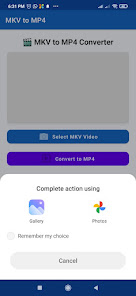
Select MKV file via gallery or file picker
Tap “Convert to MP4” — conversion starts instantly
Track progress with a real-time progress bar and time estimate
Save MP4 in your gallery; choose to Open or Share
Advanced Options (Coming Soon)
Quality presets (480p, 720p, 1080p, custom)
Trim, merge, & add metadata
Support for additional formats: AVI, MOV, MKV, MP3, AAC
Privacy & Safety
No personal data is tracked or shared
Works entirely offline—no uploads or hidden data transfers
🔧 Core Features
MKV → MP4 conversion: One‑tap transcoding using libx264, with clean audio through AAC codec
High-quality output: Preserve full HD (1080p) resolution and clarity
Fast & Efficient: Ultra-fast conversion using hardware acceleration
Batch support: Convert multiple MKV files continuously (future update)
Video preview: See thumbnails before and after conversion
Open & Share: Instantly view or share MP4 output via your favorite apps
Save to gallery: Auto-organizes into your local “ConvertedVideos” folder
Clean UI: Modern UI with Play Store–style Material Design themes
🌟 Why Choose Our App?
Speed & Quality – Converts MKV files to universally compatible MP4 using industry-standard codecs without quality loss
Offline Conversion – Fully functional without internet; ads only show when online
Compact & Light – Minimal storage footprint thanks to efficient FFmpegKit integration
Use Cases
Watch MKV videos on devices that only support MP4
Upload videos to YouTube, Instagram, or TikTok without compatibility issues
Share footage easily with friends & family using common MP4 format
How It Works
Select MKV file via gallery or file picker
Tap “Convert to MP4” — conversion starts instantly
Track progress with a real-time progress bar and time estimate
Save MP4 in your gallery; choose to Open or Share
Advanced Options (Coming Soon)
Quality presets (480p, 720p, 1080p, custom)
Trim, merge, & add metadata
Support for additional formats: AVI, MOV, MKV, MP3, AAC
Privacy & Safety
No personal data is tracked or shared
Works entirely offline—no uploads or hidden data transfers
Updated on
Safety starts with understanding how developers collect and share your data. Data privacy and security practices may vary based on your use, region, and age. The developer provided this information and may update it over time.

No data shared with third parties
Learn more about how developers declare sharing

No data collected
Learn more about how developers declare collection
App support
About the developer
Varshant Kumar
yojnasandeep@gmail.com
India


