
Mutzin Studio:PRO PHOTO EDITOR


Everyone
info
50+
Downloads

Everyone
Learn more


About this app
Mutzin Studio is a fast and easy photo editor made for photographers.
Built from years of hands-on photography experience, running a photography YouTube channel, and working on various creative projects, it includes the editing tools I use most—without the unnecessary complexity.
Everything hobby photographers need, nothing they don't.
Fine-tune brightness and color, straighten your composition, and make subtle local adjustments. Just a few simple edits can turn an ordinary photo into one you'll want to keep.
Key Features
* Basic adjustments: Exposure, Brightness, Contrast, Highlights, Shadows, Whites, and Blacks
* Color editing with Temperature, Tint, Saturation, Vibrance, and RGB Curves
* Black & White conversion with RGB channel mixing
* Creative effects including White Mist, Black Mist, Sharpness, and Film Grain
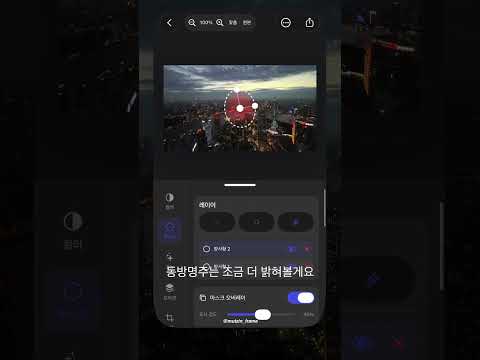
* Local adjustments with Brush, Linear Gradient, and Radial Gradient masks
* AI masks for Subject, Background, Sky, Color Range, and Luminance Range
* AI Eraser removes unwanted objects and shadows
* Flashlight tool adds natural-looking light where you need it
* Replace selected colors with the Eyedropper tool
* Crop, Rotate, Flip, Lens Correction, and Resize
* Preset and custom aspect ratio cropping
* Before/after comparison and Histogram
* Undo, Redo, and Edit History
* Save, load, and share custom color presets (.mtz)
* Export full-resolution JPEGs with adjustable quality
* Import JPEG and RAW photos
* Auto-save and restore recent edits
* View EXIF and project information
* Optimized for iPhone and iPad
* Supports portrait/landscape, Split View, and Stage Manager on iPad
Skip the complexity of professional editing software and enjoy the tools that hobby photographers actually need. Edit today's photos quickly and beautifully with Mutzin Studio.
Built from years of hands-on photography experience, running a photography YouTube channel, and working on various creative projects, it includes the editing tools I use most—without the unnecessary complexity.
Everything hobby photographers need, nothing they don't.
Fine-tune brightness and color, straighten your composition, and make subtle local adjustments. Just a few simple edits can turn an ordinary photo into one you'll want to keep.
Key Features
* Basic adjustments: Exposure, Brightness, Contrast, Highlights, Shadows, Whites, and Blacks
* Color editing with Temperature, Tint, Saturation, Vibrance, and RGB Curves
* Black & White conversion with RGB channel mixing
* Creative effects including White Mist, Black Mist, Sharpness, and Film Grain
* Local adjustments with Brush, Linear Gradient, and Radial Gradient masks
* AI masks for Subject, Background, Sky, Color Range, and Luminance Range
* AI Eraser removes unwanted objects and shadows
* Flashlight tool adds natural-looking light where you need it
* Replace selected colors with the Eyedropper tool
* Crop, Rotate, Flip, Lens Correction, and Resize
* Preset and custom aspect ratio cropping
* Before/after comparison and Histogram
* Undo, Redo, and Edit History
* Save, load, and share custom color presets (.mtz)
* Export full-resolution JPEGs with adjustable quality
* Import JPEG and RAW photos
* Auto-save and restore recent edits
* View EXIF and project information
* Optimized for iPhone and iPad
* Supports portrait/landscape, Split View, and Stage Manager on iPad
Skip the complexity of professional editing software and enjoy the tools that hobby photographers actually need. Edit today's photos quickly and beautifully with Mutzin Studio.
Mutzin Studio is a fast and easy photo editor made for hobby photographers.
Updated on
Safety starts with understanding how developers collect and share your data. Data privacy and security practices may vary based on your use, region, and age. The developer provided this information and may update it over time.
- No data shared with third partiesLearn more about how developers declare sharing
- No data collectedLearn more about how developers declare collection


What’s new
- Mutzin RAW engine has been improved.
Everyone
Learn moreApp support
About the developer
김세윤
mutzin@mutzin.com
동일로221길 22
2-806
노원구, 서울특별시 01687
South Korea