

Photo Watermark
Contains adsIn-app purchases

4.2star
64K reviews
1M+
Downloads

Everyone
info


About this app
Photo Watermark is an app for personal use that can add digital watermarks to all your images, photos and pictures with the transparency you decide.
Ideal for users who want to capture, watermark and share their photographs quickly and easily.
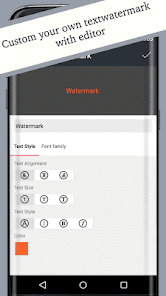
With this app you can simply create your own watermark.
Feature:
* Taking pictures with camera
* Fonts, color and other effects in text mode
* Build-in hundreds of text and png sticker as watermark
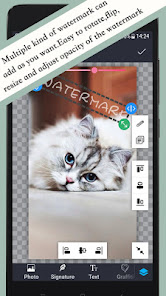
* Easy to move, rotate, reverse and change transparency of watermark as you want.
* Clone and edit watermark.
* Easy reusing of recent watermark texts
* Quick sharing to Instagram, Facebook, email and many more
The best watermarking app for creating watermarks and watermarking photos.
Brand your images before sharing them online. Digitally sign your photos/artwork with logo, signature, trademarks, copyright to claim, secure and maintain your intellectual property and reputation.
Adding of timestamp, hashtags and other properties as text watermark.
Original photographs are never altered. It let you create a new photograph with watermark on it.
Photo Watermark is easy to use:
1. Select a photo on which you want to add watermark.
2. Add signature or text or stickers, photo to create watermark on your photos.
3. Adjust your watermark on your photos; pinch it, drag it and rotate it. Adjust its opacity precisely with the slider.
4. Save and share watermarked photos with friends and family. Templates can be created and saved for future use.
Tips: Don't delete original images after watermarking, because you can't remove watermarks from processed images.
Ideal for users who want to capture, watermark and share their photographs quickly and easily.
With this app you can simply create your own watermark.
Feature:
* Taking pictures with camera
* Fonts, color and other effects in text mode
* Build-in hundreds of text and png sticker as watermark
* Easy to move, rotate, reverse and change transparency of watermark as you want.
* Clone and edit watermark.
* Easy reusing of recent watermark texts
* Quick sharing to Instagram, Facebook, email and many more
The best watermarking app for creating watermarks and watermarking photos.
Brand your images before sharing them online. Digitally sign your photos/artwork with logo, signature, trademarks, copyright to claim, secure and maintain your intellectual property and reputation.
Adding of timestamp, hashtags and other properties as text watermark.
Original photographs are never altered. It let you create a new photograph with watermark on it.
Photo Watermark is easy to use:
1. Select a photo on which you want to add watermark.
2. Add signature or text or stickers, photo to create watermark on your photos.
3. Adjust your watermark on your photos; pinch it, drag it and rotate it. Adjust its opacity precisely with the slider.
4. Save and share watermarked photos with friends and family. Templates can be created and saved for future use.
Tips: Don't delete original images after watermarking, because you can't remove watermarks from processed images.
Updated on
Safety starts with understanding how developers collect and share your data. Data privacy and security practices may vary based on your use, region, and age. The developer provided this information and may update it over time.

This app may share these data types with third parties
Device or other IDs

No data collected
Learn more about how developers declare collection

Data is encrypted in transit

Data can’t be deleted
Ratings and reviews
4.2
62.7K reviews

Victoria Krell
- Flag inappropriate
August 19, 2023
I was looking for a simple way to add translucent watermarks (signatures) to the photos I post on my blog. A friend recommended this app to me and I love it! It's a breeze to work with. I only wish I could use this app on my PC, since I much prefer working on a bigger screen. Overall, I would recommend this app to anyone looking for a free, simple, and quick way to add a Watermark to their photos. 🙂
1 person found this review helpful

A Google user
- Flag inappropriate
March 3, 2020
Great app for watermarking! I have zero complaints about the app itself. It's solid, reliable, and easy to use! I just wish that ad removal were available through a one time purchase instead of an ongoing subscription. It doesn't seem like the kind of app or service that would warrant a subscription. If a one-time purchase option were provided, I'd probably buy it in a heartbeat.
80 people found this review helpful

Heather Klump
- Flag inappropriate
December 11, 2023
Latest update removed all my saved watermarks, and the font I used to create them is GONE. A little heads up as to why the drastic change? Go to download .ttf of the font I used, and the file will not open. NOT supported. What?! I've used the app for a couple years and zero issues, and was my goto for easy, fast professional watermarks. Why? Just WHY?
3 people found this review helpful
What’s new
1. Fix bugs.
App support
About the developer
刘君
liujunwh2023@gmail.com
丁字桥路
110号
武昌区, 武汉市, 湖北省
China
430061


