

PicaBook: Story Book Creator
Contains adsIn-app purchases

star
283 reviews

Everyone
info
50K+
Downloads




About this app
Join thousands of creators worldwide using PicaBook! Its a fun book maker for stories, comics, and animations. We offer a simple editor to combine text, images, sounds, and drawings into a multi-page booklet that you can share with anyone!
When to use the PicaBook book creator?
- Create endless storybooks about your original characters, voice over their speech, or add speech bubbles
- Design digital celebration cards with music and send direct links to family and friends who can open your storybook on any device
- Zoom in to add page sections, our book creator allows you to fill each one with details as if creating a comic book
- Photo dump a day trip or vacation into a multi-page collage, store it as a keepsake on your device indefinitely, and show friends
- Animate ideas on the spot with tools optimized for fast iteration, storytelling, and exploration
- Come back later to any story book inside your expanding book creator library, record funny memories and events to remember later
- Find inspiration and ideas in the book hub where countless authors shared their own stories and animations
Who should use the PicaBook book maker?
- Children can learn the basics of drawing and storytelling with an essential set of book creator tools to design and print their own books
- Parents can design stories for their kids to rewatch many times, built-in auto play helps to playback the books hands free when needed
- Animators can explore the book maker for creating a moving sketch, playback speed and direction can be controlled in every animation
- Authors and artists can search through thousands of stories for new ideas or gain a following by publishing their own storybook
- Educators can use the book maker to design art assignments or send informational slides to the class to view at home
How can I share my story inside PicaBook?
- Generate a link to any book creator animation or story, send it to anyone so they can view it on their computer or phone immediately and without downloading the app
- Print your book onto paper by creating a pdf, this method is great for showing off something physically, storytelling without a bright screen, or sending a gift
- Publish to the book hub for views, ratings, and feedback from the PicaBook book maker community, join hundreds of other content creators in starting a following
What kind of content can I add to my pages in the book creator?
- Paintbrush Drawings: Quickly begin doodling images with highly intuitive, simplified drawing controls suitable for all ages
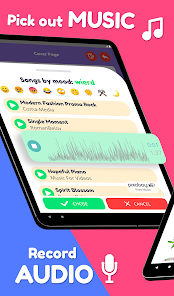
- Audio Recording: Record a sound clip for a funny sound effect or voice caption of what is on the page in the book maker
- Text Boxes: Customize font, size, and position of text to add speech bubbles, narration, explanations, and more
- Sticker Images: Bring in a camera snapshot or search through free illustrations to enhance and decorate your pages
- Background Music: Captivate your audience with a matching musical theme that elevates your storytelling skills
Storyteller! What are you waiting for? Have fun with this exciting new way learn, create, and connect! Don't forget to give us a rating so others can join too!
Privacy Policy: https://myfortuna.app/privacy-policy/picabook/
When to use the PicaBook book creator?
- Create endless storybooks about your original characters, voice over their speech, or add speech bubbles
- Design digital celebration cards with music and send direct links to family and friends who can open your storybook on any device
- Zoom in to add page sections, our book creator allows you to fill each one with details as if creating a comic book
- Photo dump a day trip or vacation into a multi-page collage, store it as a keepsake on your device indefinitely, and show friends
- Animate ideas on the spot with tools optimized for fast iteration, storytelling, and exploration
- Come back later to any story book inside your expanding book creator library, record funny memories and events to remember later
- Find inspiration and ideas in the book hub where countless authors shared their own stories and animations
Who should use the PicaBook book maker?
- Children can learn the basics of drawing and storytelling with an essential set of book creator tools to design and print their own books
- Parents can design stories for their kids to rewatch many times, built-in auto play helps to playback the books hands free when needed
- Animators can explore the book maker for creating a moving sketch, playback speed and direction can be controlled in every animation
- Authors and artists can search through thousands of stories for new ideas or gain a following by publishing their own storybook
- Educators can use the book maker to design art assignments or send informational slides to the class to view at home
How can I share my story inside PicaBook?
- Generate a link to any book creator animation or story, send it to anyone so they can view it on their computer or phone immediately and without downloading the app
- Print your book onto paper by creating a pdf, this method is great for showing off something physically, storytelling without a bright screen, or sending a gift
- Publish to the book hub for views, ratings, and feedback from the PicaBook book maker community, join hundreds of other content creators in starting a following
What kind of content can I add to my pages in the book creator?
- Paintbrush Drawings: Quickly begin doodling images with highly intuitive, simplified drawing controls suitable for all ages
- Audio Recording: Record a sound clip for a funny sound effect or voice caption of what is on the page in the book maker
- Text Boxes: Customize font, size, and position of text to add speech bubbles, narration, explanations, and more
- Sticker Images: Bring in a camera snapshot or search through free illustrations to enhance and decorate your pages
- Background Music: Captivate your audience with a matching musical theme that elevates your storytelling skills
Storyteller! What are you waiting for? Have fun with this exciting new way learn, create, and connect! Don't forget to give us a rating so others can join too!
Privacy Policy: https://myfortuna.app/privacy-policy/picabook/
DIY book maker for storytelling - make your own scrapbook, animation, or comic
Updated on
Safety starts with understanding how developers collect and share your data. Data privacy and security practices may vary based on your use, region, and age. The developer provided this information and may update it over time.
- No data shared with third partiesLearn more about how developers declare sharing
- This app may collect these data typesPersonal info, Photos and videos and 2 others
- Data is encrypted in transit
- You can request that data be deleted
- Committed to follow the Play Families Policy


Ratings and reviews
173 reviews

Brooke Smith
- Flag inappropriate
- Show review history
October 26, 2024
I thought this app was convenient and functional when I first downloaded, but I would like to make a few suggestions, such as including an "add a page". When completing a page and moving on I sometimes realize I've left out something important and I'm unable to fit it where it's supposed to be and as well on the next page. Also I don't like that it's a letter count, I'd prefer a word count. It makes what I write a miniscule amount very quickly and leaves little room for making changes.
5 people found this review helpful
My Fortuna
March 28, 2025
Thank you for your feedback! We have updated the editor to easily add pages where ever you need. Now you can press bring up page options by double pressing on any page in the editor and add pages before or after the current page. There is also now zooming features so that you can draw more text content as well.

Radstar Dimaculangan
- Flag inappropriate
February 17, 2023
Absolutely great! I made a couple of stories! But there is some bugs. Sometimes when i try to browse books, it takes me out of the game. I had to go in the app again to just browse the books that other people made, But its really good! I recommend this to other people! Actually i dont have bugs when browsing on MY books, but i had 1 bug browsing on OTHER PEOPES books, I still love it! Please download this!!😋
35 people found this review helpful
My Fortuna
March 28, 2025
Thank you for the awesome review. We love that you enjoy the book hub and will be on the lookout for any bugs browsing the books. If you have more details please feel free to email support@myfortuna.app

Craig Daniel Nuique
- Flag inappropriate
- Show review history
August 12, 2026
Please remove the Special Offer of this app and I will watch more ads again.
My Fortuna
August 14, 2026
Hello, thank you for the review. The offer is there only for one day and then it will time out to watch unlimited ads for a whole week. In a future update we will make it so that you can watch ads even when the offer is active.
What’s new
- Save favorite colors across books
- Fixed issue with some books failing to save
- Easier to see an unfinished book
- Improved stability of book printing
- Fixed issue with some books failing to save
- Easier to see an unfinished book
- Improved stability of book printing
App support
About the developer
My Fortuna LLC
support@myfortuna.app
708 E Sanson Ave
Spokane, WA 99207-3374
United States
+1 509-944-0473


