Sticky Notes
50+
Downloads

Everyone
info
About this app
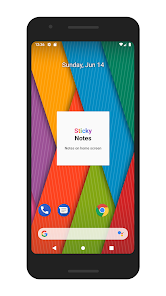
*Please test the functionality of the free version before making a purchase. This app does not have an icon on the home screen. It is only a widget app. As a result, it may not work on devices or home launchers that restrict widget functionality.
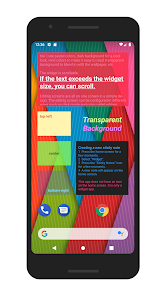
Widget with a simple design. Can be matched with any wallpaper. A variety of configurations are possible: Cute pastel colors, dark background for a cool look, vivid colors to make it easy to read, transparent background to blend in with the wallpaper, etc.
The widget is scrollable. If the text exceeds the widget size, you can scroll.
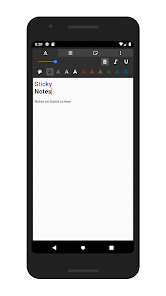
Editing screens are all on one screen in a simple design. The editing screen can be configured in different ways such as dark mode and color palette editing.
Data for up 200 previous sticky notes can be saved. If a note was deleted by mistake, it can still be recovered. (Although this feature is similar to a backup feature, it is slightly different. The data for previous sticky notes will all be deleted if the app is uninstalled. For important notes or if you will replace your device, first share or copy your notes to the cloud or to another app.)
■Instructions
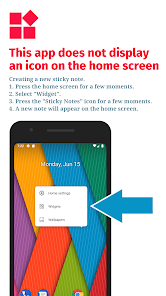
Creating a new sticky note: ① Press the home screen for a few moments. ② Select "Widget". ③ Press the "Sticky Notes" icon for a few moments. ④ A new note will appear on the home screen.
Editing a sticky note: Tap the sticky note widget on the home screen to open the editing screen.
Resetting the color palette: You can reset the color palette by emptying it, then saving it.
■Note
This app does not have an icon on the home screen. It is only a widget app.
Depending on the home launcher, certain widget functions might be restricted. In such a case, this app might not work. If problems such as a sticky note disappearing often or the widget cannot be added, use a different home launcher app.
If the widget does not appear right after being installed, restart the device. If "loading… " is displayed, wait a few moments and then it will become usable.
When a previous sticky note data is edited, it will be updated after the editing is completed. However, screen rotation or the creation of multiple windows will be saved at irregular times.
Widget with a simple design. Can be matched with any wallpaper. A variety of configurations are possible: Cute pastel colors, dark background for a cool look, vivid colors to make it easy to read, transparent background to blend in with the wallpaper, etc.
The widget is scrollable. If the text exceeds the widget size, you can scroll.
Editing screens are all on one screen in a simple design. The editing screen can be configured in different ways such as dark mode and color palette editing.
Data for up 200 previous sticky notes can be saved. If a note was deleted by mistake, it can still be recovered. (Although this feature is similar to a backup feature, it is slightly different. The data for previous sticky notes will all be deleted if the app is uninstalled. For important notes or if you will replace your device, first share or copy your notes to the cloud or to another app.)
■Instructions
Creating a new sticky note: ① Press the home screen for a few moments. ② Select "Widget". ③ Press the "Sticky Notes" icon for a few moments. ④ A new note will appear on the home screen.
Editing a sticky note: Tap the sticky note widget on the home screen to open the editing screen.
Resetting the color palette: You can reset the color palette by emptying it, then saving it.
■Note
This app does not have an icon on the home screen. It is only a widget app.
Depending on the home launcher, certain widget functions might be restricted. In such a case, this app might not work. If problems such as a sticky note disappearing often or the widget cannot be added, use a different home launcher app.
If the widget does not appear right after being installed, restart the device. If "loading… " is displayed, wait a few moments and then it will become usable.
When a previous sticky note data is edited, it will be updated after the editing is completed. However, screen rotation or the creation of multiple windows will be saved at irregular times.
Updated on
Safety starts with understanding how developers collect and share your data. Data privacy and security practices may vary based on your use, region, and age. The developer provided this information and may update it over time.

No data shared with third parties
Learn more about how developers declare sharing

No data collected
Learn more about how developers declare collection

Committed to follow the Play Families Policy
What's new
new release