
SmartWatch Player Control
4.2star
629 reviews
50K+
Downloads

Everyone
info
About this app
Control almost ANY music player by swipe's!
Have two control mode:
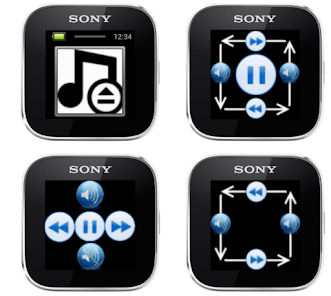
1) "Swipe mode".
Swipe from right to left - next track, from left to right - previous track. Have inverse mode!
Swipe from up to down or from down to up - to decrease or increase the music volume.
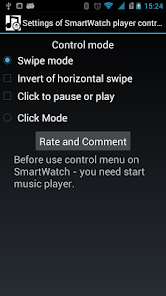
Click to pause or resume music play (can be off this feature in options menu).
2) Click mode - just click on screen buttons to select next/previous track, increase/decrease music volume or play/pause.
Have small problem, if you have more than one music player and bugs on SmartWatch 2, but in next release it will be fixed.
Before use control menu on SmartWatch - you need start music player.
LiveWare™ extension for SmartWatch
Have two control mode:
1) "Swipe mode".
Swipe from right to left - next track, from left to right - previous track. Have inverse mode!
Swipe from up to down or from down to up - to decrease or increase the music volume.
Click to pause or resume music play (can be off this feature in options menu).
2) Click mode - just click on screen buttons to select next/previous track, increase/decrease music volume or play/pause.
Have small problem, if you have more than one music player and bugs on SmartWatch 2, but in next release it will be fixed.
Before use control menu on SmartWatch - you need start music player.
LiveWare™ extension for SmartWatch
Updated on
Safety starts with understanding how developers collect and share your data. Data privacy and security practices may vary based on your use, region, and age. The developer provided this information and may update it over time.

No data shared with third parties
Learn more about how developers declare sharing

No data collected
Learn more about how developers declare collection
Ratings and reviews
4.2
602 reviews

A Google user
- Flag inappropriate
March 5, 2014
Most of the free Players that you can find will use the Google Music Player which is a high C low B rate Player. This one seems to use the default player which is my preferred player. The only flaw is that it pauses between every command which is very minor considering the quality and the fact that is free.
15 people found this review helpful
A Google user
- Flag inappropriate
June 14, 2014
Does exactly what it's supposed to. You need a bit more time to get used to swiping correctly. Five stars if the default pic changes :)
12 people found this review helpful
A Google user
- Flag inappropriate
January 26, 2014
Works better than the official Sony one that decides to play music whenever it wants. Simple controls. Had no problems with it.
3 people found this review helpful
What’s new
Added click mode (control by clicks, not swipes).
Added horizontal swipe mode.
Added music volume control.
New design.
Added horizontal swipe mode.
Added music volume control.
New design.
App support
About the developer
Моисеев Дмитрий Алексеевич
newbilius@gmail.com
Russia


