Door to Door Navigation
2.5star
491 reviewsinfo
100K+
Downloads

USK: All ages
info


About this app
Disclaimer:
System compatibility requirements - What you will need to use this app and service in your Nissan:
• A compatible and equipped Nissan vehicle registered and located within supported countries
The Door to Door Navigation has the following features to help you get to your final destination:
• It remembers your car’s location. You can use this feature to guide you back to your car again.
• It guides you to your final destination, after you have parked your car.
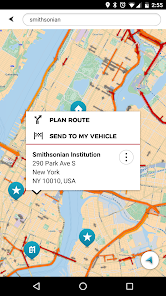
• It enables you to send a destination from your smartphone to your car’s navigation system.
Find my car
When your smartphone is connected to your car’s navigation system via Bluetooth, Door to Door Navigation receives the current location of the car.
When you leave your vehicle, the Find My Car feature starts. You receive a notification on your phone and the car location will be shown on the map.
A locate car symbol shows on the screen and a My Vehicle entry is added to your MY PLACES list.
Touch the locate car symbol when you want to return to your car. You can then:
• Select NAVIGATE TO DESTINATION to share your car location with a navigation application on your phone.
• Select WALK HERE to get a walking route to your car.
The walking route will be available if you are within 5 km of the car. If you are more than 5 km away from your car, a walking route will not be automatically generated.
Final destination navigation
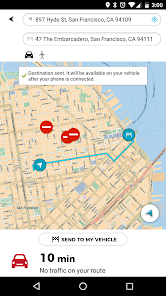
When your smartphone is connected to your car’s navigation system via Bluetooth, Door to Door Navigation receives the current location of the car, the address of where you have parked, and it will be shown on the map.
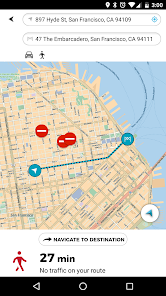
You will then be given the fastest walking route to your final destination.
A walking route will be available to get you to your final destination if you are within 5 km of the final destination. If you are more than 5 km away from your final destination, a walking route will not be automatically generated.
Send a destination to your vehicle
Use Door to Door Navigation to find a destination and send it to your vehicle. Once your smartphone is connected to your vehicle’s navigation system, it will sync with navigation system.
System compatibility requirements - What you will need to use this app and service in your Nissan:
• A compatible and equipped Nissan vehicle registered and located within supported countries
The Door to Door Navigation has the following features to help you get to your final destination:
• It remembers your car’s location. You can use this feature to guide you back to your car again.
• It guides you to your final destination, after you have parked your car.
• It enables you to send a destination from your smartphone to your car’s navigation system.
Find my car
When your smartphone is connected to your car’s navigation system via Bluetooth, Door to Door Navigation receives the current location of the car.
When you leave your vehicle, the Find My Car feature starts. You receive a notification on your phone and the car location will be shown on the map.
A locate car symbol shows on the screen and a My Vehicle entry is added to your MY PLACES list.
Touch the locate car symbol when you want to return to your car. You can then:
• Select NAVIGATE TO DESTINATION to share your car location with a navigation application on your phone.
• Select WALK HERE to get a walking route to your car.
The walking route will be available if you are within 5 km of the car. If you are more than 5 km away from your car, a walking route will not be automatically generated.
Final destination navigation
When your smartphone is connected to your car’s navigation system via Bluetooth, Door to Door Navigation receives the current location of the car, the address of where you have parked, and it will be shown on the map.
You will then be given the fastest walking route to your final destination.
A walking route will be available to get you to your final destination if you are within 5 km of the final destination. If you are more than 5 km away from your final destination, a walking route will not be automatically generated.
Send a destination to your vehicle
Use Door to Door Navigation to find a destination and send it to your vehicle. Once your smartphone is connected to your vehicle’s navigation system, it will sync with navigation system.
Updated on
Data safety
Developers can show information here about how their app collects and uses your data. Learn more about data safety

No information available
Ratings and reviews
2.5
476 reviews

A Google user
- Flag inappropriate
August 5, 2019
Map looks good on my phone but the instructions for connection to the car system simply don't work. App and car don't link the in the way the tutorial shows. Nothing happens even though car Bluetooth is connected to my phone. The connection is supposed to initiate automatically, but does not, and no info on troubleshooting. Very lengthy and frustrating experience. Service completely unusable as a result. Sounds similar for the majority of others. Real shame. Back to Android Auto for me!
64 people found this review helpful

Alan Rider
- Flag inappropriate
- Show review history
September 21, 2021
All the 1 stars are true for me. About 1 in 10 times "send to car" works. Here is another issue: If you create a route with the cell app, it does a good job determining the optimal route. However, if you create a route using the on-board app [Leaf] to the same destination, it creates a nonsense route. Yes, all route settings are the same, highways etc. It uses major highways for part of the route, then for no apparent reason, it routes on minor roads. It is not do to an "avoid tolls" setting.
28 people found this review helpful

Tolga Balcı
- Flag inappropriate
May 29, 2021
I still don't understand if that application does anything it mentions. It doesn't connect to the multimedia system, it mentions that the route is sent to the system, but it doesn't do any single thing. It seems that this application is abandonware: no replies from the manufacturer, no updates, no fixes, nothing. Please rethink thrice if you are considering downloading this application - it won't do what it is meant to do.
7 people found this review helpful
What's new
Bug Fixes