
Operacora


Everyone
info
1+
Downloads


About this app
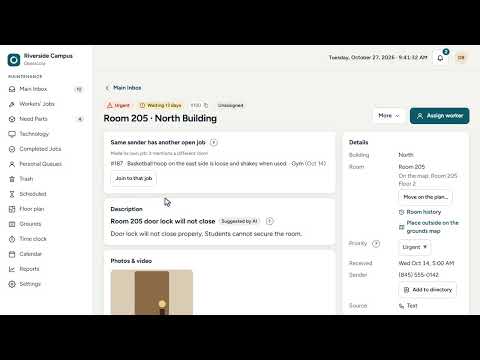
Operacora is a work-order app for organizations that look after buildings: schools and campuses, property managers, and facilities and maintenance teams. Staff report a problem by text, email or the app. Managers see every request in one place, send the right person, and get each finished job back with a photo. Workers use this app; managers use it too, and the web app at app.operacora.com on a computer or tablet.
Requests come in from anywhere
• Every text, email or app report becomes its own job, with the building, room, description and photos.
• Each building can have its own texting number and email address.
• Priorities you choose (for example normal and urgent). The most urgent work stays at the top of every list.
Assign and track
• Assign a job in two taps, change its priority, add a note.
• List, board and Gantt views. Drag a card to the next step, or select several jobs and move them together.
• See what is waiting for parts and what has waited too long.
Floor plans and grounds
• Upload your floor plans (a PDF works) and see open jobs pinned to their rooms.
• A grounds map for outdoor work, with your site boundaries.
• While you are clocked in or on site, scan the code on a room's door to say which room you are in.
For the people doing the work
• One clear list: urgent first, then the rest.
• Finish a job with a photo, ask for parts, or report that something can't be fixed.
• Report a new problem from the app, with photos.
• Works on a weak signal: your list opens from the phone, and what you do is sent when the connection is back.
Time and location (optional)
• A time clock with weekly timesheets. Workers can ask for corrections; managers review them.
• Only if your organization turns it on: the app shares which building or area you are in, only while the app is open, and only while you are clocked in or on site during work hours. You read and accept your organization's notice first, and you can stop sharing at any time. Exact GPS positions are not kept.
Reports and calendars
• Charts of jobs opened, finished and waiting, by building, week or month. Export to CSV or save as PDF.
• A calendar of due and planned work that you can subscribe to from Google Calendar, Outlook or Apple Calendar.
Bring your own providers
• Connect your own texting (Telnyx, Twilio or Bandwidth), email and AI (OpenRouter, Claude or OpenAI) accounts and pay them directly. No markup, no lock-in. Free options come first, and you can switch at any time.
• Optional AI help suggests a short title and tags for each request. Phone numbers, email addresses and names are removed before any text goes to an AI provider. AI suggests; people decide.
Built for privacy
• Each organization's data is kept separate.
• Photos and files are never public. Only people allowed to see a job can see its pictures.
• Connection keys are stored encrypted.
• No ads.
You need an account from your organization to sign in. To set up Operacora for your organization, visit operacora.com or write to hello@operacora.com.
Requests come in from anywhere
• Every text, email or app report becomes its own job, with the building, room, description and photos.
• Each building can have its own texting number and email address.
• Priorities you choose (for example normal and urgent). The most urgent work stays at the top of every list.
Assign and track
• Assign a job in two taps, change its priority, add a note.
• List, board and Gantt views. Drag a card to the next step, or select several jobs and move them together.
• See what is waiting for parts and what has waited too long.
Floor plans and grounds
• Upload your floor plans (a PDF works) and see open jobs pinned to their rooms.
• A grounds map for outdoor work, with your site boundaries.
• While you are clocked in or on site, scan the code on a room's door to say which room you are in.
For the people doing the work
• One clear list: urgent first, then the rest.
• Finish a job with a photo, ask for parts, or report that something can't be fixed.
• Report a new problem from the app, with photos.
• Works on a weak signal: your list opens from the phone, and what you do is sent when the connection is back.
Time and location (optional)
• A time clock with weekly timesheets. Workers can ask for corrections; managers review them.
• Only if your organization turns it on: the app shares which building or area you are in, only while the app is open, and only while you are clocked in or on site during work hours. You read and accept your organization's notice first, and you can stop sharing at any time. Exact GPS positions are not kept.
Reports and calendars
• Charts of jobs opened, finished and waiting, by building, week or month. Export to CSV or save as PDF.
• A calendar of due and planned work that you can subscribe to from Google Calendar, Outlook or Apple Calendar.
Bring your own providers
• Connect your own texting (Telnyx, Twilio or Bandwidth), email and AI (OpenRouter, Claude or OpenAI) accounts and pay them directly. No markup, no lock-in. Free options come first, and you can switch at any time.
• Optional AI help suggests a short title and tags for each request. Phone numbers, email addresses and names are removed before any text goes to an AI provider. AI suggests; people decide.
Built for privacy
• Each organization's data is kept separate.
• Photos and files are never public. Only people allowed to see a job can see its pictures.
• Connection keys are stored encrypted.
• No ads.
You need an account from your organization to sign in. To set up Operacora for your organization, visit operacora.com or write to hello@operacora.com.
Work orders for buildings: requests, floor plans, photo proof and time clock
Updated on
Safety starts with understanding how developers collect and share your data. Data privacy and security practices may vary based on your use, region, and age. The developer provided this information and may update it over time.
- No data shared with third partiesLearn more about how developers declare sharing
- This app may collect these data typesLocation, Personal info and 3 others
- Data is encrypted in transit
- You can request that data be deleted


What’s new
Videos are made smaller before sending, so they upload about three times faster. Videos now play in the phone's own player, with a clear Try again if something goes wrong.
App support
About the developer
UNIFIED ARRAY LLC
support@unifiedarray.com
2 Hawk St
Spring Valley, NY 10977-6104
United States
+1 845-445-8536