
Pix Material You Icons
In-app purchases
4.6star
703 reviews
10K+
Downloads

Everyone
info
About this app
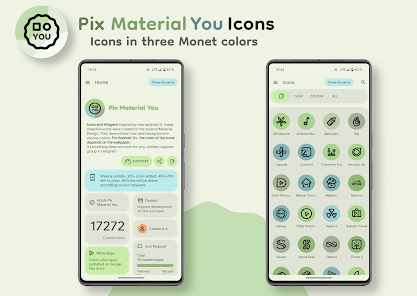
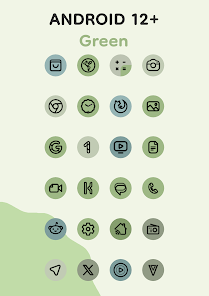
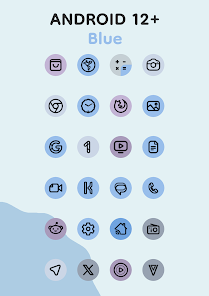
Inspired by new android 12, these Adaptive Icons were created in style of Material You.
They have a linear icon and background in various colors. They also change shape.
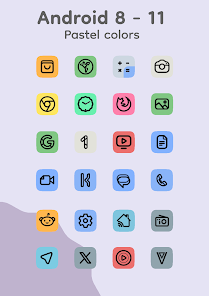
Android 8-11: icons are pastel colors because there is no Monet support.
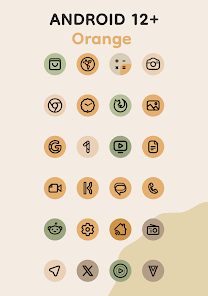
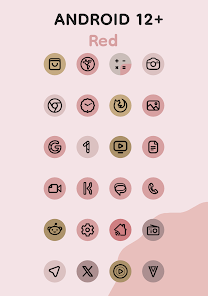
Android 12+: colors of icons and widgets depends on wallpaper and use three MaterialYou colors.
Notes (android 12+):
After changing wallpaper, you need to apply icon pack again to change color of the icons.
Available in application:
- Adaptive 17k+ icons.
- Clock Widgets.
- Exclusive thematic Wallpapers.
How to use:
How do I change the colors of the icons?
!Colors change ONLY Android 12+! After changing wallpaper / accent system, you need to reapply icon pack (or apply another icon pack, and then immediately this one).
Where can I find widgets?
On your home screen, long press and select "Widgets", Find "Pix Material You" in list. Typical way, like accessing regular device widgets.
Recommended use Launchers:
- Nova Launcher (Change Colors Avtomaticaly in A12+ (beta 8.0.4+)).
- Smart Launcher (Change Colors Avtomaticaly in A12+ (beta)).
- Hyperion (Change Colors Avtomaticaly in A12+ (beta)).
- Niagara Launcher (Change Colors Avtomaticaly in A12+).
- AIO Launcher (Change Colors Avtomaticaly in A12+).
- Stario Launcher (Change Colors Avtomaticaly in A12+).
- Action Launcher.
- Ruthless Launcher.
- Lawnchair.
- And other.
If something does not work for you, you can contact "technical support" in telegram:
https://t.me/devPashapuma
They have a linear icon and background in various colors. They also change shape.
Android 8-11: icons are pastel colors because there is no Monet support.
Android 12+: colors of icons and widgets depends on wallpaper and use three MaterialYou colors.
Notes (android 12+):
After changing wallpaper, you need to apply icon pack again to change color of the icons.
Available in application:
- Adaptive 17k+ icons.
- Clock Widgets.
- Exclusive thematic Wallpapers.
How to use:
How do I change the colors of the icons?
!Colors change ONLY Android 12+! After changing wallpaper / accent system, you need to reapply icon pack (or apply another icon pack, and then immediately this one).
Where can I find widgets?
On your home screen, long press and select "Widgets", Find "Pix Material You" in list. Typical way, like accessing regular device widgets.
Recommended use Launchers:
- Nova Launcher (Change Colors Avtomaticaly in A12+ (beta 8.0.4+)).
- Smart Launcher (Change Colors Avtomaticaly in A12+ (beta)).
- Hyperion (Change Colors Avtomaticaly in A12+ (beta)).
- Niagara Launcher (Change Colors Avtomaticaly in A12+).
- AIO Launcher (Change Colors Avtomaticaly in A12+).
- Stario Launcher (Change Colors Avtomaticaly in A12+).
- Action Launcher.
- Ruthless Launcher.
- Lawnchair.
- And other.
If something does not work for you, you can contact "technical support" in telegram:
https://t.me/devPashapuma
Updated on
Safety starts with understanding how developers collect and share your data. Data privacy and security practices may vary based on your use, region, and age. The developer provided this information and may update it over time.

No data shared with third parties
Learn more about how developers declare sharing

No data collected
Learn more about how developers declare collection

Data is encrypted in transit

Data can’t be deleted
Ratings and reviews
4.6
690 reviews

Jei Why
- Flag inappropriate
October 19, 2021
Works like a charm. Adapts to the color of the wallpaper when you apply it (Material You). But you have to reapply it everytime you change your wallpaper. My only two suggestions for the developer to keep me hooked on to this app before the competition catches up is to (1) find a way to automatically change the color of the icons or at least add a widget that easily lets me do so from the home screen and (2) add support for Nova7's Autogen for icons you don't support.
21 people found this review helpful
PashaPuma Design
October 19, 2021
Спасибо за отзыв. Но к сожалению мгновенная смена цвета иконок зависит от лаунчера, приложение значков это делает моментально ( посмотрите как изменяется цвет иконок в приложении).... Повторное применение иконок - это единственный способ ( как я изучил) ...

Nikunj Khangwal
- Flag inappropriate
April 26, 2024
Material icons always looked pretty but they weren't practical. Because they looked all the same color it was hard to find your desired app. This app kind of solves that problem by having 3 identical colors instead of 1. Also the icons are beautiful lines not just the same shape as original which also makes it unique. So definitely the best material you option out there.
3 people found this review helpful

Shanto Sarker
- Flag inappropriate
- Show review history
May 2, 2024
I'm all for the icon colors automatically matching with the background but its kind of silly to not allow for manual color adjustments, I actually really like the different pastel colors for before Android 12. If that's allowed this is a 5/5 star icon pack
PashaPuma Design
May 2, 2024
Manual color adjustment simply does not work with Icons!!! Icons don't support this. The only thing is that you can customize the colors through "Icon Pack Studio"
What's new
- Add 200+ new icons.
- Redesign some icons.
- Fixed some icons.
- Redesign some icons.
- Fixed some icons.


