
HeartRateOnStream for OBS
In-app purchases

star
134 reviews

Everyone
info
10K+
Downloads

Everyone
Learn more


About this app
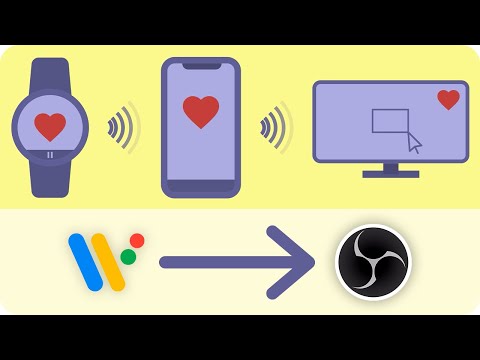
Heart Rate On Stream sends your heart rate from your Wear OS watch to OBS Studio using the preinstalled* OBS plugin obs-websocket.
⭐ Main features ⭐
⭐ You can add your heart rate to your Twitch live stream or video recordings.
⭐ Connect to OBS via QR code or autodiscover.
⭐ Add the heart animation of the app to OBS too.
⭐ The app works without an internet connection, as the heart rate is transmitted to your PC via your home network.
⭐ The watch app provides a complication and tile for displaying your heart rate and opening the app.
If that's not enough for you, here are some premium features...
💎 Add a daily step counter and speedometer via GPS to OBS.
💎 Display your highest heart rate of the day in OBS.
💎 Hide any OBS source when stopping the measurement (for example a heart animation, so it doesn't stay when there is no heart rate).
💎 The phone app provides a home screen widget for quick connection.
The app requires:
• Any obs-websocket plugin version (v5.0.0 or above is recommended) → https://github.com/obsproject/obs-websocket/releases
Streamlabs OBS is not supported.
* preinstalled since OBS v30
⭐ Main features ⭐
⭐ You can add your heart rate to your Twitch live stream or video recordings.
⭐ Connect to OBS via QR code or autodiscover.
⭐ Add the heart animation of the app to OBS too.
⭐ The app works without an internet connection, as the heart rate is transmitted to your PC via your home network.
⭐ The watch app provides a complication and tile for displaying your heart rate and opening the app.
If that's not enough for you, here are some premium features...
💎 Add a daily step counter and speedometer via GPS to OBS.
💎 Display your highest heart rate of the day in OBS.
💎 Hide any OBS source when stopping the measurement (for example a heart animation, so it doesn't stay when there is no heart rate).
💎 The phone app provides a home screen widget for quick connection.
The app requires:
• Any obs-websocket plugin version (v5.0.0 or above is recommended) → https://github.com/obsproject/obs-websocket/releases
Streamlabs OBS is not supported.
* preinstalled since OBS v30
Measure heart rate, steps and speed with your watch and send it to OBS Studio.
Updated on
Safety starts with understanding how developers collect and share your data. Data privacy and security practices may vary based on your use, region, and age. The developer provided this information and may update it over time.
- No data shared with third partiesLearn more about how developers declare sharing
- No data collectedLearn more about how developers declare collection


Ratings and reviews
114 reviews

Zephyr Gunnuscio
- Flag inappropriate
May 10, 2025
Even scanning the QR code in my websocket settings, it still says "unreachable" and doesn't connect. I'm not sure if it's because my OBS (version 31.0.3) has the Streamlabs plug-in (even though I don't use it except to download overlays) or if there is something that isn't being explained fully? The tutorial video is very...minimal and helped me connect my Galaxy Watch 6 to my Samsung, but I can't connect to my OBS and this was the only free version HR monitor I could find that was compatible..

Benjamin M
- Flag inappropriate
September 15, 2025
Works great! Not sure why this app has so many bad reviews - if you read the instructions and calibrate your watch, configure OBS correctly, it works! Some features I'd like to see (and I may just not have found them) waveform / graph of HR, average HR, and a beating heart animation that is actually tied to the current beats.
7 people found this review helpful

Tyler Hasty (Pocketpac)
- Flag inappropriate
- Show review history
March 13, 2023
When it works it works great. I have the Pixel Watch and the keep display on function seems to randomly stop working. Also it seems to be running in the background regardless if I'm using it or not as my battery drained super fast until I uninstalled which resolved it.
1 person found this review helpful
Pezcraft
March 20, 2023
The battery problem is now fixed in the last update.
What’s new
Bug Fixes
Everyone
Learn moreApp support
About the developer
Peter Ohlmann
kontakt@pezcraft.com
Softwarepark 10/Top 12
4232 Hagenberg im Mühlkreis
Austria


