
A-Score Music Composer
In-app purchases
3.9star
454 reviews
50K+
Downloads

Everyone
info


About this app
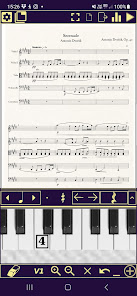
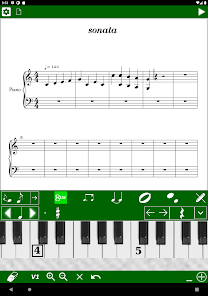
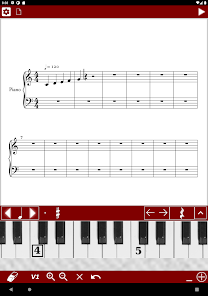
The most fully featured music notation app for Android - many of the features of Sibelius, Finale or Musescore in the palm of your hand.
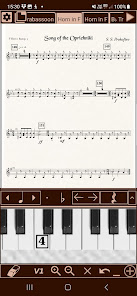
- Ability to work on individual parts
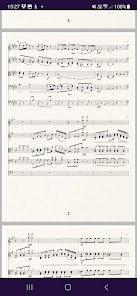
- See the whole score on a scrolling page
- Soundfont import
- Export to PDF or direct to printer
- Multiple staves and instruments
- Intuitive input via software piano keyboard
- Flexible, dynamic layout ensuring symbols make space for each other
- Zoom and scroll
- Tuplets and cross-rhythms
- Playback
- Select and paste bars, parts of bars or entire ranges
- Undo/redo
- Lyrics
- 'View' mode allows viewing score alone on the page
- Ornaments and articulations
- Acciaccaturas and groups of grace notes
- Dynamics, fermata
- Tie individual notes or whole chords
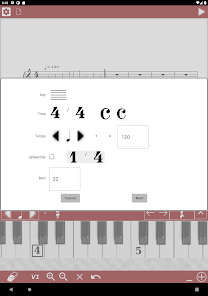
- Change clef, time and key signature at start or in middle of score
- Repeat bars, DC, Segno etc.
- Hairpin dynamics, slurs, 8va, pedal markings
- Compound and irregular time signatures
- Transpose part or all of score
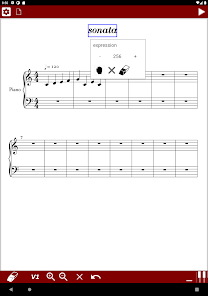
- Insert any tempo or expression marking
- Change tempo at start of score or in middle
- Chord symbols
- Add or delete bars
- Import from MusicXml
- Import from MIDI coming soon!
- Save feature
- Export to PDF, MIDI, MusicXML
- Autosave
- Ability to work on individual parts
- See the whole score on a scrolling page
- Soundfont import
- Export to PDF or direct to printer
- Multiple staves and instruments
- Intuitive input via software piano keyboard
- Flexible, dynamic layout ensuring symbols make space for each other
- Zoom and scroll
- Tuplets and cross-rhythms
- Playback
- Select and paste bars, parts of bars or entire ranges
- Undo/redo
- Lyrics
- 'View' mode allows viewing score alone on the page
- Ornaments and articulations
- Acciaccaturas and groups of grace notes
- Dynamics, fermata
- Tie individual notes or whole chords
- Change clef, time and key signature at start or in middle of score
- Repeat bars, DC, Segno etc.
- Hairpin dynamics, slurs, 8va, pedal markings
- Compound and irregular time signatures
- Transpose part or all of score
- Insert any tempo or expression marking
- Change tempo at start of score or in middle
- Chord symbols
- Add or delete bars
- Import from MusicXml
- Import from MIDI coming soon!
- Save feature
- Export to PDF, MIDI, MusicXML
- Autosave
Updated on
Safety starts with understanding how developers collect and share your data. Data privacy and security practices may vary based on your use, region, and age. The developer provided this information and may update it over time.

No data shared with third parties
Learn more about how developers declare sharing

This app may collect these data types
Location, App info and performance, and Device or other IDs

Data is encrypted in transit

Data can’t be deleted
Ratings and reviews
3.9
381 reviews

Aaron Miller
- Flag inappropriate
May 3, 2020
It could use improvements, of course. But it's very comprehensive and user-friendly for the price. What isn't intuitive can be learned through "?" help descriptions. I hadn't read notation in years, but now I'm writing it. It was easy enough to print songs from my phone. Thanks! The Save system needs work. It's reliable, but shows a blank blue screen for a long time before verifying if saving after many additions. It seems frozen until you get used to the delay.
16 people found this review helpful

Kailey Johnson
- Flag inappropriate
June 9, 2020
I bought the full version, I like the app a lot. I wish we could have files in the app itself with our music, that way we can work on multiple projects at a time and be able to go back and edit past projects. I also wish I could make it fit a laptop screen as well. I have to flip my laptop to tablet mode to work, but it would be amazing if it could go both ways. Great price and sound quality.
6 people found this review helpful

Ghost Rider
- Flag inappropriate
January 20, 2024
Definitely an app needed if used to Musescore. PROS 1. Wide selection of choices to choose from. 2. Free. 3. No (annoying) ads. I can't really think of any cons so instead here are some features that A-Score does not have that should be added. 1. Ability to change duration of already existing notes 2. On-screen keyboard visualizer during playback. 3.On-screen keyboard displaying pressed notes during editing.
3 people found this review helpful
What's new
Fix issue creating beams in 12/8
Fix issue with upbeat bars exporting to MP3
Fix issue with upbeat bars exporting to MP3
App support
About the developer
Philip Alan Blandford
philip.blandford@gmail.com
GFF
23 Cotham Grove
BRISTOL
BS6 6AN
United Kingdom
undefined