
PhotoRuler
In-app purchases

Everyone
info
10+
Downloads

Everyone
Learn more


About this app
Photo Ruler: The Ultimate Measurement & Annotation App
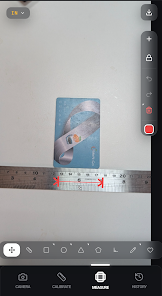
Calibrate with a known object (credit card, coin, or custom size), then measure real-world length, width, area, and angles on any photo. Annotate like a site diagram: lines, arrows, shapes, and trade icons for electrical, plumbing, and architecture. Export a PDF or save images to your gallery for DIY projects, contractors, and architects.
No ARCore required for photo measure. No data collected.
HOW IT WORKS
1. Take or open a photo that includes a known reference (credit card, coin, or enter a custom length).
2. Set the scale once, then draw measurements: lengths, areas, angles, and custom shapes.
3. Label with trade icons and styles, then export PDF or save to your gallery.
KEY FEATURES
• Photo measure: lengths, widths, diameters, areas, and angles on your photos
• Easy calibration: credit card, coin, or custom reference size
• Annotation toolkit: lines, arrows, string rulers, shapes, and hatched areas
• Trade icons: electrical, plumbing, architecture, and more
• Magnifier and line styles for precise placement
• Measurement history: reopen past sessions
• Export: PDF with measurement key, or gallery images
• Share-ready overlays with optional custom watermark
WHO IT’S FOR
DIY homeowners, contractors, architects, and anyone who needs dimensions from a photo without walking around with a tape measure.
PRIVACY
PhotoRuler does not collect your data. No data is shared with third parties (see Data safety on this listing).
SUPPORT
photo.ruler.app@gmail.com
PhotoRuler is a photo measuring and annotation app — not a live AR tape measure. Measure from photos with a simple card or coin calibration.
Use your common items to measure dimensions, angles, areas, and custom shapes.
Updated on
Safety starts with understanding how developers collect and share your data. Data privacy and security practices may vary based on your use, region, and age. The developer provided this information and may update it over time.
- No data shared with third partiesLearn more about how developers declare sharing
- No data collectedLearn more about how developers declare collection


Everyone
Learn moreApp support
About the developer
GLOBAL CONSULTING AND TRANSLATION, LLC
globalcandt@gmail.com
312 Chesham St
Ormond Beach, FL 32174-0692
United States
+1 765-889-2580


