
PrepLibrary


Everyone
info
100+
Downloads


About this app
PrepLibrary – Learn, Share & Grow
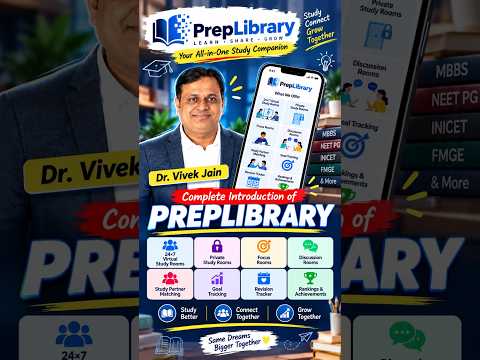
PrepLibrary is a comprehensive exam preparation and learning platform designed to help students organize their studies, stay focused, practice effectively, and achieve their academic goals.
With PrepLibrary, students can attend live classes, participate in virtual study sessions, practice mock tests, set personalized study goals, track their progress, and connect with their learning community—all in one place.
KEY FEATURES
Virtual Classrooms
Attend live online classes and learning sessions from anywhere. PrepLibrary provides a structured digital environment for students to participate in classes and continue their preparation.
Interactive Test Series
Practice with online tests and mock examinations to assess your preparation. Review performance, identify areas that need improvement, and track progress over time.
Personalized Study Goals
Set study goals and organize your preparation according to your individual requirements. Plan study activities and monitor progress toward your academic objectives.
Focus Sessions
Create dedicated study sessions with timers and productivity features designed to help you remain focused during planned study time.
Focus Mode / Focus Shield
PrepLibrary includes Focus Mode, also referred to as Focus Shield, to help reduce distractions during active study sessions.
During a Focus Session, students can select apps that they want to restrict or avoid using. PrepLibrary uses Android AccessibilityService and Usage Access to identify the app currently being used and help enforce the selected focus restrictions.
AccessibilityService Usage
PrepLibrary uses the Android AccessibilityService API specifically for Focus Mode. During an active Focus Session, it helps detect when an app outside the selected study-safe list is opened so PrepLibrary can display a focus-blocking screen and help the student return to the study session.
AccessibilityService is used only for Focus Mode. It is not used to read passwords, messages, personal communications, or private screen content, record audio, change device settings, or share Accessibility data with third parties.
Usage Access
PrepLibrary also uses Android Usage Access as a supporting method for Focus Mode. It helps identify which app is currently being used and provides a backup detection method when AccessibilityService detection is delayed or unavailable.
App-usage detection through Usage Access is performed only to support the active Focus Session. This detection happens on the device and is not recorded, stored, or sent to PrepLibrary servers or third parties.
Both AccessibilityService and Usage Access are used only to provide reliable Focus Mode functionality and help students limit distractions during their selected study sessions.
Progress Tracking
Monitor study activity, test performance, and learning progress in one place. Use performance information to understand preparation and identify areas requiring additional attention.
Community-Based Learning
Learn together with other students through community features that encourage discussion, collaboration, peer interaction, and shared learning.
Designed for Exam Preparation
PrepLibrary can support students preparing for competitive examinations, entrance examinations, professional examinations, and academic assessments.
Whether you are attending live classes, practicing mock tests, working toward daily study goals, or reducing distractions during study time, PrepLibrary provides the tools to plan, practice, focus, and track your preparation.
PrepLibrary – Plan your preparation. Stay focused. Practice consistently. Track your progress.
PrepLibrary is a comprehensive exam preparation and learning platform designed to help students organize their studies, stay focused, practice effectively, and achieve their academic goals.
With PrepLibrary, students can attend live classes, participate in virtual study sessions, practice mock tests, set personalized study goals, track their progress, and connect with their learning community—all in one place.
KEY FEATURES
Virtual Classrooms
Attend live online classes and learning sessions from anywhere. PrepLibrary provides a structured digital environment for students to participate in classes and continue their preparation.
Interactive Test Series
Practice with online tests and mock examinations to assess your preparation. Review performance, identify areas that need improvement, and track progress over time.
Personalized Study Goals
Set study goals and organize your preparation according to your individual requirements. Plan study activities and monitor progress toward your academic objectives.
Focus Sessions
Create dedicated study sessions with timers and productivity features designed to help you remain focused during planned study time.
Focus Mode / Focus Shield
PrepLibrary includes Focus Mode, also referred to as Focus Shield, to help reduce distractions during active study sessions.
During a Focus Session, students can select apps that they want to restrict or avoid using. PrepLibrary uses Android AccessibilityService and Usage Access to identify the app currently being used and help enforce the selected focus restrictions.
AccessibilityService Usage
PrepLibrary uses the Android AccessibilityService API specifically for Focus Mode. During an active Focus Session, it helps detect when an app outside the selected study-safe list is opened so PrepLibrary can display a focus-blocking screen and help the student return to the study session.
AccessibilityService is used only for Focus Mode. It is not used to read passwords, messages, personal communications, or private screen content, record audio, change device settings, or share Accessibility data with third parties.
Usage Access
PrepLibrary also uses Android Usage Access as a supporting method for Focus Mode. It helps identify which app is currently being used and provides a backup detection method when AccessibilityService detection is delayed or unavailable.
App-usage detection through Usage Access is performed only to support the active Focus Session. This detection happens on the device and is not recorded, stored, or sent to PrepLibrary servers or third parties.
Both AccessibilityService and Usage Access are used only to provide reliable Focus Mode functionality and help students limit distractions during their selected study sessions.
Progress Tracking
Monitor study activity, test performance, and learning progress in one place. Use performance information to understand preparation and identify areas requiring additional attention.
Community-Based Learning
Learn together with other students through community features that encourage discussion, collaboration, peer interaction, and shared learning.
Designed for Exam Preparation
PrepLibrary can support students preparing for competitive examinations, entrance examinations, professional examinations, and academic assessments.
Whether you are attending live classes, practicing mock tests, working toward daily study goals, or reducing distractions during study time, PrepLibrary provides the tools to plan, practice, focus, and track your preparation.
PrepLibrary – Plan your preparation. Stay focused. Practice consistently. Track your progress.
Focused exam prep with study sessions, virtual classes, tests, and collaboration
Updated on
Safety starts with understanding how developers collect and share your data. Data privacy and security practices may vary based on your use, region, and age. The developer provided this information and may update it over time.
- No data shared with third partiesLearn more about how developers declare sharing
- This app may collect these data typesPersonal info, Photos and videos, and Device or other IDs
- Data is encrypted in transit
- You can request that data be deleted


What’s new
UI enhancements
App support
phone
Phone number
+917496030048
About the developer
PREPLIBRARY LLP
admin@preplibrary.in
H No 13 8 3 A 1 Gayathri Hills, Badangpet, Badangpet
Hyderabad, Telangana 500058
India
+91 91001 85150