

Surfie-Parent
In-app purchases

3.6star
192 reviews
5K+
Downloads

Everyone
info


About this app
NEW!!! Test Surfie Parent one week for free. No payment information required!!!
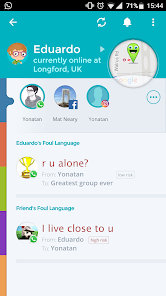
Surfie Parent alerts you when your children are cyber-bullied on WhatsApp, Instagram, Facebook and Viber. With Surfie Parent you can limit your children’s screen-time and block applications and inappropriate websites. You can set location alerts to know that your children left home on time and arrived safely at school.
Surfie Kids gives you the exact parenting tools you need to take an active part in the online life of your children.
FEATURES
• Easy install process – just a few steps and your children are protected
• Cyber-bullying – monitor foul language on WhatsApp, Instagram, Facebook and Viber
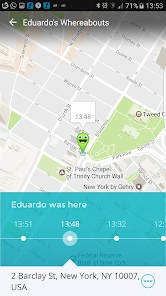
• Geofencing and location alerts -know when your children leave home, arrive at school,
• Location tracking – always know where your children are
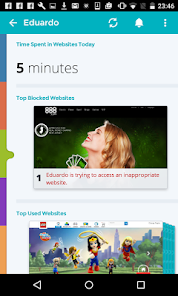
• Dynamic Webfilter – state of the art webfilter to block adult, violence, drugs and more
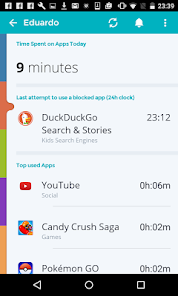
• Screen-Time - know how much time your children spent on games, chats, social apps
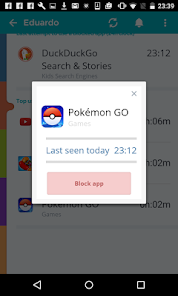
• Time limits – set limits for application and website use or block them entirely
• Real Time Alerts – be always on top of things and help your children when needed
• Low battery notification – know when you children run out of battery
GETTING STARTED
1. First, download and install Surfie Parent on your parent phone
2. Add a child profile
3. Send the install link for Surfie Kids to your child’s mobile device
4. Download and install Surfie Kids on your child’s phone
5. Follow the install wizard, you will get a success message once you are done
SUPPORT AND FEEDBACK
https://puresight.com/Support/support.html
PRIVACY POLICY
https://www.puresight.com/privacy-policy/
ADDITIONAL PRODUCTS
Child App & Parent Web portal accessible from any place, at any time.
Surfie Parent alerts you when your children are cyber-bullied on WhatsApp, Instagram, Facebook and Viber. With Surfie Parent you can limit your children’s screen-time and block applications and inappropriate websites. You can set location alerts to know that your children left home on time and arrived safely at school.
Surfie Kids gives you the exact parenting tools you need to take an active part in the online life of your children.
FEATURES
• Easy install process – just a few steps and your children are protected
• Cyber-bullying – monitor foul language on WhatsApp, Instagram, Facebook and Viber
• Geofencing and location alerts -know when your children leave home, arrive at school,
• Location tracking – always know where your children are
• Dynamic Webfilter – state of the art webfilter to block adult, violence, drugs and more
• Screen-Time - know how much time your children spent on games, chats, social apps
• Time limits – set limits for application and website use or block them entirely
• Real Time Alerts – be always on top of things and help your children when needed
• Low battery notification – know when you children run out of battery
GETTING STARTED
1. First, download and install Surfie Parent on your parent phone
2. Add a child profile
3. Send the install link for Surfie Kids to your child’s mobile device
4. Download and install Surfie Kids on your child’s phone
5. Follow the install wizard, you will get a success message once you are done
SUPPORT AND FEEDBACK
https://puresight.com/Support/support.html
PRIVACY POLICY
https://www.puresight.com/privacy-policy/
ADDITIONAL PRODUCTS
Child App & Parent Web portal accessible from any place, at any time.
Updated on
Safety starts with understanding how developers collect and share your data. Data privacy and security practices may vary based on your use, region, and age. The developer provided this information and may update it over time.

No data shared with third parties
Learn more about how developers declare sharing

No data collected
Learn more about how developers declare collection

Data is encrypted in transit

You can request that data be deleted
Ratings and reviews
3.6
190 reviews

Natasha D
- Flag inappropriate
November 7, 2020
Was reluctant to use this because of reviews but it's been a lifesaver. Only get notified if certain key words come up (algorithm is thorough!) picks up potential concerns and means I don't have to read through tons of personal messages and invade privacy unless a conversation is needed. Used free trial and just signed up. £4 a month is something I am very happy to pay for this service.
3 people found this review helpful
PureSight Technologies
November 9, 2020
Thank you for your nice words and please be assured that we are working very hard, day by day, to make our products better and better.Please share the app with your friends to keep more children protected from the increasing hazards of the Internet.We have this option on the Family Overview screen/Settings/Share with Friends. The Surfie Team

A Google user
- Flag inappropriate
June 10, 2019
some features are nice like the real time monitoring but I have paired this app with MMguardian app because the location indicator fails. it does not update often enough and just now when my child's phone is turned off it is saying we are 2 cities away (near where we went out for supper last might) and the phone is currently active yet it cant be when the battery is at 0%. I find the mmguardian and surfie app pair well together though because they make up for each others flaws
7 people found this review helpful

Einat Lotan
- Flag inappropriate
April 17, 2021
For a start, the gps based tracking feature is so poor, I keep getting notifications that my kids just left home, while they are home and even when their phones are charging and no one touches them. Secondly, the algorithm for website filtering keeps blocking totally innocent websites. The use of color for notifications is unclear and doesn't make sense (along with the total ux of the app). Lastly, I need an app that tracks not only their use of mobile phone, but also of their desktop usage.
PureSight Technologies
April 20, 2021
Hello Einat
As for the two issues please contact us using email support@puresight.com
For further assistance
As for desktop protection, this can be done by adding another profile but this time choose "Family Device" instead of "Child" and follow the set up wizard
PureSight Support
What's new
bug fix
App support
About the developer
PURESIGHT TECHNOLOGIES LTD
support@puresight.com
23 Hataas
KFAR SABA, 4442525
Israel
+972 54-521-2451