
Quicken Classic: Companion App
3.0star
4.3K reviews
500K+
Downloads

Everyone
info




About this app
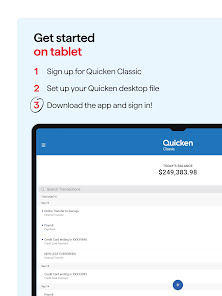
Quicken Classic is designed for existing customers. If you're not a current Quicken Classic desktop subscriber, you can either visit www.quicken.com/products to download our top personal finance software or signup through the Quicken Simplifi mobile app.
Using the App
Quicken Classic is currently available on Android mobile or tablet devices running 4.1 or higher. Windows Phone and Blackberry are not supported at this time.
Stay Connected to Your Money. Anytime, Anywhere
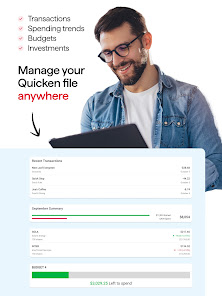
• Automatically syncs your desktop and mobile data
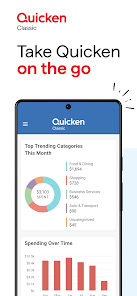
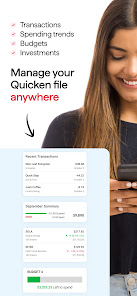
• View your balances, accounts, and transactions
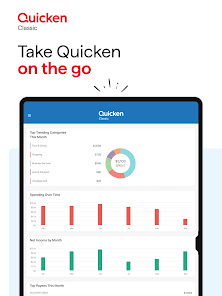
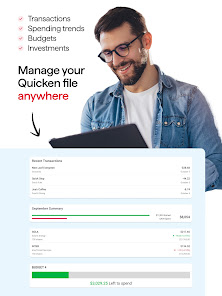
• See spending trends and check your budget
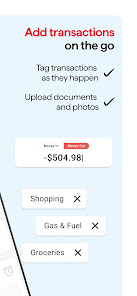
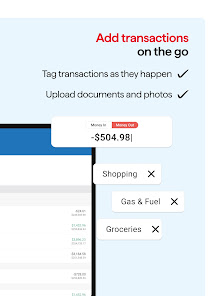
• Enter transactions as you spend even when you are not connected to the internet
• Search transaction history
• Split transactions for an accurate view of spending
• Snap and store a picture of your receipt
Feel Confidence Your Information is Secure
• Passcode-protected and backed by 256-bit encryption
• Additional security with passcode protection
• Data access guarantee: Always have full access to and ownership of your data
A Trusted Name in Personal Finance Management
Our products are backed with 40+ years of experience helping people lead healthier financial lives.
Security
We’re serious about protecting your account and privacy. Visit https://www.quicken.com/privacy/us to learn more
Privacy
If you are a California resident, please refer to the new privacy guidelines set forth by The California Consumer Privacy Act on information sharing. If you would like to opt-out of the sale of your personal information as defined by these new guidelines, please go to http://www.quicken.com/privacy
Using the App
Quicken Classic is currently available on Android mobile or tablet devices running 4.1 or higher. Windows Phone and Blackberry are not supported at this time.
Stay Connected to Your Money. Anytime, Anywhere
• Automatically syncs your desktop and mobile data
• View your balances, accounts, and transactions
• See spending trends and check your budget
• Enter transactions as you spend even when you are not connected to the internet
• Search transaction history
• Split transactions for an accurate view of spending
• Snap and store a picture of your receipt
Feel Confidence Your Information is Secure
• Passcode-protected and backed by 256-bit encryption
• Additional security with passcode protection
• Data access guarantee: Always have full access to and ownership of your data
A Trusted Name in Personal Finance Management
Our products are backed with 40+ years of experience helping people lead healthier financial lives.
Security
We’re serious about protecting your account and privacy. Visit https://www.quicken.com/privacy/us to learn more
Privacy
If you are a California resident, please refer to the new privacy guidelines set forth by The California Consumer Privacy Act on information sharing. If you would like to opt-out of the sale of your personal information as defined by these new guidelines, please go to http://www.quicken.com/privacy
Updated on
Safety starts with understanding how developers collect and share your data. Data privacy and security practices may vary based on your use, region, and age. The developer provided this information and may update it over time.

No data shared with third parties
Learn more about how developers declare sharing

This app may collect these data types
Location, Personal info and 3 others

Data is encrypted in transit
Ratings and reviews
3.0
3.87K reviews

A Google user
- Flag inappropriate
- Show review history
July 16, 2024
Mobile problems since updating to 2018 subscription model. Won't be upgrading next year. App used to work great. Now it does not work at all. Keep deleting register to reset state and only works a couple of days before going out of sync with everything. Update: I am updating my review to 5 stars. I think since my review, there have been changes that make the app work great now. I am happy they were able to "right" the ship.
6 people found this review helpful
A Google user
- Flag inappropriate
- Show review history
June 26, 2024
The app works, but I must load it twice to get all my accounts displaying correctly. Otherwise, it tells me there is a problem with my accounts. I have contacted Quicken support several times about this issue, but they dont know for sure why it is happening. Quicken should be able to resolve something like this. My above review was months back, and this problem is ongoing. I have removed a star from my rating of the app. In all fairness, I really like Quicken software, but this app needs work.
10 people found this review helpful

jasoncollege24
- Flag inappropriate
- Show review history
May 21, 2024
I've been using the Quicken Classic desktop app for several months now and have no problems with it. This mobile app is MUCH improved from what it was. However, when I logged out and back in to reset web sync, it stopped asking for login credentials, including biometrics. I also can't change any settings anymore.
56 people found this review helpful
What's new
Improved:
Minor code improvement.
Minor code improvement.


