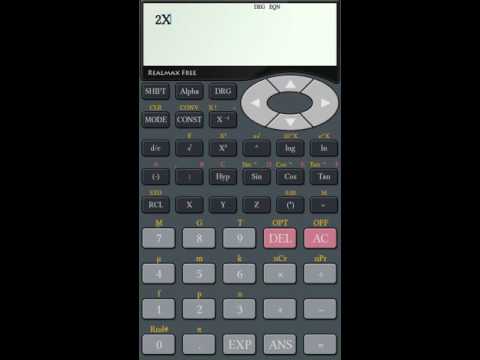

RealMax Scientific Calculator
Contains ads

star
18.1K reviews

Everyone
info
1M+
Downloads

Everyone
Learn more


About this app
RealMax Scientific Calculator - Advanced Calculator for Students & Engineers
The most powerful scientific calculator app for Android. Trusted by 1 million+ users worldwide for academic, engineering, and professional calculations.
Whether you're a high school student, university engineer, or working professional - RealMax gives you the precision and power of a physical fx-991 series calculator, right on your phone.
KEY FEATURES
SCIENTIFIC CALCULATIONS
- Full trigonometric and hyperbolic functions
- Logarithmic and exponential calculations
- Complex number support
- Fraction calculator with ab/c input
- Degree, Radian, and Gradian modes
GRAPHING AND EQUATIONS
- Graph plotting and visual graphing calculator
- Solve linear and polynomial equations
- Matrix operations including add, multiply, and invert
ENGINEERING TOOLS
- Base-N support for HEX, DEC, OCT, BIN
- Unit conversions for scientific and engineering
- 40+ predefined scientific constants
- DMS (Degree, Minute, Second) calculations
- 10 user-defined variable slots
SMART FEATURES
- History to review last 100 calculations
- Samsung Multi-Window multitasking support
- Clean and intuitive Casio-style interface
PERFECT FOR
- High school and university students
- Engineers and scientists
- Math and physics professionals
- Anyone needing a reliable scientific calculator
WHAT USERS SAY
"Very similar in layout to the Casio Scientific calculators" - 5 stars
"The best calculator app I have used so far" - 5 stars
Want an ad-free experience? Search 'RealMax Scientific Calculator Pro' on the Play Store to upgrade!
Support: realmaxsoftlk@gmail.com
Website: www.realmaxsoft.com
We constantly improve based on your feedback. Please rate us if you enjoy the app!
The most powerful scientific calculator app for Android. Trusted by 1 million+ users worldwide for academic, engineering, and professional calculations.
Whether you're a high school student, university engineer, or working professional - RealMax gives you the precision and power of a physical fx-991 series calculator, right on your phone.
KEY FEATURES
SCIENTIFIC CALCULATIONS
- Full trigonometric and hyperbolic functions
- Logarithmic and exponential calculations
- Complex number support
- Fraction calculator with ab/c input
- Degree, Radian, and Gradian modes
GRAPHING AND EQUATIONS
- Graph plotting and visual graphing calculator
- Solve linear and polynomial equations
- Matrix operations including add, multiply, and invert
ENGINEERING TOOLS
- Base-N support for HEX, DEC, OCT, BIN
- Unit conversions for scientific and engineering
- 40+ predefined scientific constants
- DMS (Degree, Minute, Second) calculations
- 10 user-defined variable slots
SMART FEATURES
- History to review last 100 calculations
- Samsung Multi-Window multitasking support
- Clean and intuitive Casio-style interface
PERFECT FOR
- High school and university students
- Engineers and scientists
- Math and physics professionals
- Anyone needing a reliable scientific calculator
WHAT USERS SAY
"Very similar in layout to the Casio Scientific calculators" - 5 stars
"The best calculator app I have used so far" - 5 stars
Want an ad-free experience? Search 'RealMax Scientific Calculator Pro' on the Play Store to upgrade!
Support: realmaxsoftlk@gmail.com
Website: www.realmaxsoft.com
We constantly improve based on your feedback. Please rate us if you enjoy the app!
Advanced Scientific Calculator for Math, Engineering, and Technical Analysis
Updated on
Safety starts with understanding how developers collect and share your data. Data privacy and security practices may vary based on your use, region, and age. The developer provided this information and may update it over time.


Ratings and reviews
17.6K reviews

Paul Rhodes
- Flag inappropriate
May 21, 2020
Very nice to use, and very similar in layout to the Casio Scientific calculators from 1980 to 2010, but with the addition of 5 or 6 extra independent memories, and an undo key! A big improvement on so many of the orher "micky mouse" calculator apps available. Adverts do pop up occasionally after pressing the equals key, but they can be swiftly dismissed by pressing the back key.
166 people found this review helpful

A Google user
- Flag inappropriate
April 14, 2020
it's a good calculator. I had uninstalled it because of the fullscreen ads in the middle of calculations. I just learned from the developers that these ads are only three times per day and I think I can live with that.. I really like the style (calculation on the top - result at the bottom). I just reinstalled it!
6 people found this review helpful
RealMax LK
April 14, 2020
App only shows maximum of 3 ads per day. You will not see more than 3 ads per day.
A Google user
- Flag inappropriate
November 14, 2019
The best calculator app I have used so far. But in the recent update there's a problem. While pressing and holding the 'DEL' key to delete multiple digits, the settings menu pops up. Settings menu should only appear while pressing SHIFT+ DEL keys. Anyway still 5 stars for this highly functional calculator.
1 person found this review helpful
What’s new
Crash fixes
Everyone
Learn moreApp support
About the developer
K W S Chandana
realmaxsoftlk@gmail.com
584/12
Mahakatuwana Road
Homagama 10200
Sri Lanka


