Script Rehearser
In-app purchases
4.1star
1.88K reviews
100K+
Downloads

Everyone
info





About this app
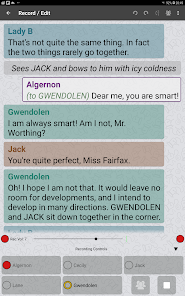
Hit the ground running. Save yourself hours and turn up knowing your lines. Whether it’s a stage script, screenplay, speech or presentation, you can rehearse and memorize on the go in an effective and convenient way. There’s no need to assemble the rest of the cast, or have a rehearsal partner or reader.
Actors, TV personalities, business people, public speakers and students - learn your material more effectively with Script Rehearser. You can even practice English language conversation.
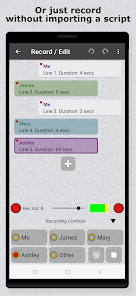
You can just start recording your own voice straight away. Or you can import your theater or movie script* or simply type in your lines. Script Rehearser will read them back to you whenever you want using its customizable options to prompt you. Optimize how you rehearse as you progress.
Features include:
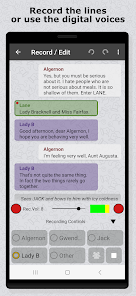
• Record your own voice directly into the app †
• Use digital voices for the other characters †
• Import a script from a PDF file ‡
• Import a script you've created on your PC or Mac, or just type it into your device
• Customize scripts with your own notes and stage directions
• Clearly distinguish your lines from others
• Show your lines; hide you lines; show the first letter of each word
• Play the whole script, or skip forward to your next cue
• Play other parts while you self-tape
• Share the recorded script †
• Choose light or dark color mode
• Designed for phones and tablets
Script Rehearser can be configured to support your personal learning style. For example:
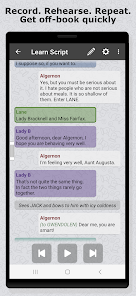
• Listen Along. Script Rehearser speaks, you listen. You can play, pause, and jump forward to your next line or back to your previous one.
• Wait For Me. Script Rehearser pauses for each of your lines until you’re ready to continue
• Repeat for Confirmation. Script Rehearser leaves a gap for you to say the line, then automatically speaks the line for confirmation and carries on
• Run Through. Script Rehearser leaves a gap for you to say your line, then automatically carries on with the next line
† Pro Features
To enable us to continue developing the app, the following are Pro features:
• Recording your own voice
• Choosing which digital voice to use for each character
• Exporting a script
There’s a 30-day free trial of Pro features, with no sign-up required and no automatic conversion to a paid subscription. After this you can keep using everything you’ve done, even if you don’t subscribe.
Keep in contact:
• For news and updates follow us on Twitter: @ScriptRehearser
• Find us on Facebook: www.facebook.com/ScriptRehearser
• Join us on our forum: www.ScriptRehearser.com
‡ Note that for a PDF file to import it must contain the text of the script, not just pictures of the text. Some PDFs contain scanned images of the text rather than the text itself, and the app can't import these files as it needs the actual text to work with.
Actors, TV personalities, business people, public speakers and students - learn your material more effectively with Script Rehearser. You can even practice English language conversation.
You can just start recording your own voice straight away. Or you can import your theater or movie script* or simply type in your lines. Script Rehearser will read them back to you whenever you want using its customizable options to prompt you. Optimize how you rehearse as you progress.
Features include:
• Record your own voice directly into the app †
• Use digital voices for the other characters †
• Import a script from a PDF file ‡
• Import a script you've created on your PC or Mac, or just type it into your device
• Customize scripts with your own notes and stage directions
• Clearly distinguish your lines from others
• Show your lines; hide you lines; show the first letter of each word
• Play the whole script, or skip forward to your next cue
• Play other parts while you self-tape
• Share the recorded script †
• Choose light or dark color mode
• Designed for phones and tablets
Script Rehearser can be configured to support your personal learning style. For example:
• Listen Along. Script Rehearser speaks, you listen. You can play, pause, and jump forward to your next line or back to your previous one.
• Wait For Me. Script Rehearser pauses for each of your lines until you’re ready to continue
• Repeat for Confirmation. Script Rehearser leaves a gap for you to say the line, then automatically speaks the line for confirmation and carries on
• Run Through. Script Rehearser leaves a gap for you to say your line, then automatically carries on with the next line
† Pro Features
To enable us to continue developing the app, the following are Pro features:
• Recording your own voice
• Choosing which digital voice to use for each character
• Exporting a script
There’s a 30-day free trial of Pro features, with no sign-up required and no automatic conversion to a paid subscription. After this you can keep using everything you’ve done, even if you don’t subscribe.
Keep in contact:
• For news and updates follow us on Twitter: @ScriptRehearser
• Find us on Facebook: www.facebook.com/ScriptRehearser
• Join us on our forum: www.ScriptRehearser.com
‡ Note that for a PDF file to import it must contain the text of the script, not just pictures of the text. Some PDFs contain scanned images of the text rather than the text itself, and the app can't import these files as it needs the actual text to work with.
Updated on
Safety starts with understanding how developers collect and share your data. Data privacy and security practices may vary based on your use, region, and age. The developer provided this information and may update it over time.


Ratings and reviews
4.1
1.73K reviews

Corbin S
- Flag inappropriate
- Show review history
June 8, 2024
This helped me so much! Timed playback, prompts, PDF upload, rehearsal sections...and this is just the free version. I was able to take a picture of my script, copy the text from the picture, paste the text to a word doc, and print that as a PDF to upload into the app. After a few edits of the lines, rehearsing was a breeze. The voice is robotic, and I don't know if the paid version offers different voices, but it worked out well for me.
8 people found this review helpful

James Kiley
- Flag inappropriate
March 11, 2024
I was delighted at how easily I was able to convert - with the help of Google photos - scans of my script into usable lessons in this app. It wasn't perfect (the app reads "..." as "dot dot dot," and treats the dot in "Mr." or "Mrs." as a full stop) but it's still a fantastic experience and I'm glad I have access to it.
13 people found this review helpful

Comedy Shotgun
- Flag inappropriate
- Show review history
February 1, 2024
I would say it's a fantastic app. The only shortcomings are that it would be great to be able to insert audio files that were recorded elsewhere. It would make rehearsing for musicals so much better. Failing that, it would be nice to be able to raise or lower the volume of the lines you self tape after you've recorded them. To much of the time, even at volume 1 recording, your self taped lines are 3 times the volume of the robot voices. Now all that being said, the program is fantastic!
9 people found this review helpful
What's new
Introduced an AI-based Helpbot to get you going quickly and answer questions about using Script Rehearser. This is gradually being made available to all users of the app