
RemontTracker: Reno Budget


Everyone
info
50+
Downloads

Everyone
Learn more


About this app
RemontTracker is the complete renovation companion for US homeowners, landlords and contractors: control your budget, track every expense, compare estimates, and plan your interior — all in one place. No more lost receipts or confusing payments to contractors. One app for your renovation project, shopping list, actual spend, deposits to contractors, analytics and AI assistant.
🏠 Visual Interior Planner
Before buying materials or ordering furniture, draw your floor plan. A simple 2D tool for creating accurate wall, window and door layouts with furniture placement. Your plan automatically:
• Calculates wall and floor areas — instantly know how much tile, laminate or paint you need.
• Lets you move furniture straight into your shopping list — add a sofa, wardrobe or bed to the plan with one tap.
Auto-create Expenses from Push Notifications
Allow access — the app reads notifications from US banks (Chase, Bank of America, Wells Fargo, Capital One), marketplaces (Amazon, eBay, Home Depot, Lowe's) and delivery services. It recognises spending-like messages and creates a draft. Just confirm or delete.
Shopping List Planning
Create your list of what you need. Tick items off — they move into your spending history. Filter and sort by date, amount or name.
Contractor Deposits & Payments
Record transfers and work completed. The app shows the balance automatically: how much you have overpaid or still owe. All transactions are stored separately for each contractor.
Collaborative Access with Flexible Permissions
Invite your partner, project manager or client. Set permissions separately for shopping, estimates, contractors and rooms. Allow them to invite others.
Multiple Projects
Manage your house, rental property and office at the same time. Switch between them easily.
Analytics by Floor Area
Enter the floor area — get cost per square foot, planned vs actual for materials and labor.
AI Assistant in Chat
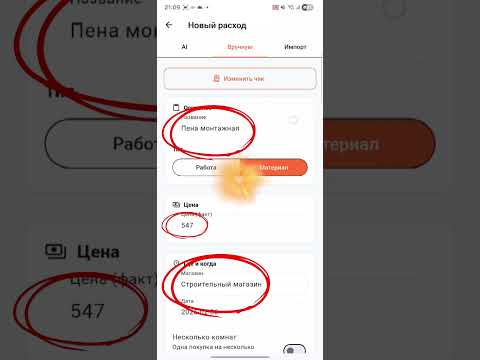
— Creates expenses by voice, text or product link (pulls name, price, retailer).
— Handles bulk input: multiple receipts, comma-separated lists or voice — all at once with a single preview.
— Answers questions about the app and renovation (paint quantity, tool selection, work sequence).
AI recommendations are informational. Confirm exact calculations with a qualified contractor.
Quick Expense Entry
— By receipt photo (one or multiple, up to 20 MB).
— By text, comma-separated or line by line.
— By voice (hold the AI button).
— By marketplace link.
— Import from Excel and PDF (up to 50 MB, 500 rows, manual column mapping).
— Via Telegram bot: /add (expense), /advance (deposit), or any text or receipt photo.
Analytics & Management
— Expenses by category, room, retailer, contractor.
— Separate "Retailers" screen — spend distribution and offers.
— Trends by day, week, month.
— Public report link (planned, actual, remaining, lists, contractor balances). The link is stable and can be sent to a client.
— Export to Excel with period selection and type separation.
— Filters: status, period, room, category, retailer, expense type, contractor (including "no contractor").
— Swipes: left — change status Buy/Bought, right — delete with undo.
— Bulk selection: change status, room, type, contractor, delete.
Settings
— Dark theme (Light, Dark, System).
— Customizable widgets on the home screen.
— Guest mode without registration with social login (Google, Facebook). Guest data is not restored on reinstall — link your account.
— Telegram bot syncs with the active project. Project switching only in the app.
Built-in Troubleshooting
Receipt not recognized → take a clear photo in bright light.
Session expired → log out and back in.
Who It's For
— For homeowners and landlords.
— For couples with a shared budget.
— For project managers and contractors (transparent reporting to clients).
— For anyone who prefers Telegram, voice and AI chat.
🏠 Visual Interior Planner
Before buying materials or ordering furniture, draw your floor plan. A simple 2D tool for creating accurate wall, window and door layouts with furniture placement. Your plan automatically:
• Calculates wall and floor areas — instantly know how much tile, laminate or paint you need.
• Lets you move furniture straight into your shopping list — add a sofa, wardrobe or bed to the plan with one tap.
Auto-create Expenses from Push Notifications
Allow access — the app reads notifications from US banks (Chase, Bank of America, Wells Fargo, Capital One), marketplaces (Amazon, eBay, Home Depot, Lowe's) and delivery services. It recognises spending-like messages and creates a draft. Just confirm or delete.
Shopping List Planning
Create your list of what you need. Tick items off — they move into your spending history. Filter and sort by date, amount or name.
Contractor Deposits & Payments
Record transfers and work completed. The app shows the balance automatically: how much you have overpaid or still owe. All transactions are stored separately for each contractor.
Collaborative Access with Flexible Permissions
Invite your partner, project manager or client. Set permissions separately for shopping, estimates, contractors and rooms. Allow them to invite others.
Multiple Projects
Manage your house, rental property and office at the same time. Switch between them easily.
Analytics by Floor Area
Enter the floor area — get cost per square foot, planned vs actual for materials and labor.
AI Assistant in Chat
— Creates expenses by voice, text or product link (pulls name, price, retailer).
— Handles bulk input: multiple receipts, comma-separated lists or voice — all at once with a single preview.
— Answers questions about the app and renovation (paint quantity, tool selection, work sequence).
AI recommendations are informational. Confirm exact calculations with a qualified contractor.
Quick Expense Entry
— By receipt photo (one or multiple, up to 20 MB).
— By text, comma-separated or line by line.
— By voice (hold the AI button).
— By marketplace link.
— Import from Excel and PDF (up to 50 MB, 500 rows, manual column mapping).
— Via Telegram bot: /add (expense), /advance (deposit), or any text or receipt photo.
Analytics & Management
— Expenses by category, room, retailer, contractor.
— Separate "Retailers" screen — spend distribution and offers.
— Trends by day, week, month.
— Public report link (planned, actual, remaining, lists, contractor balances). The link is stable and can be sent to a client.
— Export to Excel with period selection and type separation.
— Filters: status, period, room, category, retailer, expense type, contractor (including "no contractor").
— Swipes: left — change status Buy/Bought, right — delete with undo.
— Bulk selection: change status, room, type, contractor, delete.
Settings
— Dark theme (Light, Dark, System).
— Customizable widgets on the home screen.
— Guest mode without registration with social login (Google, Facebook). Guest data is not restored on reinstall — link your account.
— Telegram bot syncs with the active project. Project switching only in the app.
Built-in Troubleshooting
Receipt not recognized → take a clear photo in bright light.
Session expired → log out and back in.
Who It's For
— For homeowners and landlords.
— For couples with a shared budget.
— For project managers and contractors (transparent reporting to clients).
— For anyone who prefers Telegram, voice and AI chat.
RemontTracker: Remodel Cost
Updated on
Safety starts with understanding how developers collect and share your data. Data privacy and security practices may vary based on your use, region, and age. The developer provided this information and may update it over time.
- This app may share these data types with third partiesPersonal info, App activity, and Device or other IDs
- No data collectedLearn more about how developers declare collection
- Data is encrypted in transit
- You can request that data be deleted


Everyone
Learn moreApp support
About the developer
Корчик Николай
gorilazzz777@gmail.com
Russia