

Colibri - Taiwan Receipt Scan
Contains adsIn-app purchases

4.5star
1.96K reviews
100K+
Downloads

Everyone
info

About this app
Using Colibri is quick and convenient to scan all of your Taiwan (Uniform Invoice) Receipts and check whether they won a Lottery Prize.
Key features
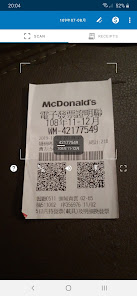
- Scan any receipt from text (traditional and electronic) or QR code (electronic)
QR Codes are sometimes damaged and unreadable - relax, as you can always rely on Text Scanning.
- Scan the receipt number AND its valid period
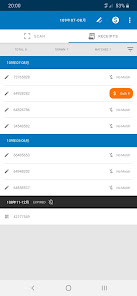
If you want to check a big chaotic pile of receipts - no problem for Colibri. It automatically matches the receipt number with its valid period and keeps them grouped together. Don't get confused, just quickly scan and let Colibri do the numbers job.
- Save scanned numbers and periods
You can scan receipts of upcoming periods and check them later. They will be displayed and sorted for you.
- Scanning works completely offline
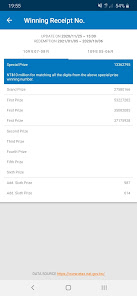
Scanning does not require an active internet connection. However, if you want to check for the Lottery Prizes, initially (and about every 2 months), Colibri will need an internet connection to download the recent official Taiwan invoice lottery numbers.
Happy Scanning and GOOD LUCK!
Please keep in mind: the performance and accuracy of text recognition also depends on a lot of factors like illumination, print quality, as well as your phone's hardware (e.g., camera). In general, it is suggested to first try and scan the QR code as it is more failure-proof - and even faster.
Key features
- Scan any receipt from text (traditional and electronic) or QR code (electronic)
QR Codes are sometimes damaged and unreadable - relax, as you can always rely on Text Scanning.
- Scan the receipt number AND its valid period
If you want to check a big chaotic pile of receipts - no problem for Colibri. It automatically matches the receipt number with its valid period and keeps them grouped together. Don't get confused, just quickly scan and let Colibri do the numbers job.
- Save scanned numbers and periods
You can scan receipts of upcoming periods and check them later. They will be displayed and sorted for you.
- Scanning works completely offline
Scanning does not require an active internet connection. However, if you want to check for the Lottery Prizes, initially (and about every 2 months), Colibri will need an internet connection to download the recent official Taiwan invoice lottery numbers.
Happy Scanning and GOOD LUCK!
Please keep in mind: the performance and accuracy of text recognition also depends on a lot of factors like illumination, print quality, as well as your phone's hardware (e.g., camera). In general, it is suggested to first try and scan the QR code as it is more failure-proof - and even faster.
Updated on
Safety starts with understanding how developers collect and share your data. Data privacy and security practices may vary based on your use, region, and age. The developer provided this information and may update it over time.


Ratings and reviews
4.4
1.93K reviews

Yuri
- Flag inappropriate
July 5, 2024
Easy to use, not just qr code but also those receipts that doesn't have qr code can be easily tracked by this app👍👍👍 it's just that it is only available on Android devices.

David Potvin
- Flag inappropriate
- Show review history
July 12, 2020
Fantastic app that scans your lottery receipts, easy to use. It'll actually try to read the ticket's numbers if the QR code is damaged. This makes it easy for when you have receipts that don't have QR codes, too. It'll also detect if your ticket is from a previous lottery draw. Plus, it's in English! I've used a few other apps and this one is by far the best. Note: Only once did it make a mistake reading a receipt, but it was trying to read the numbers, but the numbers were quite washed out.
18 people found this review helpful

Huzaifa Essajee
- Flag inappropriate
April 19, 2021
Great app! Works very smoothly and the recent update to include the flashlight option helps. It can read both text and QR codes from the receipts. I recently factory reset my phone and it took only a few minutes to scan all the receipts after I lined them up next to each other. This is handy for those who don't speak Chinese. If a Chinese speaker knew some English, they could also use this app.
9 people found this review helpful
What's new
• UI fixups