
Checkout

Everyone
info
5+
Downloads

Everyone
Learn more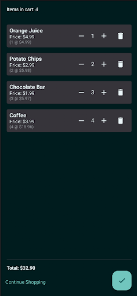


About this app
Checkout
Your all-in-one Point of Sale, right from your Android device.
Accept Payments Your Way
Take payments however your customers prefer. Sahora Checkout supports cash, Google Pay, and credit/debit cards via Stripe — including Tap to Pay on NFC-enabled devices. No dedicated terminal hardware needed.
Manage Your Inventory
Add products with photos, prices, barcodes, and categories. Scan barcodes to instantly look up items. Get automatic low-stock alerts so you never run out of your best sellers.
Fast, Flexible Checkout
Build orders quickly from your product catalog. Apply discounts and coupons, capture customer names, and add order notes — all before selecting a payment method.
Professional Receipts
Generate clean, branded receipts with your business name, address, and contact info. Share digitally via email or messaging, or print directly to a Bluetooth or USB thermal printer.
Easy Returns
Look up any past transaction by scanning the receipt barcode. Process full or partial returns with per-item quantity selection and automatic refund calculation back to the original payment method.
Sales Insights at a Glance
Track your business performance with built-in analytics:
Daily revenue trends
Top-selling products
Sales by category
Transaction counts and averages
Filter by date range to see exactly how your store is performing.
Built for Teams
Onboard employees in seconds — generate a QR code from the Back Office, and your staff scans it to register and start selling. Each team member gets their own secure login.
Multi-Store Ready
Running more than one location? Sahora Checkout supports multi-tenant operations — each store gets its own isolated products, sales data, settings, and team members.
Works Offline
No internet? No problem. Sahora Checkout stores everything locally and syncs automatically when you're back online. Your sales never stop.
Manage Everything from the Back Office
Configure your business name, tax rates, accepted payment methods, and payment credentials from the Sahora Back Office web dashboard. Changes sync to your devices automatically.
Requirements
Android 8.0 or later
Google Play Services (for Google Pay)
NFC capability (for Tap to Pay — optional, falls back to manual card entry)
Your all-in-one Point of Sale, right from your Android device.
Accept Payments Your Way
Take payments however your customers prefer. Sahora Checkout supports cash, Google Pay, and credit/debit cards via Stripe — including Tap to Pay on NFC-enabled devices. No dedicated terminal hardware needed.
Manage Your Inventory
Add products with photos, prices, barcodes, and categories. Scan barcodes to instantly look up items. Get automatic low-stock alerts so you never run out of your best sellers.
Fast, Flexible Checkout
Build orders quickly from your product catalog. Apply discounts and coupons, capture customer names, and add order notes — all before selecting a payment method.
Professional Receipts
Generate clean, branded receipts with your business name, address, and contact info. Share digitally via email or messaging, or print directly to a Bluetooth or USB thermal printer.
Easy Returns
Look up any past transaction by scanning the receipt barcode. Process full or partial returns with per-item quantity selection and automatic refund calculation back to the original payment method.
Sales Insights at a Glance
Track your business performance with built-in analytics:
Daily revenue trends
Top-selling products
Sales by category
Transaction counts and averages
Filter by date range to see exactly how your store is performing.
Built for Teams
Onboard employees in seconds — generate a QR code from the Back Office, and your staff scans it to register and start selling. Each team member gets their own secure login.
Multi-Store Ready
Running more than one location? Sahora Checkout supports multi-tenant operations — each store gets its own isolated products, sales data, settings, and team members.
Works Offline
No internet? No problem. Sahora Checkout stores everything locally and syncs automatically when you're back online. Your sales never stop.
Manage Everything from the Back Office
Configure your business name, tax rates, accepted payment methods, and payment credentials from the Sahora Back Office web dashboard. Changes sync to your devices automatically.
Requirements
Android 8.0 or later
Google Play Services (for Google Pay)
NFC capability (for Tap to Pay — optional, falls back to manual card entry)
An all-in-one P0S system for Android devices.
Updated on
Safety starts with understanding how developers collect and share your data. Data privacy and security practices may vary based on your use, region, and age. The developer provided this information and may update it over time.


What’s new
Sahora Checkout v1.0 — What's New
Accept Payments Your Way
Take payments however your customers prefer. Sahora Checkout supports cash, and credit/debit cards — including Tap to Pay on NFC-enabled devices.
- Fast, Flexible Checkout
- Professional Receipts
- Easy Returns
- Built for Teams
- Multi-Store Ready
- Manage Everything from the Back Office
Requirements
Android 8.0 or later
Google Play Services (for Google Pay)
NFC capability (for Tap to Pay — optional, falls back to manual card entry)
Accept Payments Your Way
Take payments however your customers prefer. Sahora Checkout supports cash, and credit/debit cards — including Tap to Pay on NFC-enabled devices.
- Fast, Flexible Checkout
- Professional Receipts
- Easy Returns
- Built for Teams
- Multi-Store Ready
- Manage Everything from the Back Office
Requirements
Android 8.0 or later
Google Play Services (for Google Pay)
NFC capability (for Tap to Pay — optional, falls back to manual card entry)
Everyone
Learn moreApp support
About the developer
Sahora Solutions Inc.
chris@sahorasolutions.com
40 Burnview Cres
TORONTO, ON M1H 1B7
Canada
+1 647-594-0033