Saregama Carvaan
In-app purchases
2.5star
3.37K reviews
500K+
Downloads

Everyone
info








About this app
Saregama Carvaan app connects to your Carvaan device and enables you to listen to songs, create playlists and discover your favourite retro songs on Carvaan.
The app is compatible with Carvaan Premium, Carvaan Gold, Carvaan 2.0, Carvaan Gold 2.0, Carvaan Karaoke, Carvaan Mini+, Carvaan Musicbar and Carvaan GO.
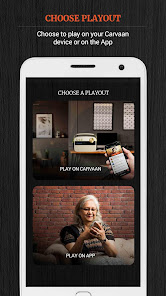
The app is categorized into 2 sections:
PLAY ON CARVAAN
Use this section of the app when you are listening to your Carvaan at home. This app enables you to browse through the library of old songs that are pre-loaded on your Carvaan.
This section works like a remote to control playout of songs on your Carvaan device. Use this section in conjunction with your Carvaan unit only.
This is what you can do in this section:
• Play a song on Carvaan unit
• Search for your favourite song
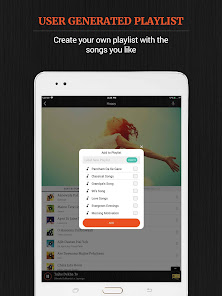
• Create playlists of your choice
• Control song playout volume
PLAY ON APP
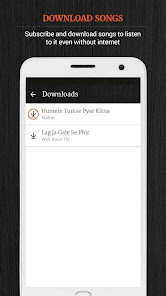
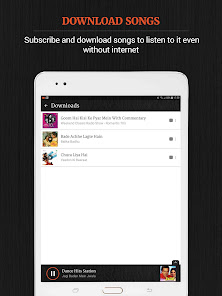
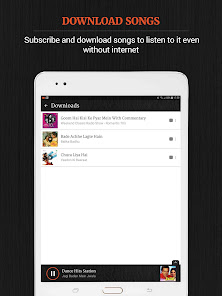
This subscription based section allows you to stream and download your favourite songs on the Saregama Carvaan App. Connect the app to your Carvaan device at least once to subscribe and use this section. Once connected, you can subscribe and listen to the songs you like on the go.
This section is available for Carvaan Premium, Carvaan Gold, Carvaan 2.0, Carvaan Gold 2.0, Carvaan Karaoke and Carvaan GO.
APP FEATURES:
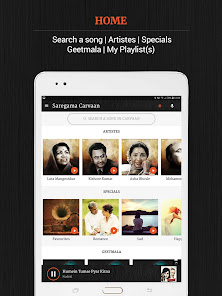
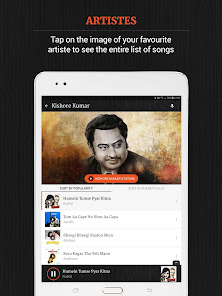
• View the entire list of songs
a. Connect your Carvaan and the app to enjoy all songs in the unit. Whether its Mohammed Rafi, Kishore Kumar, Lata Mangeshkar, Shashi Kapoor or Amitabh Bachchan, songs across all these artistes are available on the app. The songs for connected Carvaan will can be viewed on the app. the songs across
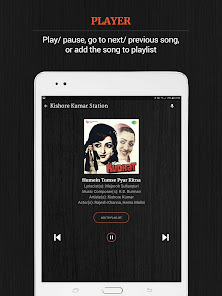
• Listen to the songs you like
a. Now that you have the entire song list in front of you, play songs as per your choice. We believe it’s the perfect way to enjoy our range of specially curated songs
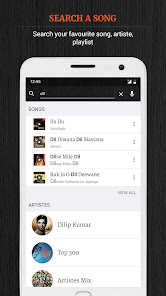
• Search for a specific song
a. Can’t find the songs that you like? Bored to scroll through the entire list of songs? Not a problem. Type in the name of the artiste like Gulzar, Asha Bhosle or any other to view a list of all their songs. Or if you are looking for something specific, simply type the song name / album name and search
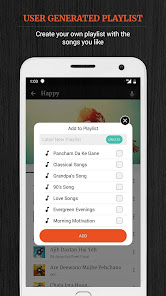
• Make your own playlists
a. You can create multiple playlists on the app. Make a playlist for different parts of the day or a variety of moods. We love to name our playlists The Happy List, Best of Romance, Non-stop Dance and Ghazals for the Soul. So go ahead, be creative. Give your playlist a fun name and add songs to go with it
Supported by:
* Android: 5 and above
Love the Saregama Carvaan app?
Facebook: https://www.facebook.com/saregama/
Instagram: https://www.instagram.com/saregama_official/
Twitter: https://twitter.com/saregamaglobal
* Please help us improve your experience by emailing to feedback@saregama.com
* Don’t forget to rate the app & also write a review
The app is compatible with Carvaan Premium, Carvaan Gold, Carvaan 2.0, Carvaan Gold 2.0, Carvaan Karaoke, Carvaan Mini+, Carvaan Musicbar and Carvaan GO.
The app is categorized into 2 sections:
PLAY ON CARVAAN
Use this section of the app when you are listening to your Carvaan at home. This app enables you to browse through the library of old songs that are pre-loaded on your Carvaan.
This section works like a remote to control playout of songs on your Carvaan device. Use this section in conjunction with your Carvaan unit only.
This is what you can do in this section:
• Play a song on Carvaan unit
• Search for your favourite song
• Create playlists of your choice
• Control song playout volume
PLAY ON APP
This subscription based section allows you to stream and download your favourite songs on the Saregama Carvaan App. Connect the app to your Carvaan device at least once to subscribe and use this section. Once connected, you can subscribe and listen to the songs you like on the go.
This section is available for Carvaan Premium, Carvaan Gold, Carvaan 2.0, Carvaan Gold 2.0, Carvaan Karaoke and Carvaan GO.
APP FEATURES:
• View the entire list of songs
a. Connect your Carvaan and the app to enjoy all songs in the unit. Whether its Mohammed Rafi, Kishore Kumar, Lata Mangeshkar, Shashi Kapoor or Amitabh Bachchan, songs across all these artistes are available on the app. The songs for connected Carvaan will can be viewed on the app. the songs across
• Listen to the songs you like
a. Now that you have the entire song list in front of you, play songs as per your choice. We believe it’s the perfect way to enjoy our range of specially curated songs
• Search for a specific song
a. Can’t find the songs that you like? Bored to scroll through the entire list of songs? Not a problem. Type in the name of the artiste like Gulzar, Asha Bhosle or any other to view a list of all their songs. Or if you are looking for something specific, simply type the song name / album name and search
• Make your own playlists
a. You can create multiple playlists on the app. Make a playlist for different parts of the day or a variety of moods. We love to name our playlists The Happy List, Best of Romance, Non-stop Dance and Ghazals for the Soul. So go ahead, be creative. Give your playlist a fun name and add songs to go with it
Supported by:
* Android: 5 and above
Love the Saregama Carvaan app?
Facebook: https://www.facebook.com/saregama/
Instagram: https://www.instagram.com/saregama_official/
Twitter: https://twitter.com/saregamaglobal
* Please help us improve your experience by emailing to feedback@saregama.com
* Don’t forget to rate the app & also write a review
Updated on
Safety starts with understanding how developers collect and share your data. Data privacy and security practices may vary based on your use, region, and age. The developer provided this information and may update it over time.

No data shared with third parties
Learn more about how developers declare sharing

This app may collect these data types
Personal info, Photos and videos, and Device or other IDs

Data isn’t encrypted

You can request that data be deleted
Ratings and reviews
2.5
3.34K reviews

Anil Gupta
- Flag inappropriate
- Show review history
January 29, 2022
The cure is worst than the disease. It just doesn't work including the radio device. It stuck where it is you just cannot maneuver the equipment and buttons do not work. Lots of flaws. No indication when fully charged. Ahh, who cares and waste time just will return the product for refund. Concept is great.
7 people found this review helpful
Saregama Carvaan
January 29, 2022
Dear Sir/Madam,
We apologise for the inconvenience caused. Request you to share your complete details at feedback@saregama.com, we'll surely arrange to resolve your issue at the earliest.
Regards,
Team Saregama

Madhu Menon
- Flag inappropriate
May 18, 2021
Love my Caravan 2.0 Gold. I also got an 1 year play on app subscription. Good collection of songs and dynamic wifi contents. the look and feel is fine. Two problems with the app: 1. In "Play on App" mode, the app stops playing & there is no way to get the song to continue other than Killing & restarting the app. The most irritating thing after paying so much money. 2. No Chromecast option for Play on App. I want to play music through chromecast on high qual speakers but limited to bluetooth.
26 people found this review helpful
Saregama Carvaan
May 18, 2021
Dear Madhu, We are sorry that we didn't meet your expectations. Please let us know what we can do to improve. Drop us an email at carvaanapp@rpsg.in and we will definitely try to resolve the issue. Regards, Team Saregama

Pankaj Mishra
- Flag inappropriate
October 26, 2024
Saregama Carvaan is a fantastic app that allows users to easily access a wide variety of songs. The user-friendly interface makes it simple to navigate and find your favorite tunes. Whether you're on the go or relaxing at home, this app is perfect for music lovers of all ages. Need to add more Playlists/Songs.
Saregama Carvaan
October 29, 2024
Thank you for sharing your experience with us. We are happy to have this valuable feedback from you. We hope that the Carvaan App continues to give a delightful experience.
What's new
-Bug fixes and improvements.
App support
About the developer
Amit Kumar
feedback@saregama.com
Marol, Andheri East
1907, Daisy-18, Vasant Oasis
Mumbai, Maharashtra 400059
India
undefined