
لوحة المتابعة المدرسية


Everyone
info
0+
Downloads

Everyone
Learn more


About this app
A comprehensive school performance monitoring system and dashboard application that helps school leadership and staff organize plans and programs, distribute tasks and permissions, track performance indicators, and generate official reports ready for printing and sharing. The application fully supports both Arabic and English languages, with the ability to switch between them instantly at any time. It features a clear, modern interface suitable for phones, tablets, and desktop computers.
The application is based on a precise roles and permissions system: a single administrator account has full system management privileges, while user accounts are each granted specific permissions for each plan. This ensures that each user can only view and edit their own data within the sections they are authorized to access.
1. Main Screen:
- Dynamic school data cards (classification, number of students, phone number, email address, number of classes, study system, etc.) updated by the administrator and displayed immediately to everyone.
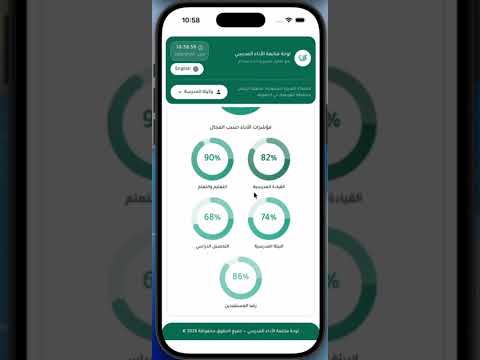
- General school performance indicators displayed as graphs illustrating achievement rates in various areas.
- Main section cards for navigating to plans, with login required based on permissions.
- Login and language switching between Arabic and English from the top of the screen at any time.
2. The Three Plan Sections:
- Operational Plan: Objectives, implementation programs, target groups, main and supporting implementing entities, performance indicators, dates, and links.
- Improvement Plan for the School Calendar: Standards, indicators, current and target levels, activities, implementation methods, implementation status, and evidence.
- Improvement Plan in the Supervisory Model: Areas and elements to be improved, and improvement procedures and methods.
3. Data Entry and Tables:
- Editable tables directly within cells with multiple field types (text, multi-line text, date, link, single checklist, multi-checklist).
- Add programs row by row, edit any cell, delete any row, with automatic saving of changes according to each user's ownership.
- Convenient display of wide tables with smooth horizontal scrolling for easy data entry and reading on small screens.
4. Reports and PDFs:
- View the plan in a neatly formatted table for quick reading.
- Preview the report on screen before printing. - Generate a PDF file in Arabic with the school letterhead and the release date and time, ready for printing or sharing.
5. Administrator Role (Full Permissions):
- Create the administrator's account for the first time via a dedicated setup screen.
- Access a control panel that includes account management (account settings, registration requests, users and permissions), plans, and data.
- Receive, review, and approve or reject new user registration requests based on their role and title.
- Precisely define each user's permissions: data entry sections and report viewing sections for each plan.
- Write plans, add programs, and define administrators and target groups.
- Add, edit, and delete school data cards that appear on the main screen for everyone.
6. User Role (Limited Permissions):
- Create a new account and specify the title/role (coordinator, leader, head or committee member, teacher, supervisor, parent).
- Submit the request to the administrator and await approval and permissions.
- Enter program data only within the authorized sections and view only their own data. - View, preview, and download assigned department reports in PDF format.
7. General Features:
- Full support for both Arabic and English languages with instant switching.
- Modern, responsive interface compatible with phones, tablets, and desktops.
- A precise role and permissions system that protects the privacy of each user's data.
- Automatic saving and secure cloud storage of data.
- Built-in user guide explaining the workflow for both administrators and users.
- Unified and elegant design with a school header, date, and time display.
The application is based on a precise roles and permissions system: a single administrator account has full system management privileges, while user accounts are each granted specific permissions for each plan. This ensures that each user can only view and edit their own data within the sections they are authorized to access.
1. Main Screen:
- Dynamic school data cards (classification, number of students, phone number, email address, number of classes, study system, etc.) updated by the administrator and displayed immediately to everyone.
- General school performance indicators displayed as graphs illustrating achievement rates in various areas.
- Main section cards for navigating to plans, with login required based on permissions.
- Login and language switching between Arabic and English from the top of the screen at any time.
2. The Three Plan Sections:
- Operational Plan: Objectives, implementation programs, target groups, main and supporting implementing entities, performance indicators, dates, and links.
- Improvement Plan for the School Calendar: Standards, indicators, current and target levels, activities, implementation methods, implementation status, and evidence.
- Improvement Plan in the Supervisory Model: Areas and elements to be improved, and improvement procedures and methods.
3. Data Entry and Tables:
- Editable tables directly within cells with multiple field types (text, multi-line text, date, link, single checklist, multi-checklist).
- Add programs row by row, edit any cell, delete any row, with automatic saving of changes according to each user's ownership.
- Convenient display of wide tables with smooth horizontal scrolling for easy data entry and reading on small screens.
4. Reports and PDFs:
- View the plan in a neatly formatted table for quick reading.
- Preview the report on screen before printing. - Generate a PDF file in Arabic with the school letterhead and the release date and time, ready for printing or sharing.
5. Administrator Role (Full Permissions):
- Create the administrator's account for the first time via a dedicated setup screen.
- Access a control panel that includes account management (account settings, registration requests, users and permissions), plans, and data.
- Receive, review, and approve or reject new user registration requests based on their role and title.
- Precisely define each user's permissions: data entry sections and report viewing sections for each plan.
- Write plans, add programs, and define administrators and target groups.
- Add, edit, and delete school data cards that appear on the main screen for everyone.
6. User Role (Limited Permissions):
- Create a new account and specify the title/role (coordinator, leader, head or committee member, teacher, supervisor, parent).
- Submit the request to the administrator and await approval and permissions.
- Enter program data only within the authorized sections and view only their own data. - View, preview, and download assigned department reports in PDF format.
7. General Features:
- Full support for both Arabic and English languages with instant switching.
- Modern, responsive interface compatible with phones, tablets, and desktops.
- A precise role and permissions system that protects the privacy of each user's data.
- Automatic saving and secure cloud storage of data.
- Built-in user guide explaining the workflow for both administrators and users.
- Unified and elegant design with a school header, date, and time display.
Updated on
Safety starts with understanding how developers collect and share your data. Data privacy and security practices may vary based on your use, region, and age. The developer provided this information and may update it over time.

No data shared with third parties
Learn more about how developers declare sharing

No data collected
Learn more about how developers declare collection

Data is encrypted in transit

You can request that data be deleted
What’s new
• إضافة قسم أرشيف الخطط المخصص للمسؤولة، مع إمكانية البحث عن الخطط السابقة حسب التاريخ وتعديلها وإضافة سجلات إليها.
• إضافة عرض ومعاينة وتحميل تقارير الخطط المؤرشفة بصيغة PDF.
• تحسين تنسيق حقول تصفية التاريخ على شاشات الجوال.
• تبسيط واجهات الخطة التشغيلية والتقارير.
• تحديث دليل استخدام لوحة التحكم وإجراء تحسينات عامة على الأداء والاستقرار.
• إضافة عرض ومعاينة وتحميل تقارير الخطط المؤرشفة بصيغة PDF.
• تحسين تنسيق حقول تصفية التاريخ على شاشات الجوال.
• تبسيط واجهات الخطة التشغيلية والتقارير.
• تحديث دليل استخدام لوحة التحكم وإجراء تحسينات عامة على الأداء والاستقرار.
Everyone
Learn moreApp support
phone
Phone number
+966598503596
About the developer
ALJAWDAH ALRAQMIYYAH ALSHAMILAH ESTABLISHMENT
info@digitalqualitysa.com
Building No. 2654,King Abdul Aziz Road,Alfayduh District
Al-Quway'iyah 19248
Saudi Arabia
+966 59 850 3596

