
DeepTrust Authenticator (OTP)


Everyone
info
1+
Downloads

Everyone
Learn more


About this app
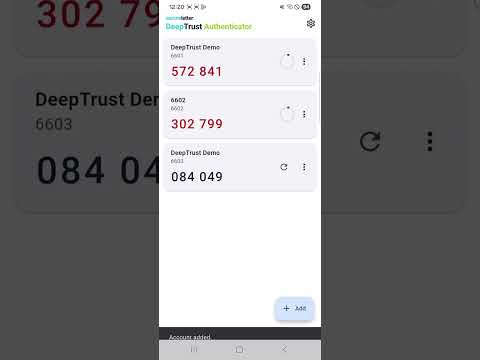
DeepTrust Authenticator generates one-time verification codes for two-step verification (2FA). Add your accounts once, then use the codes to sign in to the services you protect.
Codes are created on your device. The app needs no account, no sign-in, and no internet connection to generate them.
How it works
1. In a service's security settings, choose to set up an authenticator app.
2. In DeepTrust Authenticator, tap Add and scan the QR code, or enter the setup key by hand.
3. Enter the six-digit code shown in the app when the service asks for it.
Features
• Scan QR codes or enter a setup key manually
• Time-based codes (TOTP) that refresh automatically, with a countdown timer that turns red when time is almost up
• Counter-based codes (HOTP) with a Next code button
• Supports SHA-1, SHA-256, and SHA-512, with 6 to 10 digit codes
• Tap an account to copy its code
• Manage many accounts: edit names, delete accounts, and drag to reorder
• English and Korean language options
• Light, dark, or system theme
Privacy and security
• Account secrets are stored in your device's secure storage (Android Keystore)
• No account, no ads, no analytics, and no third-party tracking
• The camera is used only to scan setup QR codes, and images are not stored or sent anywhere
Important
Your accounts are kept only on your device. The app does not back up or sync them to the cloud. If you delete the app or lose your device, you will lose access to the codes. Keep the backup codes that each service gives you, so you can regain access to your accounts.
Works with any service that supports standard authenticator apps (TOTP/HOTP).
Generate 2FA verification codes on your device. Scan a QR code. Works offline.
Updated on
Safety starts with understanding how developers collect and share your data. Data privacy and security practices may vary based on your use, region, and age. The developer provided this information and may update it over time.
- No data shared with third partiesLearn more about how developers declare sharing
- No data collectedLearn more about how developers declare collection


What’s new
First release of DeepTrust Authenticator.
• Generate two-step verification (2FA) codes on your device
• Add accounts by scanning a QR code or entering a setup key
• Time-based (TOTP) and counter-based (HOTP) codes
• Tap to copy a code; edit, delete, and reorder accounts
• English and Korean, light and dark themes
• No account needed. Works offline.
Everyone
Learn moreApp support
phone
Phone number
+827042851264
About the developer
시큐어레터(주)
shna@secureletter.co.kr
대한민국 서울특별시 강남구
강남구 역삼로 225, 3,4층(역삼동, 동훈빌딩)
06224
+82 70-4285-1264