
CrossStitch Editor
Contains ads

star
1.72K reviews

Everyone
info
100K+
Downloads

Everyone
Learn more


About this app
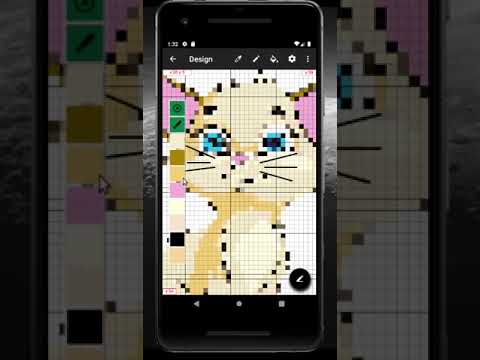
This tool allows you to create your own cross stitch pattern from image or create the blank one using popular flosses color palettes (DMC, Anchor, Gamma and more in Pro version). You are also able to draw pixel art designs. You can edit pattern, add or delete colors, fill single stitches or areas, draw geometrical figures and lines, you are able to use backstitches and halfstitches. It is possible to control color visibility and mark completed areas to provide convinient stitching from your device screen. If you want to print created pattern, you are able to export it to image or pdf-file.
Features:
- Create cross stitch designs up to 250 x 250 (9999 x 9999 in Pro version) in size and 48 colors (256 in Pro version).
- Create pixel art images up to 250 x 250 (9999 x 9999 in Pro version) in size and 48 colors (256 in Pro version).
- Convert any image or its portion to cross stitch design.
- Full featured editor: stitch color change, edit stitch type, fill areas, drawing shapes and more.
- Add text to design.
- Copy and paste.
- Stitching from device screen.
- Color palette editing: color change (in Pro version), color icon change.
- Palettes supported: DMC, Anchor, Gamma (and Cosmo, J&P Coats, Madeira, Paterna, Silk Mori in Pro version).
- Pattern Maker for cross-stitch .xsd files import.
- Sorting the palette (in Pro version).
- Several modes for selecting colors (in Pro version).
- Several modes for color icons (in Pro version).
- Export design to images or pdf file (in Pro version).
Features:
- Create cross stitch designs up to 250 x 250 (9999 x 9999 in Pro version) in size and 48 colors (256 in Pro version).
- Create pixel art images up to 250 x 250 (9999 x 9999 in Pro version) in size and 48 colors (256 in Pro version).
- Convert any image or its portion to cross stitch design.
- Full featured editor: stitch color change, edit stitch type, fill areas, drawing shapes and more.
- Add text to design.
- Copy and paste.
- Stitching from device screen.
- Color palette editing: color change (in Pro version), color icon change.
- Palettes supported: DMC, Anchor, Gamma (and Cosmo, J&P Coats, Madeira, Paterna, Silk Mori in Pro version).
- Pattern Maker for cross-stitch .xsd files import.
- Sorting the palette (in Pro version).
- Several modes for selecting colors (in Pro version).
- Several modes for color icons (in Pro version).
- Export design to images or pdf file (in Pro version).
Create and edit cross stitch designs.
Updated on
Featured stories

Safety starts with understanding how developers collect and share your data. Data privacy and security practices may vary based on your use, region, and age. The developer provided this information and may update it over time.
- No data shared with third partiesLearn more about how developers declare sharing
- No data collectedLearn more about how developers declare collection


Ratings and reviews
1.46K reviews

Help I'm in hell
- Flag inappropriate
January 26, 2026
A bit of a learning curve, but the in app "help" button was really helpful. Far more reliable than many others I've tried, although it does keep asking for folder permissions even after I've grated them. It's pretty simple to create your own patterns from scratch once you have the basics down. I really like that you can hide colours, makes it easier to find what I'm looking for in a pattern.

A Google user
- Flag inappropriate
April 10, 2020
I am having a ball with this!! Editing works well. I may have to move up to Pro! I would like to have more selection in the number of colors, some between 16 and 32 colors, but I assume that is also available in Pro. I found other's comments helpful. Export printing works well and I am wasting lots of paper to see changes! 😄
27 people found this review helpful

Stephanie Swonger
- Flag inappropriate
June 19, 2021
I really want to like this app...but to create your own design is frustrating. The entire canvas is 3865, and you cant switch to just the symbol unless you pay $8, which I'm not going to do if I'm already this irritated.... so if you are trying to add white to your design it's lost on the canvas. The colors are just blocks of color, which is no help if you have multiple colors. So, here is my suggestion. Allow us to use symbols and then for the paid app use color and symbols combined.
10 people found this review helpful
Serjth
June 19, 2021
You are able to use text search to add color. Did you notice the text field after you pressed "+" button? Pro version has more convenient features, color search and sort, color symbols and text mixture for example.
What’s new
- Add Android 14 storage support.
- Fix possible inverted colors inside Design screen in dark mode.
- Fix possible crash when converting an image.
- Fix possible inverted colors inside Design screen in dark mode.
- Fix possible crash when converting an image.
Everyone
Learn moreApp support
About the developer
Сергей Левин
support@levz.dev
пр. Шокальского 12
130
Москва
Russia
127642