SkyCharger
2.5star
651 reviews
50K+
Downloads

Everyone
info
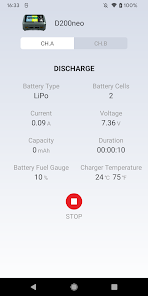
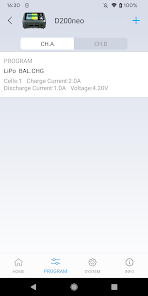
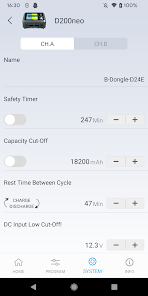
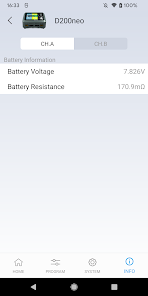
About this app
By using SkyCharger, SkyRC users can control their Bluetooth chargers remotely.
The users will find it convenient to be able to operate and control their chargers with this feature.
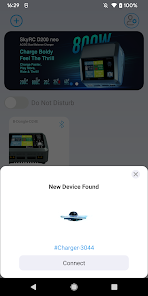
Turn on Bluetooth and launch the SkyCharger APP on your smartphone. The app will begin searching automatically. Click to connect then.
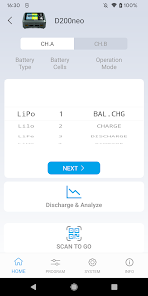
Once connected, operate the charger from your smartphone.
SkyCharger is compatible with these devices:
SK-100131 D100 v2
SK-100134 B6 NANO
SK-100146 B6 NANO DUO
SK-100158 Q200
SK-100174 B6 Nex
SK-100168 B6 EVO (optional part is in need)
SK-100181 NC2200 (optional part is in need)
The users will find it convenient to be able to operate and control their chargers with this feature.
Turn on Bluetooth and launch the SkyCharger APP on your smartphone. The app will begin searching automatically. Click to connect then.
Once connected, operate the charger from your smartphone.
SkyCharger is compatible with these devices:
SK-100131 D100 v2
SK-100134 B6 NANO
SK-100146 B6 NANO DUO
SK-100158 Q200
SK-100174 B6 Nex
SK-100168 B6 EVO (optional part is in need)
SK-100181 NC2200 (optional part is in need)
Updated on
Safety starts with understanding how developers collect and share your data. Data privacy and security practices may vary based on your use, region, and age. The developer provided this information and may update it over time.

No data shared with third parties
Learn more about how developers declare sharing

This app may collect these data types
Location, Personal info and 3 others

Data isn’t encrypted

You can request that data be deleted
Ratings and reviews
2.6
625 reviews

Alex Alex
- Flag inappropriate
January 2, 2026
The app is a disaster. If you have already saved the programs, when starting the charge, the battery type is changing. For example, a program saved for NiMH battery type, when pressing to start the charge, it automatically change to Li-Ion type and then you need to set again from the charger the correct type. Also, if the app was once opened and after a few minutes you open again the app, it does not connect again with the charger via Bluetooth until you kill the app and open it again.
4 people found this review helpful

Matthew Jeffries
- Flag inappropriate
- Show review history
November 3, 2025
I understand why someone might be upset at the additional permissions requested (Camera, Contacts, Location, Notifications, Phone) but I've simply disallowed this. Nearby Devices permission is required to access the charger via Bluetooth. Maybe devs could explain this or remove this requirement. The advertisement banner is not particularly intrusive, and the adverts I've seen have only been for SkyRC products. Bear in mind this app is free with the product, and don't need it to use the device
1 person found this review helpful

FuzzyJohn
- Flag inappropriate
- Show review history
September 24, 2025
I use the app with the MC5000 charger. I found no problems viewing and controlling the charger from the app. However, there are things that need to be addressed: Not clear what the "Do Not Disturb" switch does. Notifications? Please use 3 decimal digits for current. When I see 0.05A, on first glance, I see 5mA not 50mA. Make Loading and Saving programs more evident. When setting up Eneloop batteries, the size field remains blank. Please provide links for more Help and Contact Support in the app.
2 people found this review helpful
What’s new
Added support for NC3000 Octa.
App support
phone
Phone number
+18772203554
About the developer
天空创新科技(深圳)有限公司
lzm@skyrc.com
中国
广东省深圳市
龙华区观澜街道桂花社区观光路旁美泰科技园4号厂房 4,5,8层
邮政编码: 518109
+86 180 5993 0076


