
Olive Cast: Body Cam Video Rec

star
121 reviews

Everyone
info
10K+
Downloads

Everyone
Learn more


About this app
Jul 2021: We significantly re-wrote this app to support newer android versions. We have verified that this app works on most Samsung Phones including Xcover Pro and Xcover5. These are on Android 11 and Android 10.
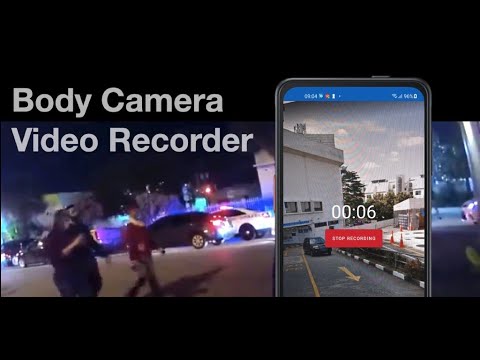
Olive Cast turns your smartphone into a body cam (Body Worn Camera). Designed for police, law enforcement, and security teams, the app records video that is automatically tagged with time and date.
*Never miss a frame: Records in Background and Screen Off*
As a security tool, getting all video is important. That’s why we have made Olive Cast to continue recording even if the app is not on the screen or if your screen is off. Download the free app to try for yourself.
*Quick Start: Start Recording via Buttons or Screen Toggle*
When incidents happen, using the on-screen button might take way too long to start recording. That’s why you can also Auto start on app launch. This works best on phones with programmable keys that can launch apps.
* Incident Information: Time, and Date Stamps *
Videos are automatically tagged with information that records when an incident took place.
*Video Storage*
Videos are recorded on the device. You can choose a location on internal storage or SDcard to store videos in. Because the users could still be accessed by users, uou should install other apps that prevent deletion of these files.
Why Use your Smartphone as a Body Cam?
OliveCast is positioned for users who do not need the high end features of Body Cameras.
Save Cost on Equipment - Allow your officers to carry one device that can be used for Guard Tour, Communication and also as a Body Cam. Save on additional equipment costs by streamlining and reusing current assets.
Send videos faster - Because Olivecast Body Camera runs on your smartphone, you can easily send the video file out when required via Email or WhatsApp
WiFi and Cloud Storage - Use Smartphone Apps like Google Drive or Dropbox to do automatic Syncing via WiFi. This is a much cheaper option that other vendor's backup options.
Olive Cast turns your smartphone into a body cam (Body Worn Camera). Designed for police, law enforcement, and security teams, the app records video that is automatically tagged with time and date.
*Never miss a frame: Records in Background and Screen Off*
As a security tool, getting all video is important. That’s why we have made Olive Cast to continue recording even if the app is not on the screen or if your screen is off. Download the free app to try for yourself.
*Quick Start: Start Recording via Buttons or Screen Toggle*
When incidents happen, using the on-screen button might take way too long to start recording. That’s why you can also Auto start on app launch. This works best on phones with programmable keys that can launch apps.
* Incident Information: Time, and Date Stamps *
Videos are automatically tagged with information that records when an incident took place.
*Video Storage*
Videos are recorded on the device. You can choose a location on internal storage or SDcard to store videos in. Because the users could still be accessed by users, uou should install other apps that prevent deletion of these files.
Why Use your Smartphone as a Body Cam?
OliveCast is positioned for users who do not need the high end features of Body Cameras.
Save Cost on Equipment - Allow your officers to carry one device that can be used for Guard Tour, Communication and also as a Body Cam. Save on additional equipment costs by streamlining and reusing current assets.
Send videos faster - Because Olivecast Body Camera runs on your smartphone, you can easily send the video file out when required via Email or WhatsApp
WiFi and Cloud Storage - Use Smartphone Apps like Google Drive or Dropbox to do automatic Syncing via WiFi. This is a much cheaper option that other vendor's backup options.
Records video & audio in background & Screen Off. Easy start ability.
Updated on
Safety starts with understanding how developers collect and share your data. Data privacy and security practices may vary based on your use, region, and age. The developer provided this information and may update it over time.
- No data shared with third partiesLearn more about how developers declare sharing
- No data collectedLearn more about how developers declare collection
- Data is encrypted in transit
- Data can’t be deleted


Ratings and reviews
119 reviews

A Google user
- Flag inappropriate
January 8, 2019
Thus far on a test run, the video stopped at seven seconds but continued on with audio. Due to my job being a high priority target for criminal activity, I need something like this to work every time. Also, videos cannot be deleted. I find this to be an important issue as some space can be saved if I could delete non vital videos. I will test it further for a length of time to see if the issue is not constant. If it isn't, I may use this more.
29 people found this review helpful

Fernando Carrillo
- Flag inappropriate
- Show review history
June 6, 2026
⚠️Dear Olivecast Developers⚠️👇 is olivecast currently having problems, because after I use it even for 5 minutes I constantly have to be installing and reinstalling to stay working or clearing the cache or storage and sometimes that's not working. 👇I googled it I said you'd been having problems 🙏 fix this the cam I use mainly as my bedroom monitor because I'm the massive hours it can run , just don't like the corrupt files ♥️ your app it's #1
1 person found this review helpful

William Everhart
- Flag inappropriate
February 9, 2024
Recorded an important event that I needed to take to court. The video plays a few seconds and then skips and doesn't recover. The only consistency is audio, but I could've gotten that from any other app. Trash, don't bother.
6 people found this review helpful
What’s new
- Fix some issues
- Allow the user to choose encoder type
- Allow the user to see video info
- Default saved video names now use "OliveCast" instead of "OliveAim"
- Improve UI of in-app Gallery screen
- Enable to add prefix to the file name
- Handle saving partial video if the app crashed/force-closed while recording video
- Allow the user to choose encoder type
- Allow the user to see video info
- Default saved video names now use "OliveCast" instead of "OliveAim"
- Improve UI of in-app Gallery screen
- Enable to add prefix to the file name
- Handle saving partial video if the app crashed/force-closed while recording video
Everyone
Learn moreApp support
About the developer
SMART WALKIE PTE. LTD.
sales@smartwalkietalkie.com
8 EU TONG SEN STREET
#18-81 THE CENTRAL
Singapore 059818
+65 8921 5351


