
Construction Calculator Lite
Contains ads

star
1.9K reviews

Everyone
info
500K+
Downloads

Everyone
Learn more


About this app
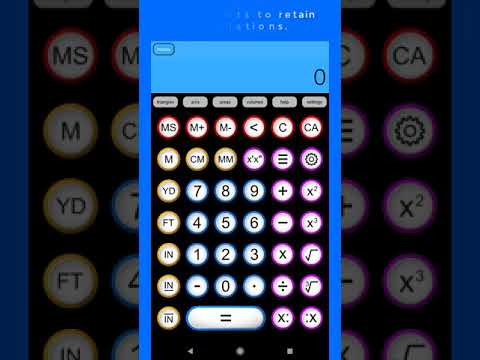
Designed by tradespeople, for tradespeople. Construction Calc Lite handles the heavy lifting of jobsite math—fractions, dimensional conversions, framing, and layout—so you can focus on the build.
Whether you're a carpenter, concrete finisher, framer, superintendent, or DIYer, Construction Calc Lite delivers fast, accurate jobsite calculations with zero guesswork.
WHY TRADES CHOOSE CONSTRUCTION CALC
• True Feet-Inch-Fraction Math: Add, subtract, multiply, and divide in full dimensional fractions down to 1/16th (or user-set precision) with automatic reduction.
• Seamless Unit Switching: Effortlessly mix Imperial and Metric. Convert feet-inch-fractions to meters, centimeters, or millimeters in a single tap.
• Split-Screen Display: View decimal values, feet/inch fractions, memory registers, and scale factors simultaneously in large, high-visibility text.
• Visual Cut & Layout Solvers: Dedicated modules for right triangles, miters, arcs, and baluster spacing complete with clear visual diagrams.
• 50 Memory Registers & Full History: Never lose a cut list or measurement. Easily recall previous calculations on the fly.
DEDICATED MODULES FOR EVERY TRADE
• Framing & Layout: Calculate stud, fence post, and baluster spacing (horizontal, angled, or circular).
• Miters & Trim: Visual miter and bevel angle calculator for crown molding and finish carpentry.
• Geometry & Stairs: Instant solutions for right triangles, diagonals, rafter lengths, arcs, and chords.
• Concrete, Volume & Area: Quickly calculate slab volume, footings, room square footage, and block/tank capacities.
• Materials & Coverage: Estimate drywall sheets, tile, paint, and material costs with built-in waste allowances.
• Smart Blueprint Scaling: Instantly scale plan drawings up or down to true field dimensions.
BUILT FOR THE JOBSITE
• High-Contrast Display: Large, legible fonts engineered for bright outdoor sunlight or dark crawl spaces.
• Works 100% Offline: No cell service required on remote sites.
Whether you're a carpenter, concrete finisher, framer, superintendent, or DIYer, Construction Calc Lite delivers fast, accurate jobsite calculations with zero guesswork.
WHY TRADES CHOOSE CONSTRUCTION CALC
• True Feet-Inch-Fraction Math: Add, subtract, multiply, and divide in full dimensional fractions down to 1/16th (or user-set precision) with automatic reduction.
• Seamless Unit Switching: Effortlessly mix Imperial and Metric. Convert feet-inch-fractions to meters, centimeters, or millimeters in a single tap.
• Split-Screen Display: View decimal values, feet/inch fractions, memory registers, and scale factors simultaneously in large, high-visibility text.
• Visual Cut & Layout Solvers: Dedicated modules for right triangles, miters, arcs, and baluster spacing complete with clear visual diagrams.
• 50 Memory Registers & Full History: Never lose a cut list or measurement. Easily recall previous calculations on the fly.
DEDICATED MODULES FOR EVERY TRADE
• Framing & Layout: Calculate stud, fence post, and baluster spacing (horizontal, angled, or circular).
• Miters & Trim: Visual miter and bevel angle calculator for crown molding and finish carpentry.
• Geometry & Stairs: Instant solutions for right triangles, diagonals, rafter lengths, arcs, and chords.
• Concrete, Volume & Area: Quickly calculate slab volume, footings, room square footage, and block/tank capacities.
• Materials & Coverage: Estimate drywall sheets, tile, paint, and material costs with built-in waste allowances.
• Smart Blueprint Scaling: Instantly scale plan drawings up or down to true field dimensions.
BUILT FOR THE JOBSITE
• High-Contrast Display: Large, legible fonts engineered for bright outdoor sunlight or dark crawl spaces.
• Works 100% Offline: No cell service required on remote sites.
Feet-inch fraction calculator for carpenters, framers, concrete & layout math.
Updated on
Safety starts with understanding how developers collect and share your data. Data privacy and security practices may vary based on your use, region, and age. The developer provided this information and may update it over time.
- This app may share these data types with third partiesLocation, App info and performance, and Device or other IDs
- No data collectedLearn more about how developers declare collection
- Data is encrypted in transit
- Data can’t be deleted


Ratings and reviews
1.82K reviews

Keith Coffman
- Flag inappropriate
November 15, 2021
WAS a great app... Now it SUCKS!! Start entering your numbers and then... without warning, the screen adds a stupid ad at the bottom of the page pushing every button upwards. It does this right as you get ready to tap the "Equal =" key, thus forcing you to click on the stupid ad!! Accident ?? I think not. I even contacted the owner and described the issue, yet he refused to fix it. I guess he is more interested in getting a little kick back from the stupid ad he forces you to click on!! There has to be something better out there!! NOT worth the time!!
2 people found this review helpful
Snappy Appz Inc.
December 20, 2021
You can simply wait for the ad to load before you begin working. The "little kickback" from the ad is the little amount of money we make to produce apps for people who don't want to pay for apps. If you dislike ads then simply buy our paid version that has no ads.

Jesse Chesson
- Flag inappropriate
September 9, 2026
have been using this calculator for a long, long time now. im a welding instructor and its one of the first apps I suggest they download when starting out. I use it all the time, and do a majority of people I refer to it. Solid, reliable construction calculator!
1 person found this review helpful
Snappy Appz Inc.
September 9, 2026
Thank you very much for your 5-star review!!! I would be very curious to talk about how you use this in welding and what else you may want it to be able to do based on your trade. Email me anytime at keatsp@snappyappz.com

Joey Masse
- Flag inappropriate
September 7, 2026
I've been using this app for quite sometime now and absolutely love it. super easy to use and always efficient when crunching numbers. highly recommend this app. ill be buying the full version now after finding out it's not some big corporation.
1 person found this review helpful
Snappy Appz Inc.
September 8, 2026
Thanks for your review! Please recommend our app to your friends, and don’t hesitate to shoot us a note at keatsp@snappyappz.com if you have any questions.
Everyone
Learn moreApp support
About the developer
Snappy Appz Inc
keatsp@snappyappz.com
2 Dunnington Crt
Kitchener, ON N2A 3M5
Canada
+1 519-220-8426


