
Easy Cleaner: Device Care
Contains ads


Everyone
info
10+
Downloads

Everyone
Learn more


About this app
Easy Cleaner is an honest, transparent Android device care assistant that monitors your device health with real-time hardware telemetry and helps you safely free up storage. No fake cleaning animations, no artificial scores — you stay in full control.
✨ KEY FEATURES
🏠 DEVICE HEALTH DASHBOARD
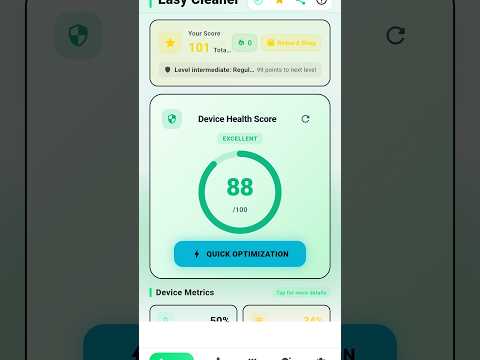
• Live Telemetry: An authentic health score calculated from CPU load, RAM usage, battery temperature, and storage capacity.
• Score Card: Track your total points, level, daily streak, and unlocked achievements — updated instantly after every action.
• Quick Optimization: Scan temporary cache residues and ease background load with a single tap.
🧹 CLEAN HUB
All tools organized in logical categories:
• Quick Actions: Review background apps, enable battery saver mode, or jump to the storage map.
• System Optimization: Deep Optimization stops background load and cleans accessible cache residues, thumbnails, trash folders, partial downloads, and empty folders in one guided flow.
• Storage Utilities: Photo cleaner, APK file manager, duplicate file finder, and unused app detector.
📸 PHOTO & MEDIA CLEANER
• Exact Duplicate Finder: Bit-by-bit duplicate photo detection using MD5 checksum matching.
• Screenshot Manager: Group and review forgotten screenshots to reclaim precious storage.
• Large Files: Manage heavy photos and videos — preview videos in-app before deciding to delete.
• Safe Preview: No photo or personal file is ever touched without your explicit confirmation.
📊 STORAGE MAP
Visualize your storage across photos, videos, audio, documents, apps, and cache with soothing cards; open any category to browse files and decide what to remove.
📱 APP MANAGER & UNUSED APPS
• Sort installed apps by name, size, today's usage, or last used.
• Multi-select and uninstall unwanted apps in batch.
• Uncover apps you haven't opened in weeks or months using genuine Android usage stats.
💡 MAINTENANCE TIPS & BATTERY MONITOR
• Practical, verified tips across battery, storage, and performance.
• Real-time battery stats: live temperature, voltage, health, and remaining duration estimates.
• High temperature alerts and an elegant animated charging screen.
🎁 GAMIFICATION & REWARD SHOP
• Earn maintenance points, level up, maintain your daily streak, and unlock achievements.
• Redeem points in the Reward Shop for ad-free passes, a 2x Points Booster, and the VIP Gold Theme.
🌍 6 LANGUAGES & MODERN DESIGN
• Fully localized in English, Türkçe, Deutsch, हिन्दी, اردو, and Filipino.
• Dark mode and pastel UI designed for battery efficiency and comfort.
🛡️ PRIVACY & HONESTY COMMITMENT
1. All scans and calculations occur 100% locally on your device; your personal files are never uploaded to remote servers.
2. We do not use placebo animations or make false claims like "cooling CPU by 20°" or "doubling RAM".
3. Nothing is ever deleted without your review and approval.
♿ ACCESSIBILITY SERVICE API DISCLOSURE
Easy Cleaner may utilize the Android AccessibilityService API solely to automate the process of stopping user-selected background applications ("Force Stop").
• Purpose: Automates navigating to system App Settings and clicking "Force Stop" on behalf of the user for apps they explicitly choose to close, freeing RAM and battery.
• Zero Data Collection: The AccessibilityService API is NEVER used to collect, read, store, or share any personal, private, or sensitive user data.
• User Control: Enabling this service is completely optional, modifies no settings without consent, and always requires explicit user confirmation beforehand.
✨ KEY FEATURES
🏠 DEVICE HEALTH DASHBOARD
• Live Telemetry: An authentic health score calculated from CPU load, RAM usage, battery temperature, and storage capacity.
• Score Card: Track your total points, level, daily streak, and unlocked achievements — updated instantly after every action.
• Quick Optimization: Scan temporary cache residues and ease background load with a single tap.
🧹 CLEAN HUB
All tools organized in logical categories:
• Quick Actions: Review background apps, enable battery saver mode, or jump to the storage map.
• System Optimization: Deep Optimization stops background load and cleans accessible cache residues, thumbnails, trash folders, partial downloads, and empty folders in one guided flow.
• Storage Utilities: Photo cleaner, APK file manager, duplicate file finder, and unused app detector.
📸 PHOTO & MEDIA CLEANER
• Exact Duplicate Finder: Bit-by-bit duplicate photo detection using MD5 checksum matching.
• Screenshot Manager: Group and review forgotten screenshots to reclaim precious storage.
• Large Files: Manage heavy photos and videos — preview videos in-app before deciding to delete.
• Safe Preview: No photo or personal file is ever touched without your explicit confirmation.
📊 STORAGE MAP
Visualize your storage across photos, videos, audio, documents, apps, and cache with soothing cards; open any category to browse files and decide what to remove.
📱 APP MANAGER & UNUSED APPS
• Sort installed apps by name, size, today's usage, or last used.
• Multi-select and uninstall unwanted apps in batch.
• Uncover apps you haven't opened in weeks or months using genuine Android usage stats.
💡 MAINTENANCE TIPS & BATTERY MONITOR
• Practical, verified tips across battery, storage, and performance.
• Real-time battery stats: live temperature, voltage, health, and remaining duration estimates.
• High temperature alerts and an elegant animated charging screen.
🎁 GAMIFICATION & REWARD SHOP
• Earn maintenance points, level up, maintain your daily streak, and unlock achievements.
• Redeem points in the Reward Shop for ad-free passes, a 2x Points Booster, and the VIP Gold Theme.
🌍 6 LANGUAGES & MODERN DESIGN
• Fully localized in English, Türkçe, Deutsch, हिन्दी, اردو, and Filipino.
• Dark mode and pastel UI designed for battery efficiency and comfort.
🛡️ PRIVACY & HONESTY COMMITMENT
1. All scans and calculations occur 100% locally on your device; your personal files are never uploaded to remote servers.
2. We do not use placebo animations or make false claims like "cooling CPU by 20°" or "doubling RAM".
3. Nothing is ever deleted without your review and approval.
♿ ACCESSIBILITY SERVICE API DISCLOSURE
Easy Cleaner may utilize the Android AccessibilityService API solely to automate the process of stopping user-selected background applications ("Force Stop").
• Purpose: Automates navigating to system App Settings and clicking "Force Stop" on behalf of the user for apps they explicitly choose to close, freeing RAM and battery.
• Zero Data Collection: The AccessibilityService API is NEVER used to collect, read, store, or share any personal, private, or sensitive user data.
• User Control: Enabling this service is completely optional, modifies no settings without consent, and always requires explicit user confirmation beforehand.
Honest device care: cleaning, battery, storage, app manager & rewards.
Updated on
Safety starts with understanding how developers collect and share your data. Data privacy and security practices may vary based on your use, region, and age. The developer provided this information and may update it over time.
- No data shared with third partiesLearn more about how developers declare sharing
- No data collectedLearn more about how developers declare collection
- Data is encrypted in transit
- Data can’t be deleted


