
Custom AOD – OLED Wallpapers
Contains adsIn-app purchases

star
2.49K reviews

Everyone
info
100K+
Downloads

Everyone
Learn more


About this app
🖼️ Custom AOD — Set Any Image on Your Always On Display
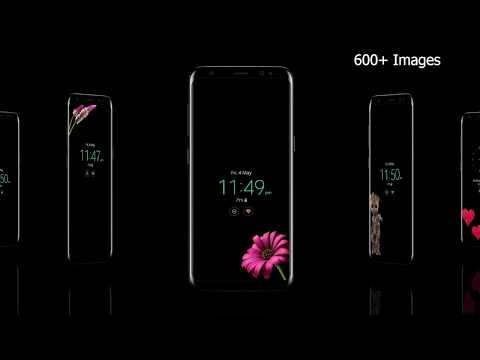
Turn your boring default AOD into something personal. Custom AOD lets you
set any image, wallpaper, or photo on your OLED Always On Display screen —
with built-in burn-in protection so your screen stays safe.
Works on Samsung Galaxy, Google Pixel, OnePlus, and all Android phones with
Always On Display or Ambient Display.
━━━━━━━━━━━━━━━━━━━━━━
🔥 WHY CUSTOM AOD?
━━━━━━━━━━━━━━━━━━━━━━
✅ Burn-In Safe Technology
Every image is converted to a checkerboard (half-pixel) pattern that
protects your OLED screen from burn-in. Images also shift position
automatically so no single pixel stays lit too long.
✅ 1000+ Ready-Made AOD Images
Browse a growing collection of images designed specifically for OLED
Always On Displays — optimized for low battery usage and screen safety.
✅ Set Your Own Photo as AOD
Pick any image from your gallery. The app automatically converts it to
a burn-in safe half-pixel format.
✅ Auto Image Rotation
Set a timer and let your AOD shuffle through your favorite images
automatically — so your screen always looks fresh.
✅ Custom Text & Emoji on AOD
Add your own text, quotes, or mood emoji directly on your AOD screen.
Change font color. Text shifts position automatically to prevent burn-in.
✅ Free to Use
Watch a short, rewarded video to unlock any Prime image — completely free.
No purchase required to enjoy the app.
✅ No Data Collected
This app collects zero user data and shares nothing with third parties.
Your privacy is fully protected.
━━━━━━━━━━━━━━━━━━━━━━
📱 SUPPORTED DEVICES
━━━━━━━━━━━━━━━━━━━━━━
- Samsung Galaxy S series (S21, S22, S23, S24, S25 and beyond)
- Samsung Galaxy Z Fold & Z Flip series
- Samsung Galaxy A series (OLED models)
- Google Pixel (Ambient Display)
- OnePlus (Ambient Display)
- Any Android phone with Always On Display or Ambient Display
━━━━━━━━━━━━━━━━━━━━━━
👑 PRIME MEMBERSHIP
━━━━━━━━━━━━━━━━━━━━━━
Upgrade to Prime to remove all ads and get instant access to all images
without watching videos. One-time or subscription — your choice.
Free users can unlock any Prime image by watching a short rewarded video.
━━━━━━━━━━━━━━━━━━━━━━
⚙️ HOW IT WORKS
━━━━━━━━━━━━━━━━━━━━━━
Custom AOD uses Android's Accessibility Service to display your chosen
image on the Always On Display screen. This is the only way any third-party
app can draw on the AOD layer — no root required.
This app uses Accessibility Service only to display AOD overlays.
It does not read your screen content, keystrokes, or any personal data.
━━━━━━━━━━━━━━━━━━━━━━
📩 SUPPORT
━━━━━━━━━━━━━━━━━━━━━━
Having trouble? We respond to every email.
📧 dhvani303@gmail.com
🌐 dhwani.tech
Maintained since 2017 — 7 years of continuous updates.
Turn your boring default AOD into something personal. Custom AOD lets you
set any image, wallpaper, or photo on your OLED Always On Display screen —
with built-in burn-in protection so your screen stays safe.
Works on Samsung Galaxy, Google Pixel, OnePlus, and all Android phones with
Always On Display or Ambient Display.
━━━━━━━━━━━━━━━━━━━━━━
🔥 WHY CUSTOM AOD?
━━━━━━━━━━━━━━━━━━━━━━
✅ Burn-In Safe Technology
Every image is converted to a checkerboard (half-pixel) pattern that
protects your OLED screen from burn-in. Images also shift position
automatically so no single pixel stays lit too long.
✅ 1000+ Ready-Made AOD Images
Browse a growing collection of images designed specifically for OLED
Always On Displays — optimized for low battery usage and screen safety.
✅ Set Your Own Photo as AOD
Pick any image from your gallery. The app automatically converts it to
a burn-in safe half-pixel format.
✅ Auto Image Rotation
Set a timer and let your AOD shuffle through your favorite images
automatically — so your screen always looks fresh.
✅ Custom Text & Emoji on AOD
Add your own text, quotes, or mood emoji directly on your AOD screen.
Change font color. Text shifts position automatically to prevent burn-in.
✅ Free to Use
Watch a short, rewarded video to unlock any Prime image — completely free.
No purchase required to enjoy the app.
✅ No Data Collected
This app collects zero user data and shares nothing with third parties.
Your privacy is fully protected.
━━━━━━━━━━━━━━━━━━━━━━
📱 SUPPORTED DEVICES
━━━━━━━━━━━━━━━━━━━━━━
- Samsung Galaxy S series (S21, S22, S23, S24, S25 and beyond)
- Samsung Galaxy Z Fold & Z Flip series
- Samsung Galaxy A series (OLED models)
- Google Pixel (Ambient Display)
- OnePlus (Ambient Display)
- Any Android phone with Always On Display or Ambient Display
━━━━━━━━━━━━━━━━━━━━━━
👑 PRIME MEMBERSHIP
━━━━━━━━━━━━━━━━━━━━━━
Upgrade to Prime to remove all ads and get instant access to all images
without watching videos. One-time or subscription — your choice.
Free users can unlock any Prime image by watching a short rewarded video.
━━━━━━━━━━━━━━━━━━━━━━
⚙️ HOW IT WORKS
━━━━━━━━━━━━━━━━━━━━━━
Custom AOD uses Android's Accessibility Service to display your chosen
image on the Always On Display screen. This is the only way any third-party
app can draw on the AOD layer — no root required.
This app uses Accessibility Service only to display AOD overlays.
It does not read your screen content, keystrokes, or any personal data.
━━━━━━━━━━━━━━━━━━━━━━
📩 SUPPORT
━━━━━━━━━━━━━━━━━━━━━━
Having trouble? We respond to every email.
📧 dhvani303@gmail.com
🌐 dhwani.tech
Maintained since 2017 — 7 years of continuous updates.
Images, text on OLED Always On/Ambient Display. Burn-in safe. 1000+ designs.
Updated on
Safety starts with understanding how developers collect and share your data. Data privacy and security practices may vary based on your use, region, and age. The developer provided this information and may update it over time.


Ratings and reviews
2.47K reviews

A Google user
- Flag inappropriate
- Show review history
October 3, 2018
I usually don't write reviews but this app was significantly irritating, you can only add a tiny sliver of an image without paying for the app (no, you can't adjust the proportions, at least not without paying), so basically anything taller than a penny is out of the question. To add insult to injury, once I finally made the picture small enough the app stuck it to the top border of the screen. I tried moving it but it wouldn't budge, so I gave up on that all together. Then, the clock is in this boring bold font and you can't change it, but you can select the font of random words and reminders, not helpful. I'd give it a lower score but I'm sure it works once you pay for it, annoying that it's advertisered as a free app but you can do barely anything without paying and I'd rather not encourage this kind of behavior.
24 people found this review helpful

Vu Duong Hoang
- Flag inappropriate
September 12, 2026
This works perfectly on my Xperia 1 VII. It respects the system AOD and does not break the device sleep handling process, so that you can wake the device as you are using native AOD. Thanks for this great app.
1 person found this review helpful
Dhwani developer
September 13, 2026
Thank you so much! I'm glad Custom AOD works perfectly on your Xperia 1 VII. Thanks for using the app!
- Dhwani Developer

Kyle Niewiada
- Flag inappropriate
February 1, 2021
I was a little surprised to find this actually works on my Pixel. My significant other and I just bought the same phone and we're constantly mixing them up because they look identical. With this app, I can customize my always on display to add a small graphic. This allows us to differentiate our phones without picking them up all of the time.
19 people found this review helpful
What’s new
Big Update
NEW — AOD Wallpaper Studio: cut a subject out of your photo, add text, and design your own always-on display.
NEW — Community designs: share what you make, and browse what others have shared.
NEW — My Images: everything you create, kept in one place.
NEW — Reminders and calendar events, shown right on your AOD.
Search now copes with typos and plurals, with suggested tags.
Plus many fixes, including dark mode throughout and a clearer first-time setup.
NEW — AOD Wallpaper Studio: cut a subject out of your photo, add text, and design your own always-on display.
NEW — Community designs: share what you make, and browse what others have shared.
NEW — My Images: everything you create, kept in one place.
NEW — Reminders and calendar events, shown right on your AOD.
Search now copes with typos and plurals, with suggested tags.
Plus many fixes, including dark mode throughout and a clearer first-time setup.
Everyone
Learn moreApp support
phone
Phone number
+918146355303
About the developer
Mukti Hooda
dhvani303@gmail.com
H.No. 1328
Sector 11
Panchkula, Haryana 134108
India


