
Smart PDF: Scanner & Toolkit


Everyone
info
0+
Downloads

Everyone
Learn more


About this app
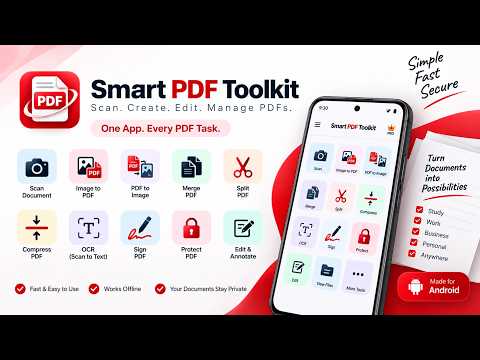
Smart PDF Toolkit is an all-in-one PDF scanner, PDF editor and document management app for Android. Scan documents, create PDFs, convert images, organize files and work with your documents using simple and practical PDF tools.
DOCUMENT SCANNER
Turn paper documents into digital PDFs using your phone camera. Scan multiple pages, adjust document edges, enhance scans and save them as PDF files.
CREATE PDF FROM IMAGES
Select photos or images from your device and combine them into a PDF. Choose page size, margins and image fitting options before creating your document.
PDF TO IMAGE
Convert PDF pages into image files when you need to share, reuse or save individual pages as images.
MERGE PDF
Combine multiple PDF files into one organized document. Select PDFs from your phone or from documents available inside the app.
SPLIT PDF
Extract individual pages or selected page ranges from a PDF and create separate PDF files.
COMPRESS PDF
Reduce PDF file size while keeping documents readable. Choose an available compression level based on your needs.
SIGN PDF
Add a signature to your PDF documents. Choose a PDF, place your signature on the page and save the signed document.
PROTECT PDF
Add password protection and encryption to supported PDF documents to help keep your files secure.
ANNOTATE PDF
Add useful annotations to PDF documents, including text, highlights, drawings, shapes and other supported markup tools.
SMART OCR
Extract text from scanned documents and images using OCR. Where supported by the app, OCR processing can be performed on-device.
PDF DOCUMENT LIBRARY
Keep track of documents created or processed with the app. Browse recent files, search documents and manage your PDF collection from one place.
PRIVATE AND SIMPLE
Core PDF processing is designed for on-device use where supported. Your documents remain on your device unless you choose to share or export them.
PDF TOOLS IN ONE APP
Whether you need a document scanner, PDF creator, PDF converter, PDF merger, PDF splitter, PDF compressor, PDF signer, PDF protector, OCR tool or PDF annotation tool, Smart PDF Toolkit brings these everyday document tasks together in one Android app.
KEY FEATURES
• Scan documents and create PDFs
• Create PDF files from images
• Convert PDF pages to images
• Merge multiple PDF files
• Split PDFs and extract pages
• Compress PDF files
• Sign PDF documents
• Protect PDFs with password security
• Annotate and mark up PDFs
• Extract text with OCR
• Browse and manage app documents
• Share and export documents when needed
Core Features: PDF Reader, PDF Editor, Document Scanner, Cam Scanner, PDF Converter
Utility Tasks: Sign PDF, PDF Merge, PDF Split, Compress PDF, OCR Text Scanner
Form Factors: Scan to PDF, JPG to PDF, Protect PDF, Offline PDF Reader
Smart PDF Toolkit is designed for students, professionals, business users, job seekers and anyone who regularly works with digital documents and PDF files.
Permissions are requested only when required for features such as scanning with the camera or selecting documents and images from your device.
Smart PDF Toolkit — Scan. Create. Edit. Manage PDFs.
DOCUMENT SCANNER
Turn paper documents into digital PDFs using your phone camera. Scan multiple pages, adjust document edges, enhance scans and save them as PDF files.
CREATE PDF FROM IMAGES
Select photos or images from your device and combine them into a PDF. Choose page size, margins and image fitting options before creating your document.
PDF TO IMAGE
Convert PDF pages into image files when you need to share, reuse or save individual pages as images.
MERGE PDF
Combine multiple PDF files into one organized document. Select PDFs from your phone or from documents available inside the app.
SPLIT PDF
Extract individual pages or selected page ranges from a PDF and create separate PDF files.
COMPRESS PDF
Reduce PDF file size while keeping documents readable. Choose an available compression level based on your needs.
SIGN PDF
Add a signature to your PDF documents. Choose a PDF, place your signature on the page and save the signed document.
PROTECT PDF
Add password protection and encryption to supported PDF documents to help keep your files secure.
ANNOTATE PDF
Add useful annotations to PDF documents, including text, highlights, drawings, shapes and other supported markup tools.
SMART OCR
Extract text from scanned documents and images using OCR. Where supported by the app, OCR processing can be performed on-device.
PDF DOCUMENT LIBRARY
Keep track of documents created or processed with the app. Browse recent files, search documents and manage your PDF collection from one place.
PRIVATE AND SIMPLE
Core PDF processing is designed for on-device use where supported. Your documents remain on your device unless you choose to share or export them.
PDF TOOLS IN ONE APP
Whether you need a document scanner, PDF creator, PDF converter, PDF merger, PDF splitter, PDF compressor, PDF signer, PDF protector, OCR tool or PDF annotation tool, Smart PDF Toolkit brings these everyday document tasks together in one Android app.
KEY FEATURES
• Scan documents and create PDFs
• Create PDF files from images
• Convert PDF pages to images
• Merge multiple PDF files
• Split PDFs and extract pages
• Compress PDF files
• Sign PDF documents
• Protect PDFs with password security
• Annotate and mark up PDFs
• Extract text with OCR
• Browse and manage app documents
• Share and export documents when needed
Core Features: PDF Reader, PDF Editor, Document Scanner, Cam Scanner, PDF Converter
Utility Tasks: Sign PDF, PDF Merge, PDF Split, Compress PDF, OCR Text Scanner
Form Factors: Scan to PDF, JPG to PDF, Protect PDF, Offline PDF Reader
Smart PDF Toolkit is designed for students, professionals, business users, job seekers and anyone who regularly works with digital documents and PDF files.
Permissions are requested only when required for features such as scanning with the camera or selecting documents and images from your device.
Smart PDF Toolkit — Scan. Create. Edit. Manage PDFs.
Scan, create, edit, merge, split, compress, sign and protect PDFs easily.
Updated on
Safety starts with understanding how developers collect and share your data. Data privacy and security practices may vary based on your use, region, and age. The developer provided this information and may update it over time.
- No data shared with third partiesLearn more about how developers declare sharing
- No data collectedLearn more about how developers declare collection


What’s new
Smart PDF tool kit - Scan. Create. Edit. Manage PDFs.
All Your PDF Tools in One App
All Your PDF Tools in One App
Everyone
Learn moreApp support
About the developer
KIRAN KUMAR REDDY DESHIDI
prasunasriramreddy@gmail.com
India


