
Rescue Ring: Fake Call
Contains adsIn-app purchases


Everyone
info
10+
Downloads


About this app
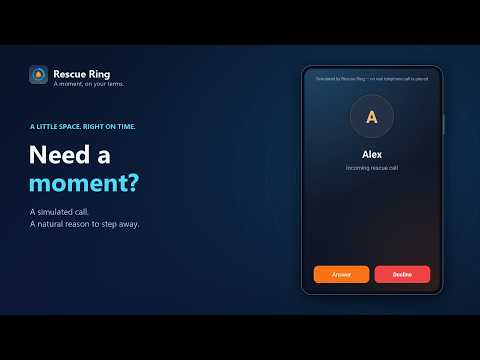
Need a natural reason to step away? Rescue Ring schedules a simulated incoming call for exactly when you need it.
Choose a caller, set a delay or clock time, then put your phone down. At the scheduled moment, your phone plays its selected ringtone and shows Answer, Decline, and Stop controls. Answer to open a clearly identified simulated call with optional conversation prompts.
PLAN YOUR EXIT
• Schedule by countdown or exact clock time
• Use quick 10-second, 30-second, 1-minute, and 2-minute presets
• Trigger a call in 30 seconds from a home-screen widget or Quick Settings tile
• Keep scheduled alerts after a device restart
MAKE IT YOURS
• Choose a caller name and optional photo
• Use your selected Android ringtone
• Temporarily boost ring volume if you choose
• Test your setup before you need it
• Add a caller photo without granting Contacts permission
STAY IN CONTROL
• Answer, decline, end, or stop the simulated call
• Use conversation prompts when you need help getting started
• See a visible notification with an immediate Stop action
• No account required
• Available in English, Afrikaans, Spanish, Brazilian Portuguese, Simplified Chinese, and Hindi
Useful for leaving a long meeting, an awkward date, an unwanted conversation, or any situation where you would prefer a discreet cue.
Rescue Ring creates a user-scheduled simulation only. It does not place or receive a real telephone call. Do Not Disturb, notification permissions, battery restrictions, and manufacturer power controls can affect ringtone playback.
Rescue Ring contains advertising. A one-time in-app purchase can remove ads.
Choose a caller, set a delay or clock time, then put your phone down. At the scheduled moment, your phone plays its selected ringtone and shows Answer, Decline, and Stop controls. Answer to open a clearly identified simulated call with optional conversation prompts.
PLAN YOUR EXIT
• Schedule by countdown or exact clock time
• Use quick 10-second, 30-second, 1-minute, and 2-minute presets
• Trigger a call in 30 seconds from a home-screen widget or Quick Settings tile
• Keep scheduled alerts after a device restart
MAKE IT YOURS
• Choose a caller name and optional photo
• Use your selected Android ringtone
• Temporarily boost ring volume if you choose
• Test your setup before you need it
• Add a caller photo without granting Contacts permission
STAY IN CONTROL
• Answer, decline, end, or stop the simulated call
• Use conversation prompts when you need help getting started
• See a visible notification with an immediate Stop action
• No account required
• Available in English, Afrikaans, Spanish, Brazilian Portuguese, Simplified Chinese, and Hindi
Useful for leaving a long meeting, an awkward date, an unwanted conversation, or any situation where you would prefer a discreet cue.
Rescue Ring creates a user-scheduled simulation only. It does not place or receive a real telephone call. Do Not Disturb, notification permissions, battery restrictions, and manufacturer power controls can affect ringtone playback.
Rescue Ring contains advertising. A one-time in-app purchase can remove ads.
Schedule a fake call with your ringtone for a discreet, natural exit.
Updated on
Safety starts with understanding how developers collect and share your data. Data privacy and security practices may vary based on your use, region, and age. The developer provided this information and may update it over time.


App support
About the developer
STEVE WARREN PARIS
protusappdev@gmail.com
Karawater Estate ERF 230006000
District Ruigtevlei
Knysna
6573
South Africa


